FUNCTIONAL AND MULTILINGUAL
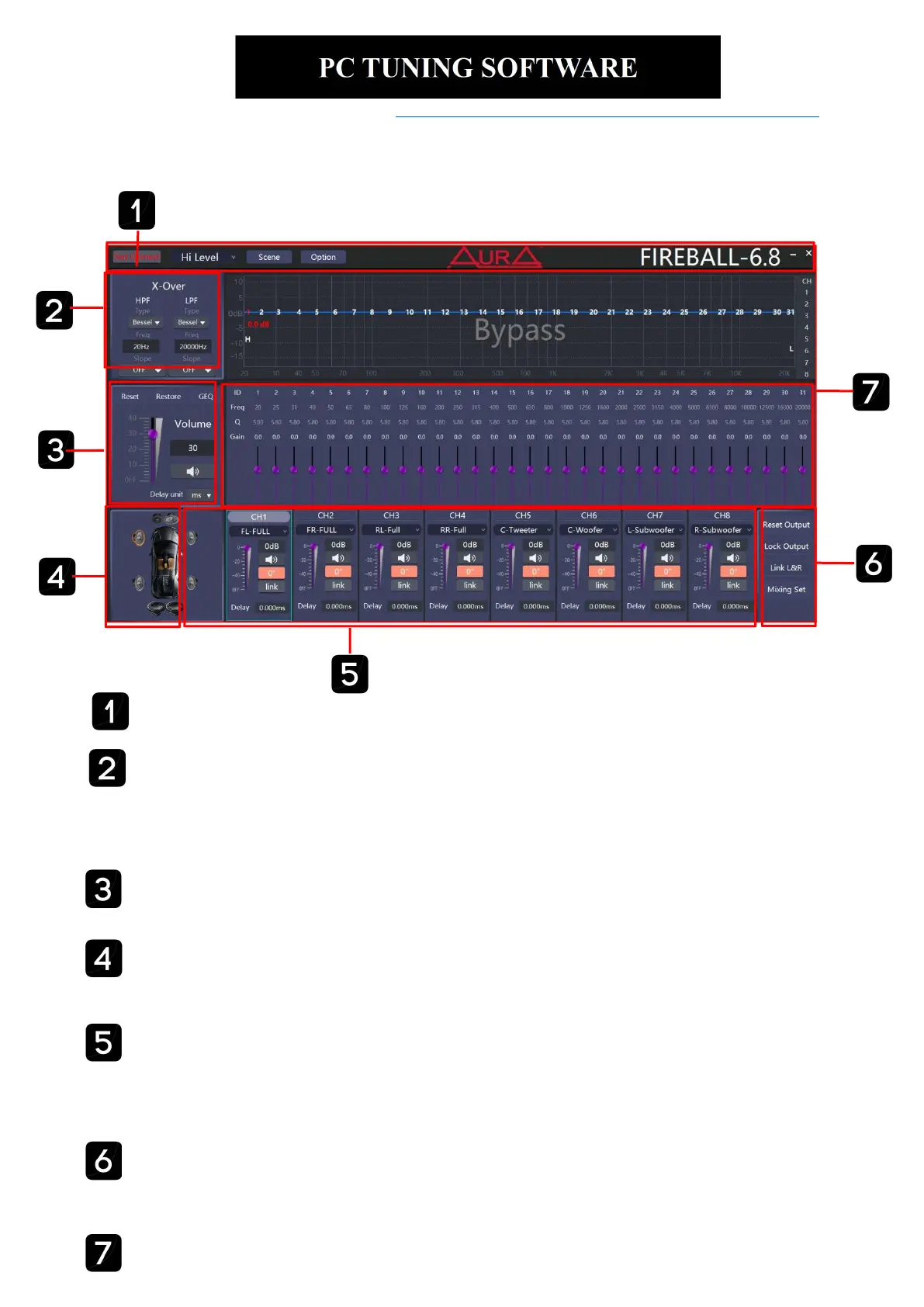
The PC software to control the DSP provides a clear GUI with the most important functions
summarized in one menu....,
Rem-out1 and Rem-out2 can be controlled from this location
EXTENSIVE FILTER SECTION
Besides the separately adjustable slope for high and low pass filters, different filter
characteristics can be selected. Each channel can also be set separately and the output signal
to AUX can be freely configured.
MAIN VOLUME
Control main volume, mute, select delay unit and separate full control of all channels including
bypass function.
EQ CONTROL
The equalizer section leaves nothing to be desired: graphical real-time display, adjustable
Q-factor, Gain and Frequency point.
CAR SPEAKER
Select car speaker to choose channel.
CHANNEL
This section contains the core of the software. Each channel can be processed here individually
or linking any channel synchronously. Among other things, the volume or the phase position can
be controlled here.
Please download the PC software from https://www.enigmatech.co.in/amplifier-fireball .
Connect USB end to the
computer using the given PC cable. Open the software, the
main page is as follows:
QUICK ADJUSTMENT
This area contains reset EQ, restore EQ, bypass EQ, graphic EQ, reset output, lock output,
link channel tuning.


 To Next Page