4
1
2
3
4
Установка устройства
Open the package and make sure that inside are:
1. USB receiver - 1 pc.
2. Remote control - 1 pc.
3. Keys for removing the receiver - 2 pcs.
4. ISO - connector - 1 pc.
5. Instruction
Package and installation
Connect the necessary
wires and connectors
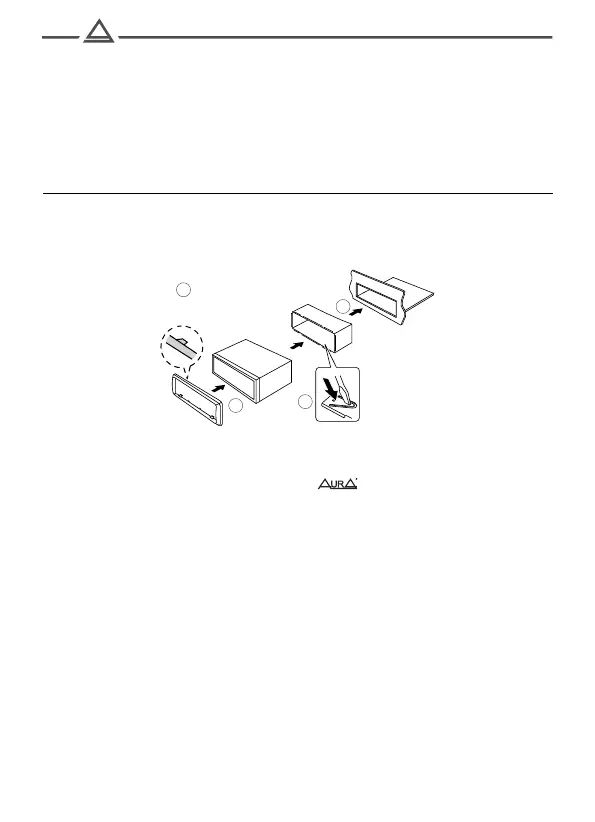
1. Install the mounting casing in the hole of the 1din standard,
provided by the manufacturer. If the regular place has a 2DIN size,
use transitional frames and adapters of the brand.
2. Light out the metal tongues on the mounting casing to fix it in place.
3. Check electrical connections, connector or individual wires
(depends on the configuration of a particular car model).
Connect the main connector to the device. Check
The system performance before fixing in the mounting casing.
4. Insert the device into the mounting casing and push it inward to
fixation by click.
In some brands of cars (for example, Toyota, Honda, ...), the device is mounted by
screws to standard brackets.
In this case, the mounting casing is not used.



 To Next Page