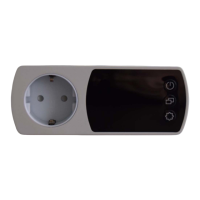
The AurAir BI is a smart indoor air quality monitor integrated into a wall socket, designed to measure and display various environmental parameters. Its primary function is to provide real-time feedback on air quality, with a strong emphasis on CO2 levels, and to offer user-friendly interaction through its integrated display and side buttons.
Function Description
The AurAir BI serves as a comprehensive air quality monitoring device. It continuously measures and displays several key environmental parameters, including Carbon Dioxide (CO2) levels, relative humidity, temperature, and air pressure. The device is designed to be user-friendly, providing clear visual feedback through its integrated display and allowing for various interactions via three side buttons: Display, Mode, and Settings.
The core function revolves around CO2 monitoring. The device displays CO2 values in parts per million (PPM), with healthy values shown in green, mediocre values in yellow, and unhealthy values in red, providing an immediate visual indication of air quality. Beyond real-time values, it can also display a graphical representation of CO2 sensor values over the past 25 hours, allowing users to track trends and identify periods of poor ventilation. This graphical view also uses a color-coding system to indicate air quality over time.
In addition to CO2, the AurAir BI measures and displays relative humidity, temperature (in Celsius), and air pressure (in hPa). These values are shown on the lower part of the display. The device also features a "Measurement Cadence Icon," a green solid circle that gradually shrinks after each CO2 measurement until the next measurement is initiated, providing a visual cue of the measurement cycle.
Connectivity is another important aspect, as the device can connect to a cloud service. Users can access their air quality history by logging into the AurAir cloud platform via https://www.aurair.eu. The device's settings, including network configurations, admin password, cloud username, and cloud password, can be viewed and managed through the settings menu.
Important Technical Specifications
While specific numerical ranges for measurements are not provided, the manual highlights the following technical aspects:
- Flame Resistant Encasing: The device's casing is designed to be flame resistant, enhancing safety by making it impossible to burn.
- Integrated Wall Socket: The AurAir BI is built into a straight-through wall socket, compatible with CEE 7/3 sockets and CEE7/7 plugs. This makes it suitable for use in countries such as Germany, the Netherlands, Sweden, Norway, and Finland.
- Display: The device features an integrated display that shows all measured sensor values and various indicators, including WiFi mode, measurement unit, and a countdown to the next CO2 measurement.
- Sensors: It incorporates sensors for CO2, relative humidity, temperature, and air pressure.
- Connectivity: The device supports WiFi connectivity for cloud integration, allowing data logging and remote access to air quality history.
- Power: It operates by being plugged directly into a wall socket.
Usage Features
The AurAir BI offers a range of usage features controlled primarily through its three side buttons:
-
Display Button:
- Single click: Toggles the display ON/OFF.
- Double click: Dims the display. Another double click restores full brightness.
- Long click: Initiates the firmware update process. The display will prompt the user for confirmation (Mode button for YES, Settings button for NO).
-
Mode Button:
- Single click: Switches the display to the "CO2 Graph" view, showing a graphical representation of CO2 values over the past 25 hours. Another single click returns to the "CO2 Value" view.
- Double click: Displays minimum, maximum, and average CO2 values for the last 24 hours. Another double click returns to the "CO2 Value" view.
- Long click: Initiates the CO2 sensor calibration process. The display will ask for confirmation (Mode button for YES, Settings button for NO). Calibration takes 1300 seconds to complete. Important Warning: Calibration should only be performed outdoors in dry conditions or in a well-ventilated indoor room.
-
Settings Button:
- Single click: Navigates to the settings page, which displays network settings, admin password, cloud username, and cloud password. Another single click returns to the "CO2 Value" view.
- Double click: Disables the admin password for 5 minutes, allowing login without a password. Another double click returns to the "CO2 Value" view.
- Long click: Restores factory settings. The display will ask for confirmation (Mode button for YES, Settings button for NO).
Maintenance Features
The AurAir BI includes features for maintenance and troubleshooting:
- Firmware Updates: The device supports firmware updates, initiated by a long click on the Display button. This ensures the device can receive improvements and bug fixes.
- CO2 Sensor Calibration: A long click on the Mode button allows users to calibrate the CO2 sensor. This is a crucial maintenance step to ensure accurate readings over time. The manual provides a clear warning about the conditions under which calibration should be performed (dry, well-ventilated environment).
- Factory Reset: A long click on the Settings button allows users to restore the device to its factory settings, which can be useful for troubleshooting or reconfiguring the device.
- Troubleshooting Guide: The manual provides a basic troubleshooting guide for common issues:
- Initialization Failure (logo and waves for >3 minutes): Solution is to pull the device from the wall socket, wait 20 seconds, and plug it back in.
- Garbled CO2 countdown background: This is considered a minor issue; the screen will clear when the countdown finishes.
- CO2 value pixels from previous values remaining on display: Solution is to press the Mode button once to go to "CO2 Graph" mode and then once again to return to "CO2 Value" view.
These features collectively aim to provide a robust and user-friendly experience for monitoring indoor air quality.

 Need help?
 General

 To Next Page