automatically.)!Use!this!feature!to!specify!the!encoding!method!of!non-UTF8!
CUE!files!present!in!your!library.!
• Erase'Lightning'Server'Index:!This!function!erases!all!existing!library!indexes!
and!rebuilds!them.!Erasing/rebuilding!your!library!indexes!may!resolve!library!
errors.!Musi c!fi les!themselves!are!not!changed!or!affected!in!any!way.!
!
System'
!
!
!
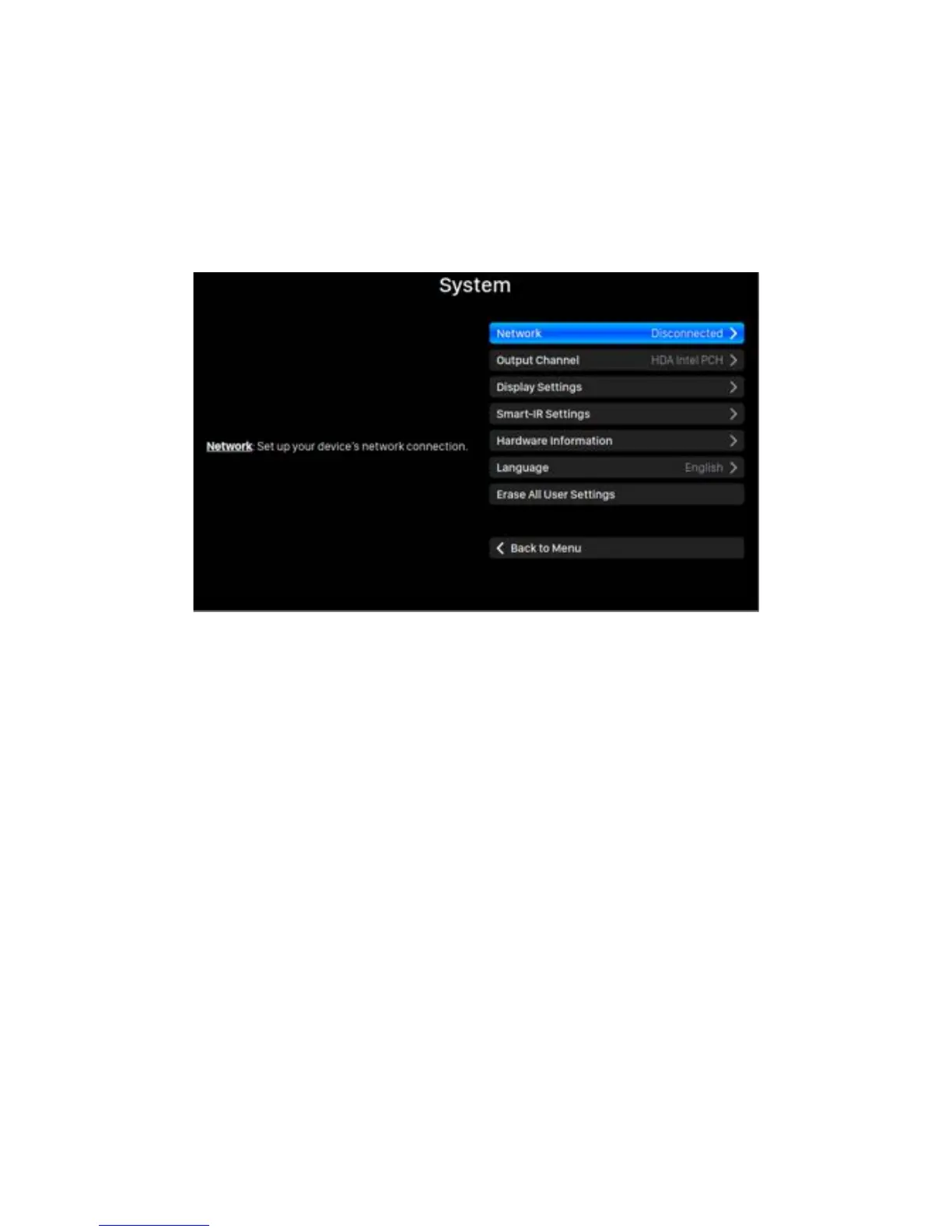
The!System!menu!contains!all!interface!and!hardware!related!settings.!Use!the!‘Up’!and!
‘Down’!buttons!to!highlight!menu!items!and!use!the!‘Play/Pause’!button!to!select.!Use!
the!‘M’!button!to!quit!the!Library!interface!
!
1. ‘Network’:!Set!up!your!device’s!network!connection.!
a. Connection'Type:!Choose!Ethernet!or!Wi-Fi!to!connect!your!device.!
i. Wired:!Set!up!an!Ethernet!connection!for!your!device.!
ii. Wireless:!Set!up!a!Wi-Fi!connection!for!your!device.!
b. Network'Information:!S how!network!connection!information!such!as!IP!
address,!Wi-Fi!network,!etc.!
c. Start' Wi-Fi' Hotspot:! Your! device! will! create! a! Wi-Fi! hotspot! named!
'AURALiC-Lightning'.! You! can! use! your! computer,! iPhone! or! iPad! to!
connect!to!this!Wi-Fi!network!and!set!up!the!d evice’s!network!settings.!
You !cannot!play!music!while!in!Wi-Fi!Hotspot!mode.!
2. ‘Output'Channel’:!Select!from!signal!output!channels!currently!available!for!your!
streaming! device.! Analog/digital! outputs! and ! USB! outputs! may! not! be! used!
simultaneously!as!they!utilize!separate!clocks!for!signal!timing.!
3. ‘Display'Settings’:!Set!preferences!for!the!front!panel!display.!
a. Idle'Status:!Select!whether!you’d!like!the!displ ay!to!always!remain!on,!or!



 To Next Page