!
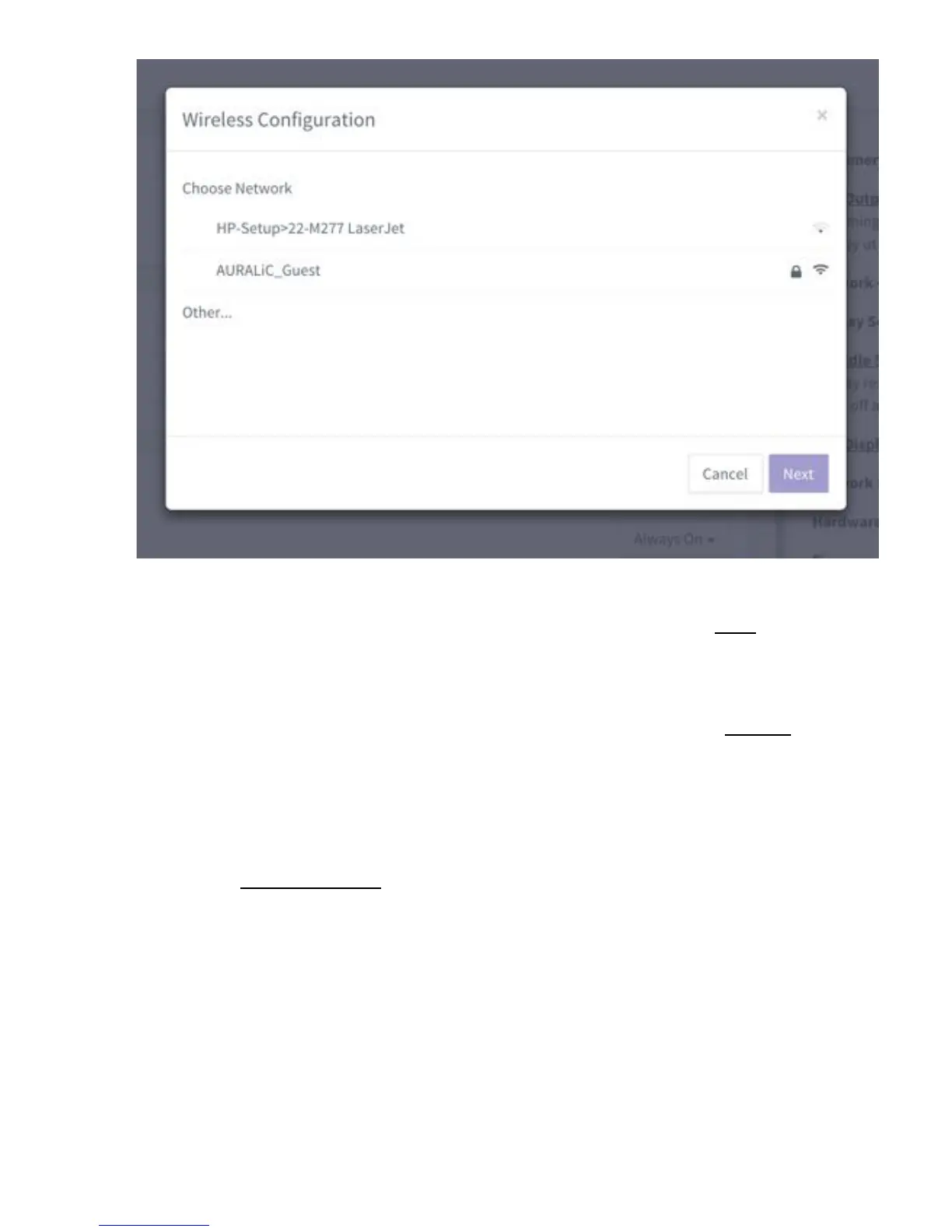
Wi-Fi!network!list!on!Lightning!web!control!interface!
!
Select!the!network!you’d!like!to!use!with!your!ARIES!G2!and!select!‘Next’!(once!the!
button!has!turned!blue.)!Provide!the!network!password!in!the!popup!win dow!the!
appears,!and!select!‘Join’!on!the!following!window.!!
!
If!your!Wi-Fi!network!is!not!visible!(hidden!SSID),!you’ll!need!to!select!‘Other…’!when !
the! Wi-Fi! l is t! is! shown,! and! manually! enter! the! Wi-Fi! network! name,! encryption!
method,!and!network!password!(if!needed.)!
!
If! you! are! using! a! browser! on! a! small-screen! device! such! as! a! smartphone,! this!
interface!is!slightly!different.!Select!the!menu!icon!(upper!right!next!to!the!gear!icon),!
then!select!‘Hardware'Setup’:!
!



 To Next Page