EasyManua.ls Logo

Auriol Z29536 - User Manual

Auriol Z29536
66 pages
Print Icon
To Next Page IconTo Next Page
Loading...
Z29536
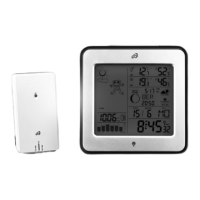
RADIO-CONTROLLED WEATHER STATION
Operation and Safety Notes
FUNK-WETTERSTATION
Bedienungs- und Sicherheitshinweise
VREMENSKA ST ANICA
Upute za posluživanje i za Vašu sigurnost
ΑΣΥΡΜΑΤΟΣ ΜΕΤΕΩΡΟΛΟΓΙΚΟΣ ΣΤΑΘΜΟΣ
Υποδείξεις χειρισμού και ασφαλείας
STAţIE METEO RADIO-REgLATă
Instrucţiuni de utilizare şi de siguranţă
МЕТЕОРОЛОГИЧНА СТАНЦИЯ
С РАДИОКОНТРОЛ
Инструкции за обслужване и безопасност
7

Table of Contents

Other manuals for Auriol Z29536

Questions and Answers

Summary

Introduction and Product Overview

Intended Use and Product Description

Details the specific purpose of the weather station and describes its parts and features.

Technical Data and Scope of Supply

Provides technical specifications and lists the included items in the product package.

General Safety Precautions

Safety Information for Device Operation

Covers general safety advice, warnings for children, and handling of damaged devices.

Battery Handling and Safety Guidelines

Provides essential instructions for battery insertion, handling, and disposal to prevent hazards.

Initial Setup and Device Placement

Setting Up Devices and Location Selection

Instructions on selecting a suitable location and properly placing the weather station and sensor.

Installing and Operating Weather Station Components

Outdoor Sensor Installation and Operation

Steps for installing the outdoor sensor, including battery replacement and mounting options.

Weather Station Power Up and Signal Reception

Guide to powering up the weather station, removing battery strips, and initial signal reception.

Core Operation: Time and Signal Settings

DCF Radio Signal Reception and Synchronization

Explains how the weather station receives and synchronizes with the DCF radio time signal.

Manual Time, Date, and Language Configuration

Procedure for manually setting the time, date, language, location, and time zone.

Operation: Time Formats and Alarm Settings

Switching Between 12;24 Hour Time Displays

Instructions on how to toggle between 12-hour and 24-hour time formats on the display.

Setting and Managing Alarm Times

Guide to setting and activating up to two different alarms on the weather station.

Operation: Alarms, Celestial Data, and Forecasting

Activating and Deactivating Alarm Functions

Steps to enable or disable the alarm function and how to silence an active alarm.

Viewing Sun;Moon Times and Moon Phases

How to display calculated sun/moon rise/set times and interpret moon phase symbols.

Preparing the Weather Forecasting Feature

Instructions on how to input current weather conditions to enable the weather forecast function.

Operation: Pressure, Channels, and Temperature;Humidity

Reading Barometric Pressure and Trends

Guide to reading current and historical barometric pressure and understanding pressure trends.

Setting Outdoor Sensor Channels

Procedure for setting channels for multiple outdoor sensors for data transmission.

Displaying Outdoor Temperature and Trends

How to view the outdoor temperature and its rising, falling, or constant trend.

Operation: Indoor Readings and Device Features

Displaying Indoor Temperature and Humidity

How to view indoor temperature, humidity levels, and comfort indicators.

Viewing Max;Min Values, Backlight, and Battery Status

Instructions for viewing maximum/minimum readings, using backlight, and checking battery status.

Replacing Weather Station and Sensor Batteries

Step-by-step guide for replacing batteries in both the main weather station and the outdoor sensor.

Troubleshooting Common Weather Station Issues

Addressing Interference and Display Problems

Guidance on resolving issues caused by interference from electronic devices or display anomalies.

Cleaning and Maintenance of Weather Station

Proper Cleaning Methods for Devices

Instructions for cleaning the weather station and outdoor sensor using a soft dry cloth.

Disposal of Weather Station and Batteries

Environmental Disposal of Product and Batteries

Guidelines for environmentally sound disposal of the device and batteries, avoiding household waste.

Declaration of Conformity and Product Information

Declaration of Conformity Statement

Declares that the product meets essential requirements of relevant EU directives.

Auriol Z29536 Specifications

General IconGeneral
Radio frequency433 MHz
Display typeLCD
Power supplyBattery
TypeWeather Station
Indoor Temperature Range0°C to +50°C
Humidity Range20% to 95%
Transmission range100 meters
Power supply (outdoor sensor)2 x AA batteries
Featuresweather forecast

Related product manuals