28
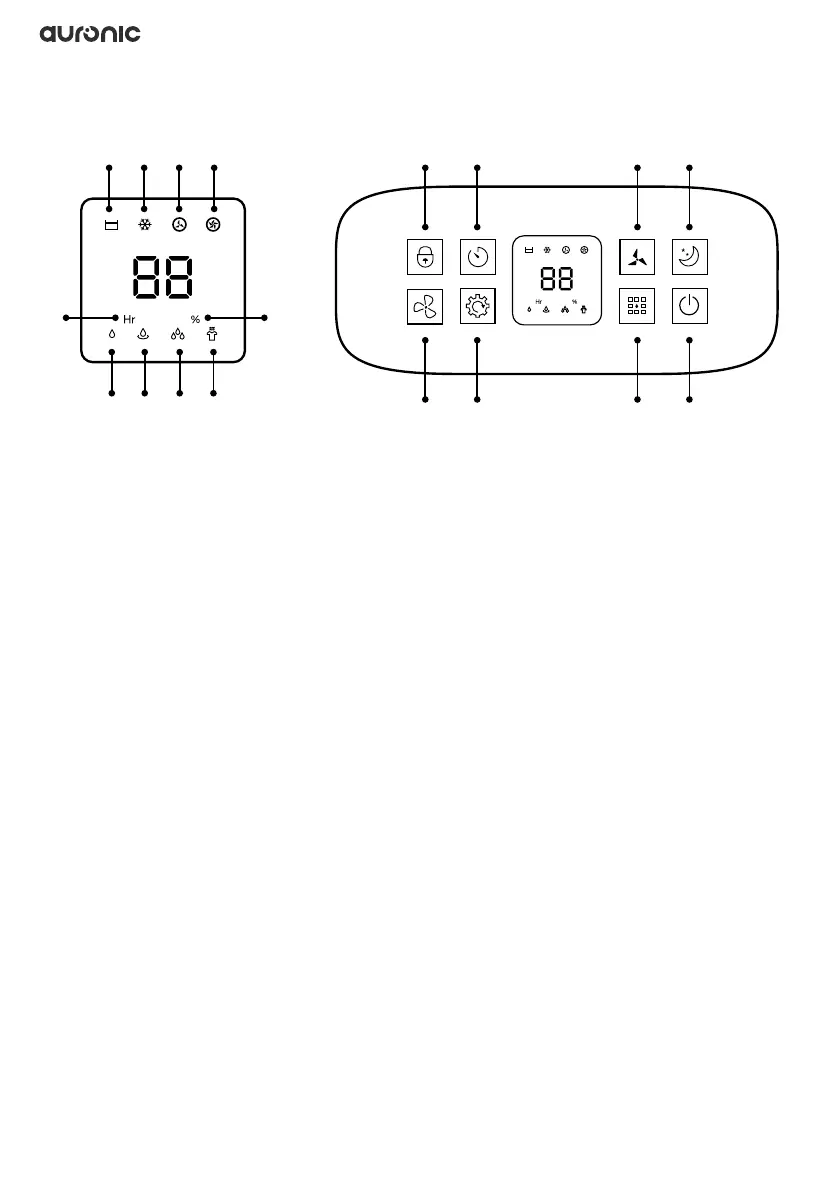
3.2 Display and control panel
1. Collection tray is full
2. Defrost
3. Low fan speed
4. High fan speed
5. Dehumidify
6. Timer display
7. Continuous dehumidication
8. High dry mode
9. Humidity percentage
10. Clothes drying mode
11. Child lock: Touch for 3 seconds to turn on or off.
12. Fan mode: Touch repeatedly to set the desired fan mode.
13. Timer: Can be set from 0-24 hours. Touch repeatedly to set the desired time.
14. Humidity: Touch repeatedly to set the desired humidity level from 30% to 80%.
15. Mode: Touch repeatedly to set the desired mode to manual dehumidication, continuous
dehumidication, high drying mode and clothes drying mode.
16. Fan speed: Touch repeatedly to set the desired fan speed. This function only works in
manual dehumidication and fan mode.
17. Power button: Touch to turn the product on or off.
18. Sleep mode: Touch to turn off all lights - except the “sleep mode/child lock” indicator light on
the display.
11 13 16 181 2 3 4
96
12 14 15 175 7 8 10



 To Next Page