EN-4
7. Connecting to paired devices
M07 must have been previously paired with your device
before you can connect.
Control Instructions
1) Volume Controls
2) Phone Calls Controls
When M07 is turned on and not in pairing mode, M07 will pair
with the last paired device automatically when it is on.
Note: On some PC and Mac computer you will need to
manually enable Wireless audio every time you connect .
3) Media Playback Controls
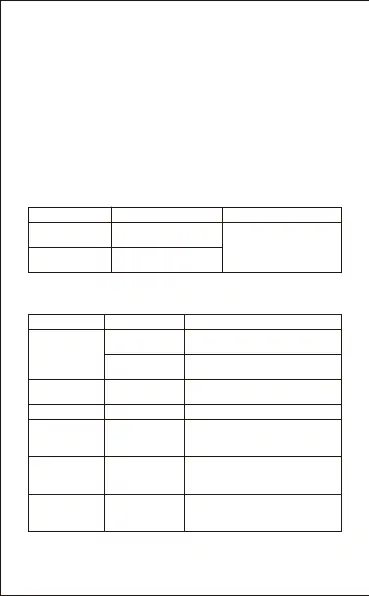
Function Operation Notes
Increase volume
Short press the
Volume up V+ button
Decrease volume
Short press the Volume
Down V- button
When the Volume reaches
the minimum or maximum
level the headset will
produce a short tone
Status Function Operation
Answer a call
Reject a call
Short press the PLAY/PAUSE
button
Press and hold the PLAY/PAUSE
button for approximately 3 seconds
Incoming call
End a call
Cancel dialing
Short press the PLAY/PAUSE
button
Short press the PLAY/PAUSEbutton
Call in progress
Dial a call
Transfer call to
headset
Press and hold the PLAY/PAUSE
for approximately 2 seconds
Call in progress,
phone handset
active
Answer new call
and hang up
current call
Short press the PLAY/PAUSE
button
Call in progress,
second
incoming call
Remove hang up
current call to
answer first call
Long press the PLAY/PAUSE
button
Call in progress,
remove hang up
call


 To Next Page
 Loading...