EN-5
8. Using a mobile phone or M07
- When there is an incoming call, the headset will ring.
- Single press the power button to answer an incoming call.
You may also press the answer button on your cellular phone
to receive the call in your headset. Music playback pauses
temporarily.
- To end a call, simply press the power button once again.
Note: if you answer or make a call while listening to media, the
media will be paused until the call has ended.
4) Additional Functionality
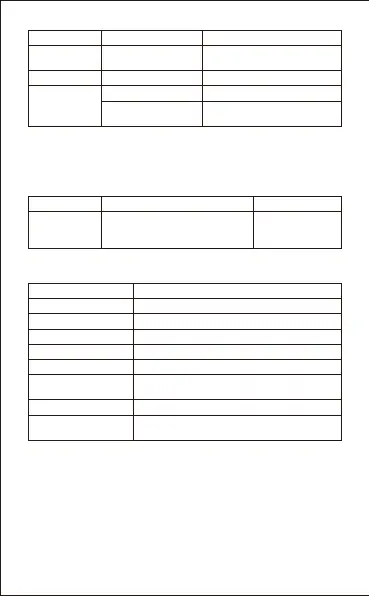
5) LED Status indicator
Status Function Operation
Skip to next track
Restart the
track/previous track
Long press V+ button
Long press V- button
Either media
playing or
stopped
Play media
Pause media playback
Press the Play/Pause button
Press the Play/Pause button
No media
Playing
Media playing
During Charging Red LED light on
Red LED light off
Blue LED light will flash twice every 1second
Full charge
Call in progress
Blue LED light will flash once every 1-2second
Standby(unconnected)
Blue LED light on
Standby(connected)
Red LED light will flash twice every second
Incoming call
Blue LED light will flash once every second
Unconnected to
Wireless device
Red LED light will flash once every second
Low battery
Red and Blue LED light will flash in an
alternating manner
Pairing
Action/Status Button Function Sounds
Double press the PLAY/PAUSE
button, the headset will make a
redial to your last called number
/
Redial last
number


 To Next Page
 Loading...