30
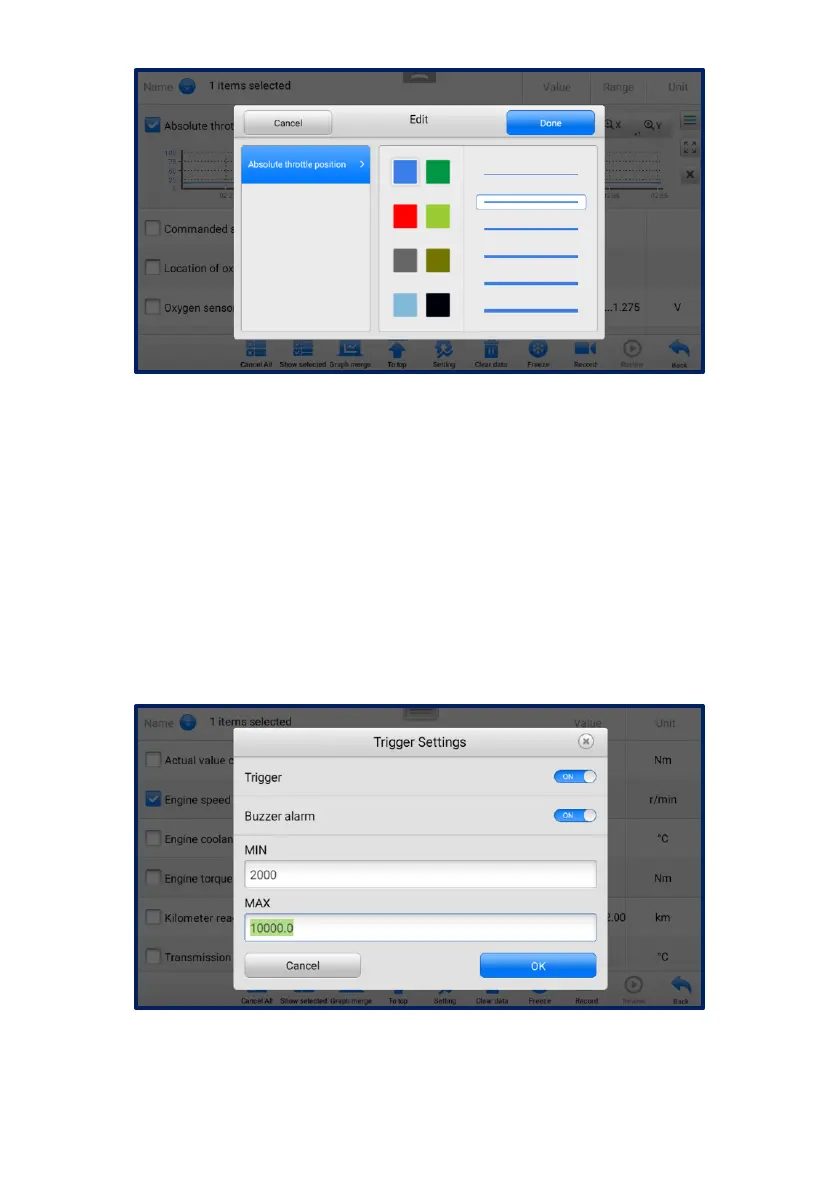
Figure 4-16 Waveform Edit Screen
Digital Gauge Mode — displays the parameters in the form of a digital gauge
graph.
Trigger Settings
On the Trigger Settings screen, you can set a standard range by filling in a
minimum value and a maximum value. When exceeding this range, the trigger
function will be executed and the tablet will automatically record and save the
generated data. You can review the saved live data by tapping the Review
button at the bottom of the screen.
Tap the drop-down button on the right side of a parameter to open a submenu.
The Trigger button is the last one in the submenu. Tap to display the Trigger
Settings screen.
Figure 4-17 Trigger Setting Screen
Two buttons and two input boxes are available in the Trigger Settings screen.
a) Trigger On — switches the trigger on and off. The trigger is ON by default.



 To Next Page