31Owners Handbook
Truma Combi 4E/6E
Vehicle Space Heater Truma Combi 4E/6E
Symbol Operating mode Power type
a Gas / Diesel Gas
b EL 1 Electro
b + c EL 2 Electro
a + b Mix 1 * Gas + Electro
a + b + c Mix 2 * Gas + Electro
* Mixed mode
Special aspects in the mixed mode
Interruption of the power supply 230 V Combi Gas
The heater automatically switches to the gas mode.
As soon as the 230 V power supply is reconnected,
the heater automatically switches back to the mixed
mode. Malfunction in the combustion process
(e.g. lack of fuel)
Combi Gas The heater automatically switches to the
electro mode. If the heater should operate in the
mixed mode again, the cause of the malfunction
needs to be rectified. Switch the heater off and on
again on the control panel.
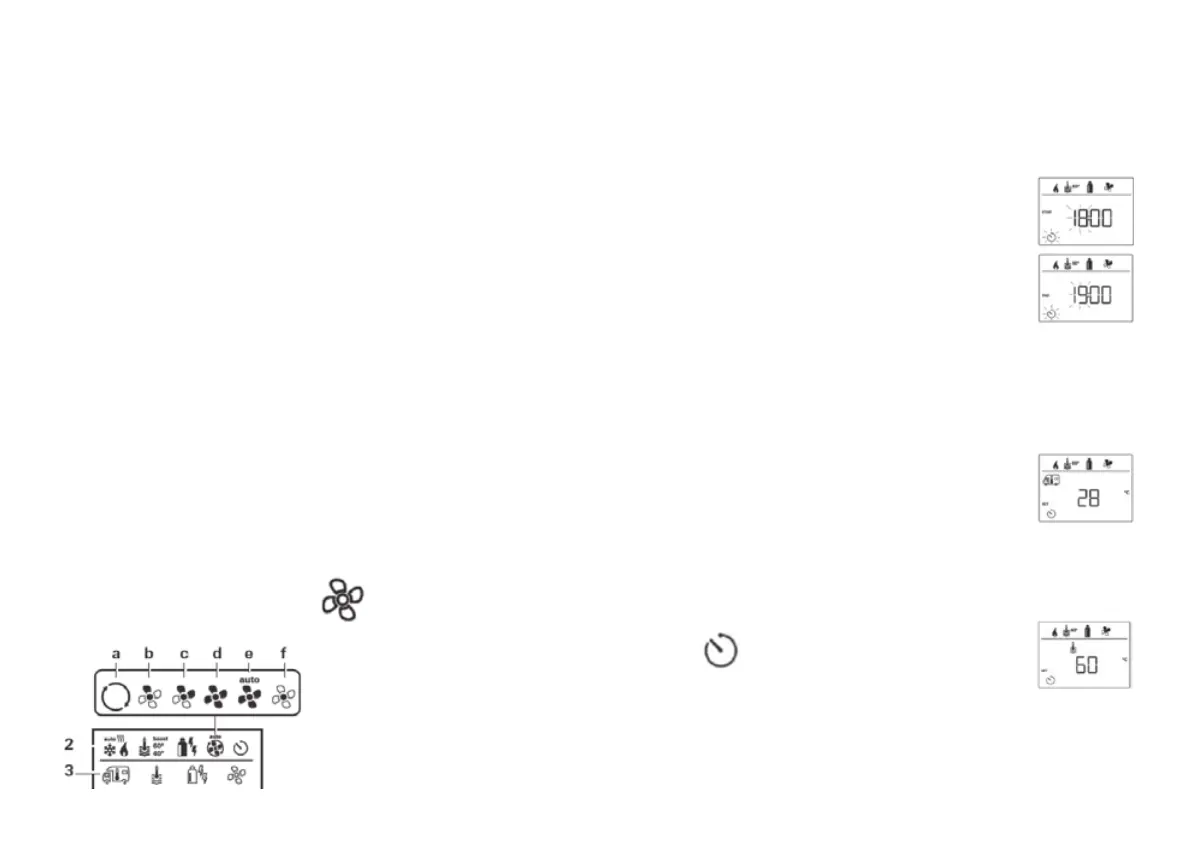
Select fan level
When the heater / air conditioning unit is
connected:
• Use the control knob / push button to select the
symbol in menu line (3).
• Click to change to the setting level.
• Use the control knob / push button to select the
required fan level.
• Click the control knob / push button to confirm
the value.
Heater Combi
Symbol Operating mode Description
– Off Fan is switched off.
a Vent Circulating air, if no device is in
operation. 9 speed levels can
be selected.
b Eco Low fan level.
c Mid High fan level (only Combi
Gas).
d High Fast heating of the room. Available,
if the difference between the
selected and current room
temperature is >10 °C.
Set timer
• Use the control knob / push button to
select the symbol in menu line (4).
• Click to change to the setting level.
If the timer is activated (ON), the timer in the menu
is shown as deactivated (OFF).
Enter start time
Use the control knob /
push button to set the
hours, then the minutes.
Enter end time point
Use the control knob /
push button to set the
hours, then the minutes.
If the start / end times are exceeded when entered,
the operating parameters are only taken into
consideration when the next start / end times are
reached. Until then, the operating parameters set
outside the timer remain valid.
Set the room temperature
• Click to change to the setting
level.
• Use the control knob / push
button to select the required
room temperature.
• Click the control knob / push button to confirm
the value.
Set the warm water level
• Click to change to the setting
level.
• Use the control knob / push
button to select the required warm
water level.
• Click the control knob / push button to confirm
the value.





 To Next Page