3
Key Features
Installation
● Support two cameras (One camera is included. The
second camera is sold separately)
● Flip the image Mirror/Normal/Up/Down (Optional)
● Six different sizes of guidelines
Prior to installing your backup camera, please test all the components
of the product using your vehicle power or an external power supply to
check if the product can work properly.
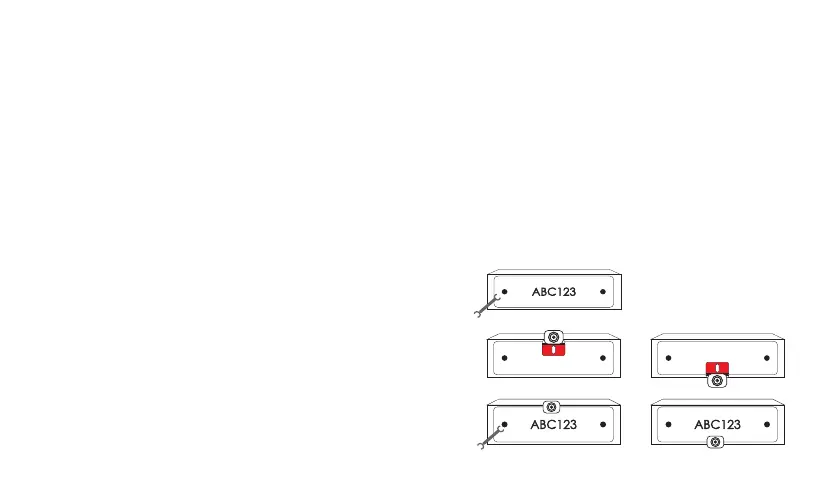
Installing the backup camera
Step1: Remove the license plate.
Step2: Find the installation location and clean it with a microfiber cleaning
cloth and alcohol (To ensure the camera stick firmly).
Step3: You can install the camera above/below your license plate. When
you install it below, flip the image vertically up/down in the setting
menu if the image is upside down.
Step4: Fix your license plate with screws.
● 2.4 GHz wireless transmission
● Wide-angle (Diagonal 118°)
● User-friendly menu
● Simple and quick installation
①
③
or
or
④


 To Next Page