17
© 2007 directed electronics, inc.
QQUUIICCKK RREEFFEERREENNCCEE GGUUIIDDEE
To lock/arm using your remote
➤ To arm the system press for one second. The doors will lock. The LED
will begin to flash. The Failsafe® Starter Kill will prevent the vehicle’s starter
from cranking if it has been installed. The vehicle’s horn (if connected) will
honk and the parking lights will flash once to confirm Locking/Arming of the
system.
To unlock/disarm using your remote
➤ To disarm the system press for one second. The doors will unlock The
Failsafe
®
Starter Kill will be deactivated and the vehicle’s horn (if connected)
will honk twice and the parking lights will flash twice to confirm
unlocking/disarming of the system. If progressive unlocking is installed, the
first press of the unlock button will unlock only the driver's door and a
second press will unlock the remaining doors.
To enter or exit Valet
®
Mode
➤ Turn the ignition to the ON position. Turn the ignition back off. Press and
release the Valet
®
switch within 10 seconds. The status LED will light steadily
if you have entered Valet
®
Mode. To exit Valet
®
Mode, repeat the steps above.
The LED will turn off when exiting Valet
®
Mode.
To activate Panic Mode
➤ Press and hold for 2 seconds.
To activate Aux Channel 2
➤ Press and hold for 1.5 seconds.
To activate Aux Channel 3
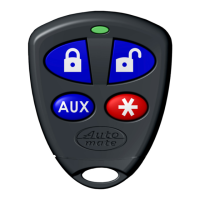
➤ Press and release the and together.
To exit Panic Mode
➤ Press on the transmitter.
Location of Valet Switch___________________________________
Cut along dotted line and fold for a quick and easy reference to keep in your purse or wallet.
✂
✂


 To Next Page