EasyManua.ls Logo

Automatic Technology KPX-7V2 - User Manual

Automatic Technology KPX-7V2
4 pages
Print Icon
To Next Page IconTo Next Page
Loading...
Doc #: 160004_04
Part #:13301
KPX-7V2
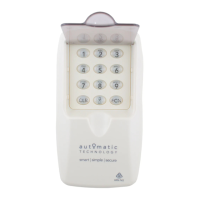
Wireless Keypad
Legend:
0 - 9 Pin Code Keys
1 - 8 Channel Numbers (CH#)
CLR Clear Button
FCN Function button for programming
Doorbell control
Proceed to
Quick Set up Guide
User Information Table
Memory
(MEM)
User Name / Information
Channel (CH#) Allocation
1 2 3 4 5 6 7 8
1 PRIMARY USER PIN ( )
2
3
4
5
6
7
8
9
10
11
12
13
14
15
16
17
18
19
20
Channel Function
CH# Receiver / Function
1
2
3
4
5
6
7
8
0
Safety Rules
Install the Wireless Keypad in a
location where the garage door
is visible, but out of reach of
children, at a height of at least
1.5m.
Watch the moving door and
keep people away until the
door is completely opened or
closed. Do not operate door
when persons are near the door.
Do not allow children to
play with door controls or
transmitters.
Wrong Pin Code
If a wrong pin code is entered,
a specific sound is heard after
pressing the function (FCN) key. The
clear (CLR) key must be pressed to
start re-entering the pin code. On
the fourth consecutive wrong pin
code entry, an alarm (light blinks
and sound beeps) is triggered for
10 seconds. Every next wrong pin
code entry will trigger the alarm.
The time out for the wrong pin code
is one minute.
The Wireless Keypad has built-in
keypad lighting for use at night
or in dark areas. The keypad will
illuminate upon pressing a button.
Built in lighting
Question and Answer IconNeed help?

Do you have a question about the Automatic Technology KPX-7V2 and is the answer not in the manual?

Summary

Safety Rules

Wrong Pin Code

Built-in Lighting

Quick Set Up Guide

Coding KPX into the Opener

Learn receiver codes for keypad/transmitter operation.

Program Primary User

Set a 4-8 digit PIN for keypad operation and programming.

Test the Operation of the Keypad

Verify keypad functionality by entering PIN and activating channels.

Change User Pin

Update the existing User PIN using the programming sequence.

Adding; Deleting Users

Creating New User Pins

Add new users with specific channel access or temporary use.

Deleting User Pins

Remove previously added user PINs using their memory location.

Clearing the Memory

Reset the keypad to factory defaults, erasing all user data.

Extra Features

Utilising the Channel 0 Button

Use Channel 0 for non-secure functions without a PIN, like doorbells.

Coding KPX-7 V2 into Other Receivers

Program keypad functions to various receivers like gates and lights.

Coding KPX-7 V2 into Logic Console, DCB-05 and NeoSlider

Integrate keypad with specific devices using their LCD prompts.

Mounting and Maintenance

Attaching the KPX-7 V2 to the Wall

Instructions for securely mounting the keypad to a wall.

Changing Batteries

Steps to replace the keypad's batteries when the monitor indicates low power.

Automatic Technology KPX-7V2 Specifications

General IconGeneral
Operating Temperature-20°C ~ +50°C
Storage Temperature-30°C ~ +70°C
Operating Frequency433.92 MHz
Power Source12V - 24V AC/DC
Voltage Rating12V DC
Current Rating50mA
Contact Resistance≤100mΩ
Insulation Resistance≥100MΩ
Dielectric Strength500V AC for 1 minute