EasyManua.ls Logo

Automotive Data Solutions iDatastart TR2450AE - User Manual

Automotive Data Solutions iDatastart TR2450AE
15 pages
Print Icon
To Next Page IconTo Next Page
Loading...
TR2450AE
2022-01-21 © Automotive Data Solutions Inc. 1/15
OWNER’S MANUAL
TERMS OF USE
INSTALLER TERMS OF USE
Automotive Data Solutions Inc. (“ADS”) products are strictly intended for installation by Certified Technicians
who are employed by a registered business specialized in the installation of automotive aftermarket electronics
products. Prior to beginning installation of an ADS product in a vehicle, it is the Certified Technician’s
responsibility to review the most current Product Guide, Install Guide and vehicle-specific notes available in
Weblink®. ADS is not responsible for any damages whatsoever, including but not limited to any consequential
damages, incidental damages, damages for loss of time, loss of earnings, loss of profit, commercial loss, loss of
economic opportunity and the like that may or may not have resulted from the use, misuse, improper
installation or operation of its products. Purchasers sole contractual remedy is refund of the purchase price of
the ADS product(s). ADS reserves itself the right to suspend any Weblink® account without notice and decline
to offer technical support to non-Certified Technicians, non-compliant Certified Technicians or end users.
END USER TERMS OF USE
ADS products are designed to remote start vehicles from a distance. In order to ensure your iDatastart system
meets all safety regulations and operates as intended by the manufacturer, please follow the usage
recommendations below:
• DO NOT use this product for any purpose other than its intended usage.
• DO NOT remote start a vehicle in an indoor or enclosed area (i.e. garage). Exhaust fumes are extremely
dangerous and can cause personal injury or death. Install carbon monoxide detectors in every living area that
can be exposed to vehicle exhaust fumes.
• DO NOT remote start a vehicle while it is being serviced. Follow the Valet Mode procedure as outlined in your
Owner’s Manual.
• DO NOT remote start a vehicle in gear.
• DO NOT remote start a vehicle with the key in the ignition.
• DO NOT remote start a vehicle left unattended with open windows, unlocked doors or open convertible top.
• DO NOT allow children handle or operate long range remotes.
• ALWAYS engage your emergency brake prior to exiting your vehicle. This may limit motion if the vehicle is
accidentally started in gear.
• AVOID remote starting your vehicle while passengers or pets are on board. This may increase the risk of
Question and Answer IconNeed help?

Do you have a question about the Automotive Data Solutions iDatastart TR2450AE and is the answer not in the manual?

Overview

This document outlines the operation and maintenance of the iDatastart remote start system, designed to enhance vehicle convenience and security through remote functionality.

The primary function of the iDatastart system is to enable remote starting of vehicles from a distance, allowing users to warm up or cool down their vehicle's interior before entry. This system is intended for installation by Certified Technicians employed by registered businesses specializing in automotive aftermarket electronics. This ensures proper setup and adherence to safety guidelines.

Usage Features:

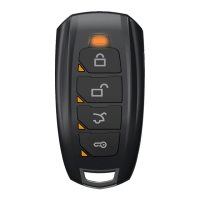
The iDatastart system utilizes multiplexing technology, allowing its compact 5-button remotes to control over 30 different functions. These functions are categorized by button presses (press and release, or press and hold for 2.5 seconds), button sequences (buttons pressed one after the other with a 3-second timeout), or simultaneous button presses. Some functions are only available in "2nd Car Mode," which allows a single remote to control two iDatastart-equipped vehicles.

Key usage features include:

  • Lock & Arm: Secures the vehicle by locking doors and arming the alarm. Confirmed by 1 chime and 1 flash.
  • Unlock & Disarm: Accesses the vehicle by unlocking doors and disarming the alarm. Confirmed by 2 chimes and 2 flashes.
  • Query*: Queries the vehicle for battery voltage and interior temperature. This function is marked with an asterisk, indicating it's available in 2nd Car Mode.
  • Panic*: Triggers the panic siren. Confirmed by 1 chime and 1 flash.
  • Trunk Release*: Releases the trunk or hatch.
  • Engine Start/Stop*: Starts and stops the engine. Confirmed by 4 chimes and 4 flashes, with button LEDs flashing intermittently while the engine is running.
  • AUX 1, 2, 3, 4*: These auxiliary functions are to be configured by an Authorized Dealer, providing customizable controls.
  • Silent Lock*: Disables the vehicle's horn and alarm siren when locking.
  • Silent Unlock*: Disables the vehicle's horn and alarm siren when unlocking.
  • Valet Mode ON/OFF: This crucial safety feature turns off remote start and security functions when the vehicle is being serviced or valet parked. Keyless entry remains functional. Activation is confirmed by 1 chime, deactivation by 2 chimes. It can be toggled via the remote or by cycling the ignition OFF/ON twice rapidly and pressing the brake three times.
  • Runtime Extend: Seamlessly extends the engine's runtime without restarting the vehicle.
  • Mute ON/OFF: Disables the vehicle's horn and alarm siren even when the alarm is triggered, though the remote will still receive alarm notifications. Activation is confirmed by 1 chime, deactivation by 2 chimes.
  • Ignition Lock ON/OFF: Automatically locks doors when the engine is running. Activation is confirmed by 1 chime, deactivation by 2 chimes.
  • Passive Lock & Arm ON/OFF: Automatically locks and arms the vehicle 60 seconds after it is unlocked. Activation is confirmed by 1 chime, deactivation by 2 chimes.
  • Turbo ON/OFF: Cools down the turbo before turning off the engine. The programmable runtime ranges from 30 seconds to 4 minutes. Activation is confirmed by 1 chime, deactivation by 2 chimes.
  • Weather Start ON/OFF: Sets the vehicle to automatically remote start every 2, 3, or 4 hours (programmable) or based on input from a separately sold temperature sensor. Activation is confirmed by 1 chime, deactivation by 2 chimes.
  • Lock Remote: Disables all functions on the remote. Confirmed by 1 chime and 1 flash.
  • Unlock Remote ON/OFF: Enables all functions on the remote. Confirmed by 2 chimes and 2 flashes.
  • Mute Remote ON/OFF: Disables the chime when pressing any button on the remote. Activation is confirmed by 1 chime, deactivation by 2 chimes.

The system also supports remote engine start from the factory key fob on some vehicles, using specific button sequences (e.g., three consecutive lock presses). The remote start range in this case is limited to the factory key fob's door lock range.

Safety Recommendations for End Users:

  • Do not use the product for any purpose other than its intended usage.
  • Never remote start a vehicle in an indoor or enclosed area (e.g., garage) due to the danger of exhaust fumes. Install carbon monoxide detectors in all living areas exposed to vehicle exhaust.
  • Do not remote start a vehicle while it is being serviced. Use Valet Mode.
  • Do not remote start a vehicle in gear or with the key in the ignition.
  • Avoid remote starting a vehicle left unattended with open windows, unlocked doors, or an open convertible top.
  • Do not allow children to handle or operate long-range remotes.
  • Always engage the emergency brake before exiting the vehicle to limit motion if it accidentally starts in gear.
  • Avoid remote starting the vehicle with passengers or pets inside, as this increases the risk of the shifter being put in gear.
  • Avoid parking on inclined surfaces or in areas surrounded by obstacles. For manual vehicles, always ensure the Reservation Mode sequence is correctly engaged before remote starting.
  • Immediately contact a Certified Technician if the iDatastart system malfunctions.

Maintenance Features:

  • Adjusting Engine Runtime Settings: The default runtime for remote start is 15 minutes, but it can be programmed for 3, 5, 10, 25, 30, or 35 minutes. Changes must be made by an iDatastart Authorized Dealer.
  • Key Takeover Following Remote Start: This procedure ensures the engine does not shut down when entering the vehicle during remote start runtime. For standard key vehicles, unlock and enter, close doors, insert key into ignition and turn to ON, then press the foot brake. For push-to-start vehicles, unlock and enter with a valid smartkey, close doors, then press the foot brake. This must be completed within a programmed delay time (45, 90 seconds, 3, or 4 minutes), which will be communicated by the Authorized Dealer.
  • Programming a New Remote: If a remote is lost, damaged, or an additional one is desired, a functional iDatastart system must already be installed. All new remotes must be programmed by an iDatastart Authorized Dealer. A maximum of 4 remotes can be programmed per system.
  • Replacing Remote Batteries: To replace batteries, insert a slim tool into the opening to pry open the rear cover, carefully remove the circuit board, slide out the old battery, replace with a new one, and reassemble.
  • Remote Start Troubleshooting: If the remote fails to start the vehicle, the parking lights will flash three times immediately, followed by a number of flashes indicating specific errors (e.g., key in ignition, door open, hood open, brake detected, system in Valet Mode, communication failure, bypass error, module overheat protection). Solutions typically involve addressing the detected issue (e.g., removing the key, closing doors, releasing the brake) or contacting an Authorized Dealer.
  • Vehicle Shutdown Troubleshooting: If the vehicle shuts down after a remote start sequence, the parking lights will flash four times immediately, followed by a number of flashes indicating specific errors (e.g., no engine rev detected, brake detected, hood open, engine revving over 3000 RPM, glow plug error, vehicle speed sensor error, 'Check Engine' light detected, low fuel, door open, CAN communication failure, key synchronization failure, bypass error, module overheat protection). Solutions range from simple actions like releasing the brake or closing the hood to contacting an Authorized Dealer for more complex issues.

Warranty Information:

The control module and installation harnesses are covered by a limited lifetime warranty for as long as the original purchaser owns the vehicle in which it was originally installed. Remote transmitters and antennas are covered for one year from the date of original installation, excluding battery replacement. The warranty is void if an original proof of purchase is not provided, the date code or serial number is defaced/missing/altered, or the product/vehicle is transferred to a new owner. ADS is not responsible for consequential damages, loss of time, earnings, or profit resulting from misuse or improper installation. The sole contractual remedy for purchasers is a refund of the product purchase price.

Automotive Data Solutions iDatastart TR2450AE Specifications

General IconGeneral
InstallationProfessional installation recommended
Number of Buttons on Remote5
Number of Remotes Included2
Remote ColourBlack
Antenna RangeUp to 3000 feet
Operating Temperature-40°F to 185°F (-40°C to 85°C)
TypeRemote Starter
RangeUp to 3000 ft
Features2-way confirmation, keyless entry, trunk release, security system integration
Engine Start MethodRemote button press
Power Supply12V DC
Warranty1 year limited warranty

Related product manuals