EasyManua.ls Logo

Autopage RF-305 - User Manual

Autopage RF-305
6 pages
Print Icon
To Next Page IconTo Next Page
Loading...
CHIRP AND PARKING LIGHT FLASH INDICATORS
1. 1 Chirp & 1 light flash = Security System is armed
2. 2 Chirps & 2 light flashes = Security System is disarmed
3. 4 Chirps & 3 light flashes = Security System breach or intrusion in your
absence.
PATHWAY ILLUMINATION (OPTIONAL)
When disarming the Security System, the vehicles parking lights will stay on
illuminating your pathway to the vehicle. The vehicles parking lights will stay on
for 30 seconds or until the vehicles ignition is turned to the “ON” position.
30 SECOND ARMING DELAY
After arming your vehicle with the Remote Control Transmitter, the siren will chirp
(1) time and the vehicles parking lights will flash (1) time. The Security System
will instantly go into a 30-second standby mode to monitor all Security System
functions. After the 30 seconds has elapsed, the Security System is now fully
armed. If a door is opened or if you have a faulty sensor, the Security System will
give a warning by chirping the siren (3) times.
SHOCK SENSOR
Your AutoPage Security System includes a dual zone shock sensor designed to
trigger the alarm from impact to the vehicle, such as a window being broken. If
sensitivity adjustment should become necessary consult your local Authorized
Dealer. Do not attempt to do this on your own!
STARTER DISABLE FEATURE (OPTIONAL)
If installed with your Security System, this feature is designed to prevent a thief
from starting your vehicle once they have broken in to it.
SECOND VEHICLE OPERATION
Your AutoPage Security Systems Remote Control Transmitter can be utilized to
control a second vehicle equipped with an RF-305 or RF-405. If your Remote
Control Transmitter is programmed to a second vehicle, the Remote Control
Transmitter will operate as follows:
1. Push the Green side shift button on the right side of the Remote Control
Transmitter, the LED will illuminate for 3 seconds.
2. While the LED is illuminated, push the desired button operation. For
Example: To Arm the second vehicle, simply push the Green side shift
button once then push the Lock/Arm button while the LED is illuminated.
1815 West 205
th
Street
Suite 101
Torrance, California 90501-1525
Main Office: 310-618-2002
RF305
PROFESSIONAL VEHICLE SECURITY
OPERATIONS MANUAL
THIS PRODUCT IS DESIGNED FOR PROFESSIONAL INSTALLATION
ONLY
Question and Answer IconNeed help?

Do you have a question about the Autopage RF-305 and is the answer not in the manual?

Summary

Operation Instructions

Remote Control Transmitter Operation

Explains arming, disarming, panic, and auxiliary functions of the remote transmitter.

Remote Control Transmitter Programming

Guides on adding or replacing remote control transmitters for the security system.

System Operation

Second Vehicle Remote Transmitter Programming

Instructions for programming a remote transmitter to control a second vehicle.

Changing the Remote Control Transmitter Battery

Details on how to replace the battery in the remote control transmitter.

Override Function

How to disarm the system when the remote transmitter is lost or inoperative.

Valet Function

Passive;Manual Operation

Describes manual and passive arming/disarming procedures for the security system.

Automatic Rearming (Optional)

Details the automatic re-arming feature and its cancellation conditions.

Ignition Control Door Locks (Optional)

Explains automatic door locking/unlocking based on ignition status.

LED Status Indicator

Interprets the meaning of different LED states for system status.

Chirp and Parking Light Flash Indicators

Pathway Illumination (Optional)

Describes how parking lights illuminate the path when disarming the system.

30 Second Arming Delay

Explains the 30-second standby mode after arming before full activation.

Shock Sensor

Details the dual zone shock sensor and its sensitivity.

Starter Disable Feature (Optional)

Describes the feature designed to prevent vehicle theft by disabling the starter.

Second Vehicle Operation

Remote Control Transmitter Operation for Second Vehicle

How to operate the remote transmitter for a second vehicle.

Overview

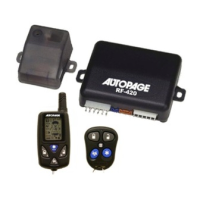
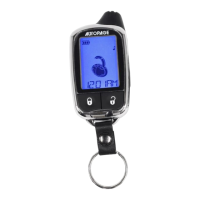
The AutoPage RF305 is a professional vehicle security system designed to protect your vehicle from theft and intrusion. It comes with two 5-button remote control transmitters that utilize a sophisticated code-hopping system to prevent unauthorized access and code grabbing. This system is intended for professional installation only.

Function Description

The primary function of the RF305 is to arm and disarm your vehicle's security system. When armed, it provides various layers of protection, including a dual-zone shock sensor and an optional starter disable feature. The system also offers convenience features such as remote panic, auxiliary functions, and pathway illumination.

Usage Features

Remote Control Transmitter Operation:

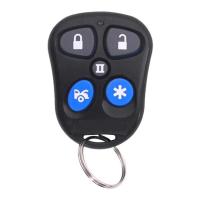
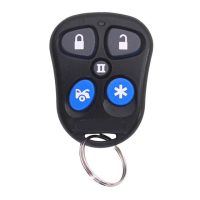
  • Arming and Locking: Press the "LOCK" button once. The siren will chirp once, and the parking lights will flash once, indicating the system is armed. If interfaced, vehicle doors will lock.
  • Disarming and Unlocking: Press the "UNLOCK" button once. The siren will chirp twice, and the parking lights will flash twice, indicating the system is disarmed. If interfaced, vehicle doors will unlock.
  • Muting Chirps: To temporarily mute the arm/disarm chirps, press both "LOCK" and "UNLOCK" buttons simultaneously. Confirmation will be via parking lights only.
  • Remote Panic Function: Press and hold the "*" button for 3 seconds to activate the panic function. The siren will sound, and parking lights will flash continuously. To cancel, press the "LOCK" or "UNLOCK" button.
  • Auxiliary Function (Optional): The "EXT1" button can be used for a separate function, such as an electronic trunk release. Press "EXT1" for 2 seconds to activate.

Programming Remote Control Transmitters:

To add or replace a remote control transmitter:

  1. Turn the ignition to "ON."
  2. Push the valet switch 3 times. You will hear one long chirp and one short chirp.
  3. Press any button on the first transmitter (one short chirp).
  4. Within 10 seconds, press any button on the second transmitter (two short chirps).
  5. To exit, turn the ignition to "OFF" or wait 10 seconds (three long chirps). The system retains the last 4 programmed transmitters, deleting older ones if memory is exceeded.

Second Vehicle Remote Transmitter Programming:

Your remote can control a second vehicle equipped with an RF-305 or RF-405.

  1. Before pressing any button, select the green side shift button.
  2. The LED on the transmitter will illuminate for 3 seconds.
  3. While the LED is illuminated, press any desired button for the second vehicle's operation (e.g., press "LOCK/Arm" to arm the second vehicle).

System Operation Modes:

  • Override Function: If your remote is lost or inoperative, enter the vehicle (alarm will sound), turn the ignition to "ON," and push the valet/override switch until the alarm stops. The system will disarm and reset.
  • Valet Function: For vehicle servicing or valet parking, turn the ignition to "ON," then push and hold the valet/override switch for 2 seconds until the LED turns solid "ON." Turn the ignition to "OFF." To reactivate, repeat the process until the LED turns "OFF." Keyless entry remains functional in valet mode.
  • Passive/Manual Operation (Optional): The system can automatically arm 30 seconds after the last door is closed.
    1. Turn ignition to "OFF" and exit the vehicle.
    2. After all entrances are closed, the LED flashes fast for 30 seconds. Re-opening a door stops the flashing; it resumes when the door is closed.
    3. After 30 seconds, the system automatically arms (one siren chirp, one parking light flash). If interfaced, doors will lock automatically after passive arming. This feature can be reprogrammed by a dealer if not desired.
  • Automatic Rearming (Optional): If enabled, the system will re-arm itself 60 seconds after disarming with the remote. This is canceled if any door is opened before the timer elapses.
  • Ignition Control Door Locks (Optional): If interfaced, doors will automatically lock when the ignition is turned "ON" and unlock when the ignition is turned "OFF." This will not occur if a door is open when the ignition is turned "ON."

LED Status Indicator:

  • LED OFF: System disarmed.
  • LED ON: System in valet mode.
  • LED FAST FLASHING: Automatic arming timer counting down.
  • LED FLASHING: System armed.

Chirp and Parking Light Flash Indicators:

  • 1 Chirp & 1 light flash: System armed.
  • 2 Chirps & 2 light flashes: System disarmed.
  • 4 Chirps & 3 light flashes: System breach or intrusion detected.

Pathway Illumination (Optional):

When disarming, parking lights stay on for 30 seconds (or until ignition is turned "ON") to illuminate your path.

Second Arming Delay:

After arming, the siren chirps once, and parking lights flash once. The system enters a 30-second standby mode to monitor functions. After 30 seconds, it is fully armed. If a door is opened or a faulty sensor is detected during this delay, the siren will chirp 3 times as a warning.

Shock Sensor:

The system includes a dual-zone shock sensor to detect impacts, such as a broken window. Sensitivity adjustments should be performed by an authorized dealer.

Starter Disable Feature (Optional):

If installed, this feature prevents a thief from starting your vehicle after a break-in.

Maintenance Features

Changing the Remote Control Transmitter Battery:

The remote control transmitters use one miniature 12-volt battery (GP23A, #EL12, #VR22, or Radio Shack #23-144), which typically lasts about one year. To replace the battery:

  1. Carefully remove the case screw located on the bottom of the transmitter where the key ring attaches, using a miniature #1 Phillips head screwdriver.
  2. Gently pop open the plastic case.
  3. Note the direction of the "+/-" terminals before removing the old battery.
  4. Install the new battery, ensuring correct polarity and avoiding bending the battery contacts.
  5. Replace the case cover, insert, and tighten the screw. Do not overtighten.
  6. Test the remote control transmitter.

For any complex issues or reprogramming needs, it is recommended to consult your local authorized dealer.

Autopage RF-305 Specifications

General IconGeneral
Number of Buttons on Remotes4
Remote ControlYes
Shock SensorYes
Engine ImmobilizerYes
Keyless EntryYes
Panic ModeYes
LED IndicatorYes
Valet ModeYes
Type2-Way

Related product manuals