Need help?
Do you have a question about the Autopage C3-RS-915 LCD and is the answer not in the manual?
Lists essential safety measures to follow when using the system.
Instructions for charging the remote and understanding its battery level indicator.
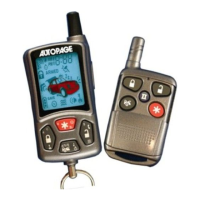
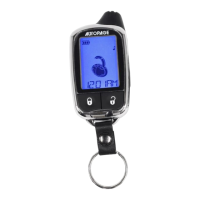
Defines common icons displayed on the remote control's LCD screen.
Details icons representing specific system functions and states.
Guides on using transmitter buttons for system functions.
Explains audible chirps and visual light flashes for system feedback.
Details system behavior and indicators during various alarm states.
Steps for manual arming, disarming, and bypassing sensors.
Automatic arming sequence and passive door locking.
Disarming the system using the valet switch without a PIN code.
Disarming the system using a programmed PIN code.
Activating and using valet mode to bypass alarm functions.
Using the transmitter for vehicle location and manual panic activation.
What triggers the alarm and how to use anti car-jacking.
Details on active and passive anti car-jacking operation.
Procedures for checking system status and trigger history.
Features for paging drivers and controlling interior dome lights.
Automatic door lock/unlock and remote trunk release functions.
Programming timer outputs for channels 4, 5, and 6.
Managing power saving and controlling a second vehicle.
Steps to start the vehicle remotely.
Child safety start feature and operating the vehicle during remote start.
Features for temporary engine run and turbo cooling.
Programming automatic start times and checking interior temperature.
How to stop the engine and conditions that cause automatic shutdown.
Temporarily disabling the remote start function.
Entering and exiting advanced user modes on the LCD remote.
Interpreting one, two, and three beep confirmation signals.
Understanding four beeps, musical tones, and programming the remote.
Adjusting parking meter and timer configurations.
Configuring backlight, selecting vehicles, and setting clocks.
Customizing confirmation feedback and managing button lock.
Managing power save mode and setting the daily start timer.
 General
| LCD Display | Yes |
|---|---|
| Remote Start | Yes |
| Keyless Entry | Yes |
| Shock Sensor | Yes |
| Alarm Type | Audible and Visual |
| Range | Up to 3000 feet |
| LCD Remote | Yes |
| Starter Kill | Yes |
| Door Trigger | Yes |
| Trunk Trigger | Yes |
| Hood Trigger | Yes |
| Anti-Theft | Yes |
| Valet Mode | Yes |
| Parking Light Flash | Yes |
| Panic Mode | Yes |
| Silent Arm/Disarm | Yes |
| Battery Backup | No |
| Type | 2-Way |

 To Next Page