EasyManua.ls Logo

AUTOTECH KB-1W - User Manual

AUTOTECH KB-1W
5 pages
Print Icon
To Next Page IconTo Next Page
Loading...
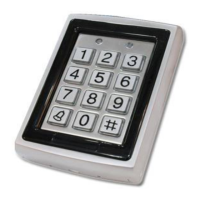
Πολυλειτουργικό αδιάβροχο πληκτρολόγιο KB-1W
Ο KB-1W είναι πίνακας ελέγχου εισόδου (access control), µε κάρτες προσέγγισης (proximity cards) και
λειτουργία πληκτρολόγησης κωδικού. Υποστηρίζει µέχρι 500 χρήστες µε λειτουργία προστασίας
βανδαλισµού.
Τεχνικές Λεπτοµέρειες
Τάση τροφοδοσίας 12 VDC
Ρεύµα εισόδου
Αναµονή 40 mA
Μέγιστο 130 mA
Έξοδοι
Ρελέ ηλεκτρικής κλειδαριάς
Βοηθητικό ρελέ
Ελεγχος εξόδου ηλεκτρικής κλειδαριάς
Βοηθητικός έλεγχος εξόδου
Είσοδοι
Rex Push button (NO)
Βοηθητική είσοδος (NO/NC)
Ενσωµατοµένος αναγνώστης καρτών προσέγγισης
Απόσταση 65 mm
Ρύθµιση ASK (125KHz)
Συµβατές κάρτες 26-bit EM
Περιβαλλοντικές παράµετροι
Θερµοκρασία -31 C ως 63 C
Υγρασία 0 ως 95%
Μηχανικά στοιχεία
∆ιαστάσεις 120 Χ 76 Χ 27 mm
Βάρος 0.55 Kg
Βασικά Χαρακτηριστικά
Ενσωµατοµµένος αναγνώστης καρτών προσέγισης (125KHz, ASK ρύθµιση)
Ενσωµατοµµένο πληκτρολόγιο
Βοηθητικές είσοδοι και έξοδοι
8 βοηθητικές καταστάσεις
1. Ανοιγµα πόρτας
2. Βίαια είσοδος
3. Προσέγγιση πόρτας
4. Μόνιτορ Χρήστη
5. Νορµάλ/ασφαλής
Ενσωµατοµµένος βοµβητής
LED προγραµµατισµού 2 καταστάσεων
2 καταστάσεις λειτουργίας
1. Ασφάλειας
2. Νορµάλ
Multifunctional waterproof keyboard KB-1W
KB-1W is an access control board with proximity cards and keyboard for code entry. It can store up to 500
users and has anti-vandalism alarm function.
Technical Specifications
Power supply 12 VDC
Input current
Standby 40 mA
Max 130 mA
Outputs
Electric lock relay
Auxiliary relay
Electric lock output control
Auxiliary output control
Inputs
Rex Push button (NO)
Auxiliary input (NO/NC)
Built in proximity card reader
Range 65 mm
Adjustment: ASK (125KHz)
Compatible cards: 26-bit EM
Environmental parameters
Temperature -31 C up to 63 C
Humidity 0 up to 95%
Mechanical parameters
Size: 120 Χ 76 Χ 27 mm
Weight: 0.55 Kg
Basic Features
Built in proximity card reader (125KHz, ASK adjustment)
Built in keypad
Auxiliary Inputs & Outputs
8 Auxiliary Modes
1. Door Open
2. Force Entry
3. Reaching Door
4. Monitor User
5. Normal / Safe
Built in beeper
2 State Programming LED
2 Operation Modes
1. Safe
2. Normal
Question and Answer IconNeed help?

Do you have a question about the AUTOTECH KB-1W and is the answer not in the manual?

Summary

Multifunctional Waterproof Keyboard KB-1 W

Technical Specifications

Detailed technical data including power supply, inputs, outputs, environmental and mechanical parameters.

Basic Features

Key functionalities including built-in reader, keypad, auxiliary I/O, and auxiliary modes.

User Levels and Modes

User Levels

Defines three user roles: Normal, Safe, and Administrator, each with distinct access rights.

Door Opening Modes

Describes four distinct methods for opening the door, combining card and code entry.

Anti-vandalism Alarm

Features integrated anti-vandalism protection with an LED indicator for enhanced security.

Adjustable Alarm Time

Allows customization of the alarm duration, offering flexibility in security settings.

Adjustable Electric Lock Time

Enables adjustment of the electric lock's engagement duration for secure access.

Installation Guide

Step-by-step instructions for physically installing the access control device.

Operation Instructions

Guidance on how to operate the access control system and manage user access.

User Modes

Details the three operational modes (Normal, Safe, Administrator) for user access control.

Basic and Auxiliary Credentials

Explains the use of basic and auxiliary cards/codes for user authentication.

System Configuration and Operation

Normal vs. Safe Mode

Explains the difference between Normal and Safe operational modes for the access control.

Toggle Between Modes

Instructions on how to switch the system between Normal and Safe operating modes.

Programming Mode

Guide on entering and navigating the system's programming interface for configuration.

System Codes Management

Details on managing system codes including opening, auxiliary, administrator, and safety codes.

Change Opening Door Code

Procedure to modify the primary code used for opening the door.

Change Auxiliary Code

Steps to update the secondary or auxiliary access code for users.

Change Administrator Code

Instructions for modifying the administrator's access code for system management.

Change Safety Code

Process for updating the safety code used for enhanced security settings.

Advanced Settings and Recovery

Electric Lock and Alarm Parameters

How to adjust electric lock settings and alarm time parameters for system behavior.

Define Auxiliary Mode

Setting up different auxiliary modes for varied operational responses.

Auxiliary Relay Settings

Configuration options for the auxiliary relay's behavior based on input and mode.

Add;Delete User Credentials

Procedures for adding and deleting basic and auxiliary cards or codes for users.

Add Basic Card;Code

Standard method for registering a user's primary card or code.

Add Auxiliary Card;Code

Method for registering a user's secondary card or code.

Delete User Credentials

Instructions for removing user cards and codes, including standard and search methods.

Electric Lock and Alarm Administration

Methods for managing electric lock and alarm settings, including standard and search options.

Factory Default Settings Reset

Procedure to restore the system to its original factory settings, clearing all data.

Recover Administrator Code

Steps to retrieve or reset the administrator code if it is lost or forgotten.

Recover Safety Code

Procedure to recover the safety code when it is lost and the system is in safe mode.

AUTOTECH KB-1W Specifications

General IconGeneral
BrandAUTOTECH
ModelKB-1W
TypeWireless Keyboard
ConnectionWireless
InterfaceUSB
Keyboard LayoutQWERTY
Battery TypeAAA
Number of Keys104
CompatibilityWindows