EN
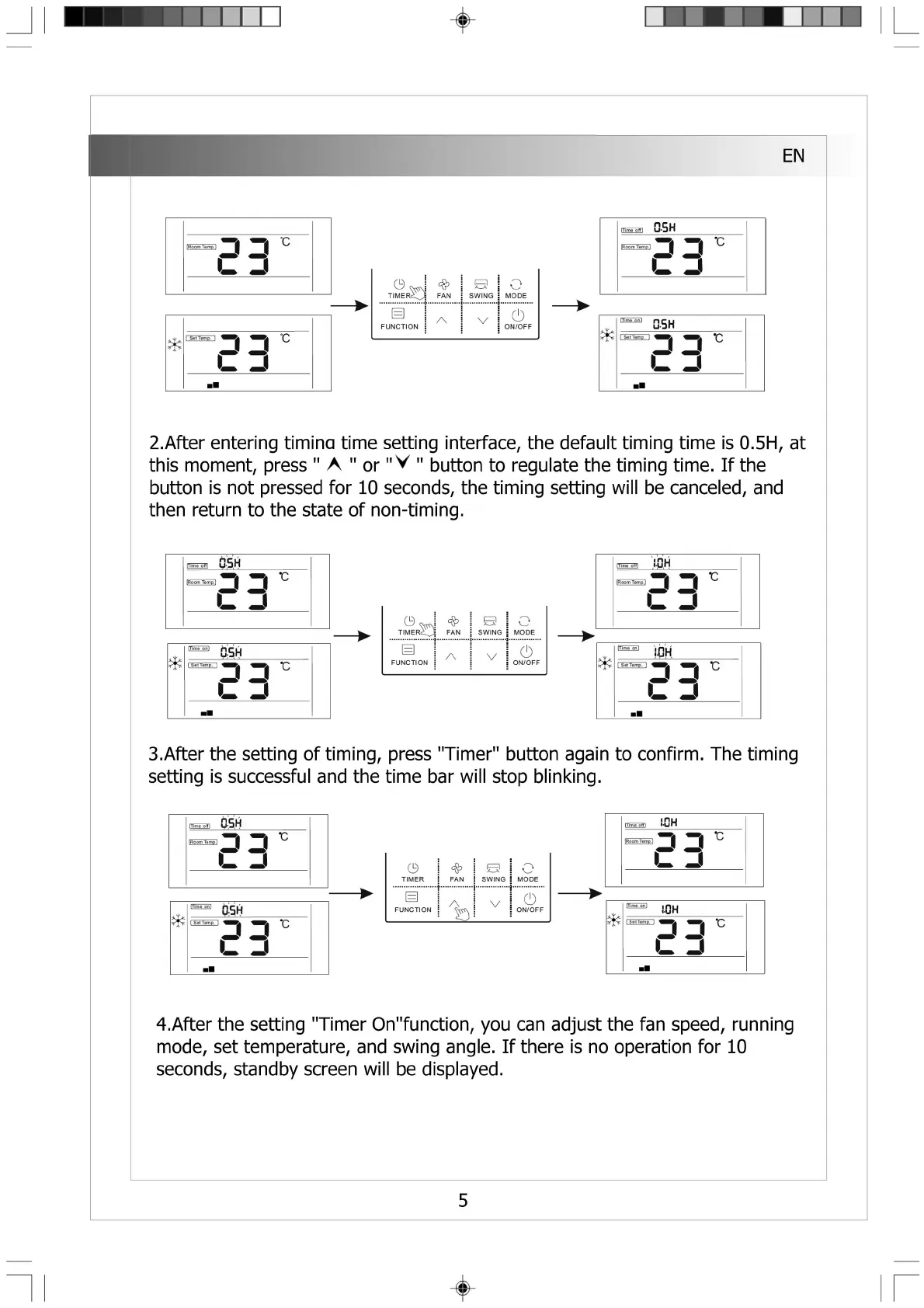
2.After entering timina time setting interface, the default timing time is 0.5H, at
this moment, press " A " or "V " button to regulate the timing time. If the
button is not pressed for 10 seconds, the timing setting will be canceled, and
then return to the state of non-timing.
litme oit|
— 1 ■_
C 3
lT>n?»..〇.nJ n ^ l^ J
EEr
■ ■
S
o
TIM E R ^Ji
FAN
SWING
MODE
曰
八
v
0
FUNCTION ON/OFF
Hime ottl H
C D
3.After the setting of timing, press "Timer" button again to confirm. The timing
setting is successful and the time bar will stop blinking.
4.After the setting "Timer On"function, you can adjust the fan speed, running
mode, set temperature, and swing angle. If there is no operation for 10
seconds, standby screen will be displayed.
5


 To Next Page
 Loading...