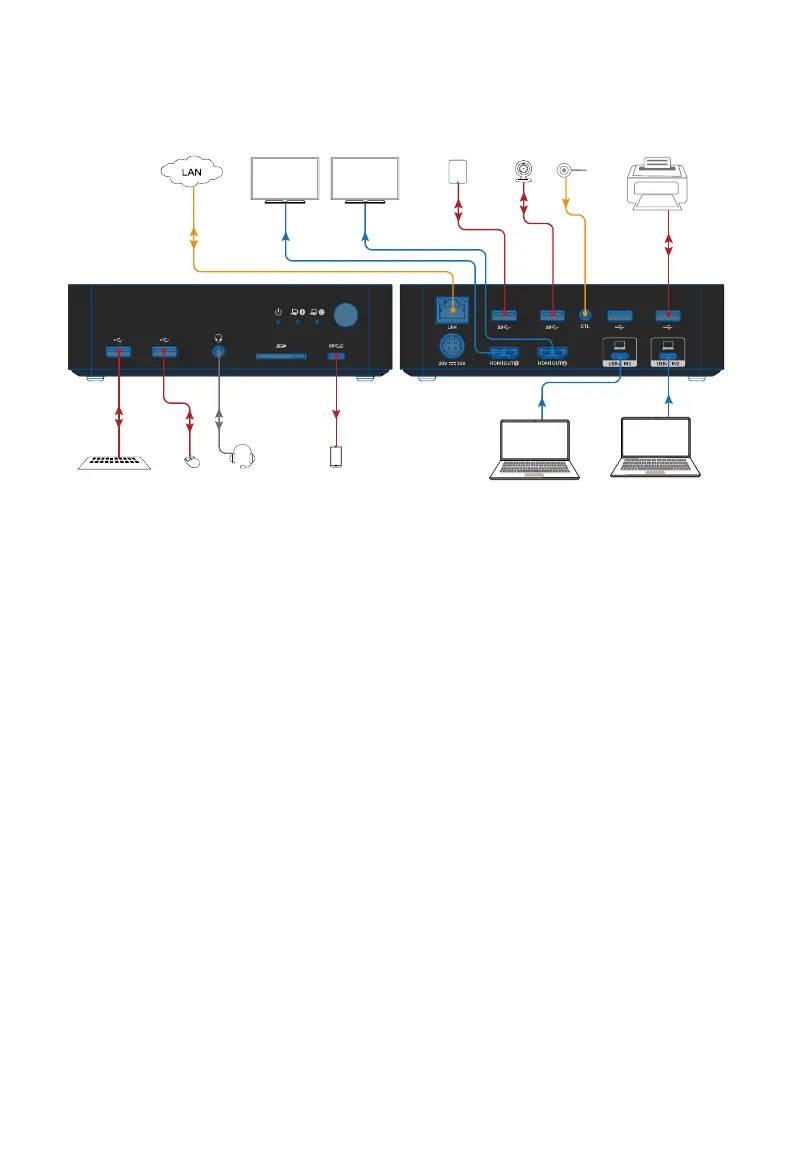
Application
Application
Monitor 1 Monitor 2
Laptop
Laptop
Extend A
Extend B
Keyboard
Camera
Headset
Phone
Mouse
HDMI
HDMI
USB-C
USB-C
USB
USB USB
USB
USB
Charging
Front Panel Rear Panel
Hard Disk
Printer
LAN
Extended
Control Button
Note:
1. The LAN port can provide network connectivity to two connected USB-C
laptops, no matter which one is selected.
2. KVM Docking can charge two connected USB-C laptops no matter which
one is selected.
3. Other ports, such as USB 3.0, USB 2.0, SD card, Headphone and USB-C
(data only) ports will only be connected to the currently selected laptop.


 To Next Page