EasyManua.ls Logo

AV-GAD EasyLoader AV-701 - User Manual

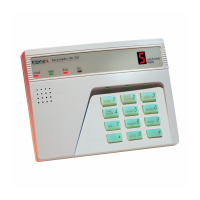
AV-GAD EasyLoader AV-701
23 pages
Print Icon
To Next Page IconTo Next Page
Loading...
EasyLoader
End User Manual
Downloaded from: http://www.guardianalarms.net

Questions and Answers

  • S
    spencer26Aug 17, 2025
    What to do if Siren was triggered, but programmed phone numbers were not dialed on my AV-GAD Control Panel?
    • M
      Melissa LeAug 17, 2025
      There could be several reasons why the programmed phone numbers were not dialed when the siren was triggered: * A faulty dialer. * A faulty phone line or the phone is off the hook. * A mistaken report of alarm. To troubleshoot: 1. Hold down the ‘6’ key (dialer test); automatically dialed numbers will be displayed (test takes several minutes). 2. If the telephone line to the alarm control has been disconnected, reconnect it. 3. If it is a malfunction of the alarm system - call your installer.
  • R
    Ryan FriedmanAug 20, 2025
    What to do if three LEDs indicators are blinking on my AV-GAD Control Panel, indicating Power Failure?
    • E
      Erin VasquezAug 20, 2025
      If three LEDs indicators are blinking on your AV-GAD Control Panel, indicating a power failure, it's possible that there is a general power failure. Check your premises fuse box. WARNING! If the Green indicator is still OFF, your system is operating on temporary power supplied by the Battery.
  • W
    williampriceAug 22, 2025
    What to do if my AV-GAD Control Panel displays ‘C’ (blinking)?
    • M
      Miss Barbara FernandezAug 22, 2025
      If your AV-GAD Control Panel displays a blinking ‘C’, it indicates that the telephone line is disconnected or dead, or that the system failed to contact the central station. Check your telephone line and call your installer immediately.
  • S
    Samuel BurchAug 26, 2025
    Why does my AV-GAD Control Panel system fail to Arm when code is entered at Keypad?
    • R
      Rhonda ClarkAug 26, 2025
      If your AV-GAD Control Panel system fails to arm when the code is entered at the keypad: 1. Hold down the ‘9’ key until you hear a beep, then enter the arming code. 2. Program a new arming code. 3. If you forgot your arming code, call your installer.
  • B
    Brandy WatersAug 27, 2025
    What does it mean if ‘H’ is displayed on my AV-GAD EasyLoader AV-701 Control Panel, and ‘h’ is blinking?
    • S
      Seth SanchezAug 28, 2025
      If ‘H’ is displayed on your AV-GAD Control Panel and ‘h’ is blinking, it means a panic alarm was activated. Take emergency measures. For a blinking ‘h’, set the system time by holding down the ‘0’ key then the ‘1’ key. Arm and disarm the system to abort the alarm and H display.
  • M
    Mark BlairAug 30, 2025
    What to do if my AV-GAD EasyLoader AV-701 Control Panel system cannot be disarmed?
    • X
      xsuarezAug 30, 2025
      If your AV-GAD Control Panel system cannot be disarmed: 1. Hold down the ‘9’ key until you hear the confirmation beep. Enter the arming code carefully. Do not be confused by Siren noise. 2. If the system was armed using the Instant Arming key (key 5), but the code was changed, you can ask your installer to cancel this feature.
  • M
    Matthew BrownSep 1, 2025
    What does it mean if the yellow indicator is on on my AV-GAD Control Panel?
    • T
      Thomas GibsonSep 1, 2025
      If the yellow indicator is on, it indicates that zones have been bypassed on your AV-GAD Control Panel. Arm and disarm the system; the indicator light should turn off.
  • A
    April HamiltonSep 4, 2025
    Why is the green indicator blinking continuously when I attempt to arm the AV-GAD Control Panel?
    • K
      Kara LivingstonSep 4, 2025
      If the green indicator blinks continuously when you attempt to arm the AV-GAD Control Panel system, it indicates an open instant or 24H zone. Hold down the ‘3’ key; the zone/s in trouble will be displayed. Check the cause: an open window; movement detected by detector or else. 1. Press the ‘0’ key (Bypass), and then the zone number where the alarm was triggered. The yellow indicator should light in confirmation. 2. A delayed zone may be troubled. An open delayed zone will cause the green indicator to blink upon exit/entry.
  • F
    floresallisonSep 6, 2025
    Why is the buzzer activated for no apparent reason on my AV-GAD EasyLoader AV-701?
    • G
      Gregory BennettSep 7, 2025
      If the buzzer is activated for no apparent reason on your AV-GAD Control Panel, it could be because keys ‘5’ or ‘7’ have been pressed, activating the door Chime or the Fault Find function. To resolve this, arm and disarm the system. Hold down the ‘9’ key to reset the Day Zone or Tamper alarm.
  • B
    Bobby DavisSep 9, 2025
    What does ‘L’ displayed on my AV-GAD EasyLoader AV-701 mean?
    • A
      Autumn HoustonSep 9, 2025
      If ‘L’ is displayed on your AV-GAD Control Panel, it indicates that the battery is low, faulty, or dead. Call your installer immediately.

Summary

System Configuration

Zone Index

Defines system zones, their types, and descriptions for property protection.

Safety and Maintenance Instructions

Glossary

Entry Delay

Period allowed for disarming the system upon entering the premises.

Entry-Exit Zone

Designated zones for entering and leaving premises while the system is armed.

Exit Delay

Period allowed for users to leave the premises after arming the system.

Instant Arming

System arming feature that bypasses exit delay for immediate protection.

Master Code

The primary code used for arming, disarming, and system programming.

Basic Operations

Arming Your System

Step-by-step guide on how to arm the security system for protection.

Disarming

Instructions on how to disarm the security system upon entering the premises.

Ambush Disarming

Procedure for disarming the system under duress, triggering a silent alarm.

Zone Bypassing

Method to temporarily exclude zones from system arming.

Arming Choices

Home Mode

Arming mode allowing users to stay on premises while securing perimeter zones.

Away Arming

Arming mode for when the premises are empty, securing all zones.

Instant Arming

Arms the system without a user code, useful for quick arming.

AV-701, AV-702 Keypads (LED type)

Panic Button

Functionality of the panic buttons on the keypad for emergency alerts.

LED Indicators

Setting New Code for the AV-701

Delete a User Code

Setting the Follow-Me Telephone Number

AV-707, AV-706, AV-705 Keypads (LCD type for PRO panels)

Setting New Code for the AV-707

Guide to setting or changing user codes on the AV-707 keypad.

Displaying System Information

Trouble Conditions

Identifying and understanding system faults or error states.

Setting System Features

Changing Codes

Procedures for modifying or setting user and master codes for system access.

Testing Your System

Siren and Battery Test

Testing the siren and battery backup to ensure proper operation during power loss.

Detection Devices Test

Verifying the functionality of all installed detection devices.

Testing your Central Station (CS)

Procedure for testing communication with the central monitoring station.

Troubleshooting

System fails to Arm when code is entered at Keypad

Resolving issues where the system does not arm after code entry.

System cannot be disarmed

Troubleshooting steps for when the system fails to disarm.

Siren was triggered, but programmed phone numbers were not dialed

Troubleshooting why alarms are not being reported to phone numbers.

AV-GAD EasyLoader AV-701 Specifications

General IconGeneral
BrandAV-GAD
ModelEasyLoader AV-701
CategoryControl Panel
LanguageEnglish

Related product manuals