The AVPro Edge AC-EX40-444-KIT is an Ultra Slim HDBaseT Extender Kit designed for transmitting high-bandwidth 4K HDR signals over copper cable, featuring audio extraction, EDID management, and scaling capabilities. The kit includes a Transmitter (AC-EX40-444-T2) and a Receiver (AC-EX40-444-R).
Function Description:
The AC-EX40-444-KIT extends HDMI 2.0(a/b) signals, supporting up to 18Gbps bandwidth using AVPro Edge's Invisible Compression Technology (ICT). This technology ensures virtually lossless transmission of 4K HDR signals, preserving Deep Color and HDR Metadata without artifacts like banding or color shifting. The kit facilitates long-distance transmission of video, audio, control signals (IR and RS232), and power over a single UTP/STP LAN cable (CAT-6A). It also includes L/R audio extraction on both the Transmitter and Receiver, EDID management with emulate and copy functions, and 4K to 1080P down-scaling for mixed systems. Built-in 4K and HD test patterns aid in troubleshooting.
Important Technical Specifications:
- Video Resolutions: Up to 4K 60Hz 4:4:4, up to DCI 4K (4096x2160).
- VESA Resolutions: 420, 422, 444 (10 and 12 Deep Color).
- HDR Formats/Resolutions: HDR10, HDR10+, HLG, Dolby Vision, Low Latency Dolby Vision.
- Color Space: YUV (Component), RGB (CSC: REC. 601, REC. 709, BT2020, DCI. P3 D6500).
- Chroma Subsampling: 4:4:4, 4:2:2, 4:2:0 supported.
- Deep Color: Up to 16-bit (1080), up to 12-bit (4K).
- Down Scaling: 4K (and HDR) down to 2K.
- Audio Formats Supported (HDMI): PCM 2.0 Ch., LPCM 5.1 & 7.1, Dolby Digital, DTS 5.1, Dolby Digital Plus, Dolby TrueHD, DTS-HD Master Audio, DTS-X, Dolby Atmos.
- Audio Formats Supported (Extracted): PCM 2 Ch. (no downmix).
- Distance:
- HDBaseT (CAT6a): 40 meters / 131 feet (4K 60 4:4:4 & HDR), 70 meters / 230 feet (1080P).
- HDMI Lead In/Out: up to 50 feet (4K60 4:4:4) using Bullet Train HDMI, up to 130 feet (4K60 4:4:4) using Bullet Train AOC.
- Bandwidth: 18 Gbps (w/ ICT).
- HDCP: 2.3 and earlier.
- Ports:
- HDMI (TX & RX): Type A.
- Audio (Extracted Analog): 3-pin terminal block (unbalanced).
- IR TX (TX & RX): 3.5mm mono (2 conductor).
- IR RX (TX & RX): 3.5mm stereo (3 conductor).
- RS232 (TX & RX): 3-pin terminal block.
- Power (TX & RX): 2-pin terminal block.
- Power: 12 Watts Max (consumption), Input: AC 100-240V - 50/60Hz, Output: DC 48V 0.5A.
- Dimensions (Single Unit): 129 x 92 x 12 mm (5.05 x 3.62 x 0.47 inches).
- Weight (Single Unit): 0.2 lbs (0.12 kg).
- PoH: Bi-directional 48V PoH (Power Over HDBaseT), requiring only one power supply.
- IR Protection: 3-20V protection circuit built in for safe IR transport.
- ESD Protection: Inputs & Outputs to 7KV.
Usage Features:
- Ultra Slim Design: With a thickness of only 0.47 inches (12mm), these extenders are designed for discreet installation.
- PoH (Power over HDBaseT): Only one 48V power supply is needed for the entire kit, which can be connected to either the Transmitter or the Receiver.
- EDID Management:
- GEN2 (pre-DIP Switches): Cycle through pre-defined EDID settings (Bypass, 1080P 2CH/8CH, 4K60Hz YC420 3D 2CH/8CH, 4K60Hz YC444 3D 2CH/8CH HDR) using the "SETTINGS" button. LED indicators on the board show the selected EDID.
- Copy EDID: Select the USER EDID slot (LED #4 lit), then press and hold the "SETTINGS" button for approximately 5 seconds to copy EDID from the Sink Device. The red POWER LED flashes to confirm success.
- GEN2 (NEW FOR 2022) with DIP Switches: On the bottom of the Transmitter, DIP switches 1-3 are used to set the EDID (OFF/UP/0, ON/DOWN/1). Pre-defined EDID settings include Bypass, 1080P 2CH/8CH, 4K60Hz YC420 3D 2CH/8CH, 4K60Hz YC444 3D 2CH/8CH HDR. To copy EDID, move DIP switches 1, 2, and 3 from OFF (up) to ON (down) simultaneously while the connected Sync is powered on.
- 4K to 2K Down-Scaler:
- Pre-DIP Switches: Press and hold the "SETTINGS" button in any state other than USER EDID to enable/disable the 4K to 2K Down-Scaler.
- DIP Switch 4: On models with DIP switches, DIP switch 4 controls the scaler: OFF/UP/0 for Scaler Bypass/OFF, ON/DOWN/1 for down-scaling all 4K signals to 2K.
- Test Pattern Generator:
- Transmitter (without DIP Switches): Unplug power, hold the "SETTINGS" button, then plug power back in to enable a built-in 1080P Color Bar Test pattern. Power cycle (remove power for 3 seconds, then plug back in) to disable.
- Transmitter (with DIP Switches): Press the "TEST PATTERN" button once to enable the 1080P Color Bar Test pattern, press again to disable.
- Receiver: The "SETTINGS" button enables a 2K test pattern (first press), a 4K test pattern (second press), and disables (third press).
- Audio Extraction: L/R audio output (PCM 2ch only) is always active on both TX and RX. Requires a 3-pin terminal block for custom cable assembly or optional AC-CABLE-3PIN-2CH pre-made cables. Note: Only works if the source is 2Ch; for down-mixing, AC-AVDM-AUHD is recommended.
- IR Configuration:
- IR Mode Slide Switch (on Transmitter): Selects between "IR-EYE" (for IR Receiver Eye) and "I-PASS" (for direct connection from a control system via mono or stereo 3.5mm cable, protected from 3v-20v). Default is IR-EYE.
- IR OUT Port: Designed to accept an IR Emitter.
- IR IN Port: Designed to accept an IR Receiver Eye or a control system (in I-PASS mode).
- Bi-directional IR: Allows IR signals to be sent from source to sink or vice-versa.
- RS-232 Pass-through: Bi-directional RS232 communication over the Category cable. Both Transmitter and Receiver must be set to "MODE NORM" (default) for signal pass-through. "RS232 PROG" mode is for firmware updating.
- CEC Pass Through: Supports Consumer Electronics Control.
Maintenance Features:
- Reliable Operation: Use provided power supplies; ensure adequate ventilation; operate within specified temperature and humidity ranges.
- Cleaning: Clean units with a soft, dry cloth. Avoid alcohol, paint thinner, or benzene.
- Damage Requiring Service: If the power supply cord is damaged, liquids enter the unit, it's exposed to rain, operates abnormally, or the housing is damaged, professional service is required.
- Troubleshooting Lights:
- POWER (Red): On the back by the power supply input. Solid ON indicates power is connected and functioning. OFF indicates no power.
- STATUS (Blue): On the front by the HDMI port. Solid ON indicates correct and solid sync with the HDMI source. Flashing indicates sync process or potential issue.
- LINK (Green): Above the RJ45 (HDBT) port. Solid ON indicates a solid HDBaseT link between TX and RX. Flashing or off indicates a link issue.
- STATUS (Amber): Above the RJ45 (HDBT) port. Steadily BLINKING indicates power is present between TX and RX. If not blinking, check cable length, coils, patch panels, re-terminate connectors, or try powering from the other unit.
- Troubleshooting Steps: Verify power, connections, check TX/RX indicator lights, and IR connections. If lights are good but no picture, consult the Bandwidth Chart to ensure the signal does not exceed the extender's 17.82Gbps limit.

 Need help?
 General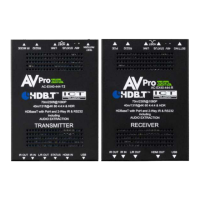

 To Next Page