
 Need help?
Do you have a question about the Ava RENTAL Series and is the answer not in the manual?
Information to prevent personal injury and display damage, including usage instructions and warnings.
Covers electrical safety, environmental warnings, and operational precautions for the display.
Details on proper usage, environmental conditions, and handling procedures for the display.
Steps for cabinet installation, including wearing gloves, handling, and protecting corners.
Detailed steps for hanging installation using truss and FlyKit, including preparatory work.
Covers screen installation steps, power distribution cabinet, and cable requirements.
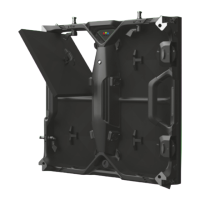
The CR OR 500x500 RENTAL SERIES LED display is designed for versatile use, particularly in rental markets where installation locations frequently change. This manual provides comprehensive instructions for its installation, operation, and maintenance, ensuring users can effectively manage the display and address any issues that may arise.
The CR OR series LED display is a high-precision, ultra-thin, die-cast aluminum panel system, offering pixel pitches from P2.6 to P4.81. It is designed to display high-definition video and images, making it suitable for various events and applications. The system includes a sending box that transmits video data to the display, and a receiving card that processes the DVI video signal, sending data through network cables to the display modules. The display is controlled via specialized software, NovaLCT-Mars, which allows for parameter settings, brightness adjustments, and other functions.
The CR OR series is engineered for ease of installation and flexibility. For hanging installations, common in rental scenarios, AVA LED provides a truss and FlyKit system. The installation process involves setting up the truss, installing the FlyKit according to the locking bars of the cabinet, and then carefully placing and locking each cabinet. Each cabinet is lit immediately after erection to check for any dead lights or bright lines, ensuring optimal display quality. Power and signal cables are plugged into the sockets, with a "crispy" sound indicating a good connection. The system supports both hanging and stacking configurations, with limits of 16 cabinets for hanging and 20 cabinets for stacking.
For floor installations, the products require a smooth and flat surface. The manual also details the connection of power and signal cables. The main power cable, with a diameter of 3*2.5mm², connects the power distribution cabinet to the display, carrying a maximum current of 16A. The total current of cascaded cabinets on one main power cable should not exceed 16A. Signal transmission between cabinets uses five types of network cables, with a maximum length of 70m for direct connection; optical fiber can be used for longer distances up to 20 kilometers. The sending box, which contains a sending card, transmits video data to the display.
The cabinet features a user-friendly locking mechanism for quick assembly and disassembly. To lock, one panel is stacked onto another, and the lock lever is pushed up into position until it clicks, securing the panels together. To unlock, the lock lever handle is turned in the UNLOCK direction until it cannot move further, and a button is pushed to release the lever.
Maintenance of the CR OR series emphasizes safety and product longevity. Users are advised to keep the cabinet dry and clean, and to conduct regular safety and visual inspections to check for damaged cables or LED lamps. Any damaged parts should be repaired or replaced promptly. The display is designed for back maintenance, allowing for easy access to internal components.
Safety Guidelines:
Warning Statement:
Instructions for Use:
The CR OR series is designed for durability and performance, with a focus on user safety and ease of maintenance, making it a reliable choice for dynamic display needs.
 General
| Category | Lighting Equipment |
|---|---|
| Type | LED Moving Head |
| Pan Range | 540° |
| Tilt Range | 270° |
| Power Supply | AC100-240V, 50/60Hz |
| Control | DMX512 |
| DMX Channels | 16 |

 To Next Page