EasyManua.ls Logo

Avanti 16848 - User Manual

Avanti 16848
6 pages
Print Icon
To Next Page IconTo Next Page
Loading...
USER GUIDE
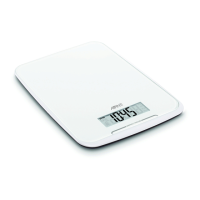
Weighing area
LCD display area
Zero/mode button
Mode
Weighing mode Water volume mode Milk volume mode
Setting/zero/tare/up/convert
LCD display
Unit conversion (on base, under kickstand)
Unit conversion button
Kickstand
Battery case
cover
Pull up hanging hole
for all mount storage
FEATURES
Weight unit
Weight unit
Volume unit
Tare Weight Mode
AM/PM
Zero Weight Mode
Negative value
HIGH CAPACITY DIGITAL
KITCHEN SCALE
Question and Answer IconNeed help?

Do you have a question about the Avanti 16848 and is the answer not in the manual?

Summary

FEATURES

Scale Components

Identifies key physical parts of the scale like weighing area, LCD, buttons, and mounting features.

Operational Modes and Indicators

Describes different modes like weighing, volume, zero, tare, and display indicators.

Measurement Units

Covers the types of units the scale can display for weight and volume.

SET UP

INSTALL OR REPLACE BATTERIES

Instructions for inserting and removing batteries.

WARNING

Safety precautions regarding battery hazards.

BATTERY SAFETY

Guidelines for safe battery handling and disposal.

OPERATION

TO SWITCH ON AND TO SET TIME

Steps to power on the scale and set the current time.

WEIGHT UNIT MEASUREMENT

How to change between metric and imperial units.

USING THE SCALE

WEIGHT MODE

Instructions for weighing solid items.

VOLUME MODE

Instructions for measuring liquid volume.

ZERO AND TARE FUNCTIONS

ZERO FUNCTION

How to reset the display to zero for consecutive weighing.

TARE FUNCTION

How to subtract the weight of a container.

WARNING INDICATORS

Lo

Indicates that the battery needs replacing.

Err

Indicates maximum capacity has been exceeded.

CLEANING AND CARE

TROUBLESHOOTING

SPECIFICATIONS

Summary

FEATURES

Scale Components

Identifies key physical parts of the scale like weighing area, LCD, buttons, and mounting features.

Operational Modes and Indicators

Describes different modes like weighing, volume, zero, tare, and display indicators.

Measurement Units

Covers the types of units the scale can display for weight and volume.

SET UP

INSTALL OR REPLACE BATTERIES

Instructions for inserting and removing batteries.

WARNING

Safety precautions regarding battery hazards.

BATTERY SAFETY

Guidelines for safe battery handling and disposal.

OPERATION

TO SWITCH ON AND TO SET TIME

Steps to power on the scale and set the current time.

WEIGHT UNIT MEASUREMENT

How to change between metric and imperial units.

USING THE SCALE

WEIGHT MODE

Instructions for weighing solid items.

VOLUME MODE

Instructions for measuring liquid volume.

ZERO AND TARE FUNCTIONS

ZERO FUNCTION

How to reset the display to zero for consecutive weighing.

TARE FUNCTION

How to subtract the weight of a container.

WARNING INDICATORS

Lo

Indicates that the battery needs replacing.

Err

Indicates maximum capacity has been exceeded.

CLEANING AND CARE

TROUBLESHOOTING

SPECIFICATIONS

Overview

The Avanti High Capacity Digital Kitchen Scale is a versatile and user-friendly kitchen appliance designed for precise measurement of ingredients. Its primary function is to weigh solid items, but it also offers specialized modes for measuring the volume of liquids like water and milk. The scale is built for high capacity, making it suitable for a wide range of cooking and baking needs.

Function Description

The core function of the Avanti kitchen scale is to provide accurate weight measurements. It operates in a "Weight Mode" by default, allowing users to place solid items directly onto the weighing area for an immediate reading on the LCD display. The scale supports both metric (grams) and imperial (pounds and ounces) units, with the default setting being metric. Users can easily toggle between these units using a dedicated conversion button located on the back of the scale, under the kickstand.

Beyond simple weighing, the scale incorporates "Zero and Tare Functions" which are crucial for measuring multiple ingredients consecutively without the need to empty the bowl after each addition. The "Zero Function" automatically activates when the total weight of the load is below 400g (or 4% of the scale's capacity). In this mode, after placing a container and resetting the display to '0', subsequent ingredients can be added, and the display will show the weight of only the newly added item. The "Tare Function" is similar but engages when the total weight exceeds 400g. It allows users to reset the display to '0' after placing a container or an initial ingredient, enabling the measurement of additional items. The scale also offers the ability to view the combined weight of multiple loads after using the Tare function.

A distinctive feature of this scale is its "Volume Mode," which allows for the measurement of liquid ingredients such as water and milk. After switching to Volume Mode and placing a container on the platform, the display can be reset to '0'. Pouring the liquid then shows its volume directly. The default volume unit is milliliters (ml) when the weight unit is metric (g), and fluid ounces (fl'oz) when the weight unit is imperial (lb:oz). Users can also switch back to "Weight Mode" to view the weight of the liquid.

The scale also includes a clock function, displaying the time in AM/PM format. This can be set upon initial battery installation or reset later. If the scale remains idle in Time Set mode for 60 seconds, it automatically reverts to Weighing Mode. Similarly, if it's idle in Weighing Mode for 120 seconds, it will revert to Clock Mode, conserving battery life.

Usage Features

The Avanti kitchen scale is designed for ease of use with several practical features:

  • Weighing Area: A flat, stable surface where items are placed for measurement.
  • Zero/Mode Button: This multi-functional button is central to operating the scale. It's used to switch between Clock mode, Weighing mode, and Volume mode (Water/Milk). It also serves to reset the LCD display to '0' for the Zero and Tare functions, and to set the hour and minute during time setup.
  • LCD Display Area: A clear digital screen that shows weight, volume, time, and various indicators.
  • Pull-up Hanging Hole: Located on the back, this feature allows for convenient wall-mount storage, saving counter space.
  • Battery Case Cover: Provides access for installing or replacing batteries.
  • Kickstand: A foldable support on the back that helps stabilize the scale on a flat surface and conceals the unit conversion button.
  • Unit Conversion Button: Positioned under the kickstand, this button is used to toggle between metric and imperial weight units, and also plays a role in setting the time.
  • Warning Indicators: The LCD display provides useful alerts: "Lo" indicates that the battery needs replacing, and "Err" signifies that the maximum capacity has been exceeded, prompting the user to remove items to prevent damage.
  • Time Setting: The scale automatically enters Time Set Up Mode after battery installation. The Zero/Mode button and Unit Conversion button are used in conjunction to set the hour and minute. The time can be re-set by pressing and holding the Unit Conversion button for 3 seconds.

Maintenance Features

Maintaining the Avanti kitchen scale is straightforward, focusing on cleanliness and proper battery management to ensure longevity and accurate performance:

  • Cleaning: The scale should be cleaned with a damp cloth only. It is crucial not to immerse the scale in water or use chemical/abrasive cleaning agents, as this can damage the internal components. All plastic parts should be cleaned immediately after contact with fats, spices, vinegar, and strongly flavored or colored foods to prevent staining or residue buildup. Contact with acids, such as citrus juices, should also be avoided.
  • Battery Installation and Replacement: The scale requires 2 x AAA batteries. Users should follow the polarity (+/-) diagram inside the battery compartment when inserting batteries. To remove batteries, they should be gently pushed inwards until they pop out. The battery compartment cover is easily removed by pushing on a lever.
  • Battery Safety: Avanti recommends using high-quality alkaline batteries for optimal performance; heavy-duty or rechargeable batteries are not recommended. Users are advised to clean battery contacts before installation, remove batteries if the scale will not be used for an extended period, and promptly remove dead batteries. Used batteries should be disposed of properly according to local laws and regulations. It is important not to incinerate used batteries, dispose of them in fire, mix old and new batteries or different types of batteries (alkaline/standard), or attempt to recharge non-rechargeable batteries. Short-circuiting the supply should also be avoided. Batteries are a choking hazard and should always be kept out of reach of children.
  • General Care: The scale should always be used on a hard, flat, and stable surface to ensure accurate readings. Users should avoid striking, shaking, or dropping the scale, as it is a precise instrument. Proper care and storage in a cool, dry place will help maintain its accuracy and extend its lifespan.
  • Usage Limitations: This scale is intended for domestic use only and should not be used for commercial purposes.

Avanti 16848 Specifications

Power IconPower
power source2 x 3V AAA batteries
battery type3V AAA
battery includedYes
Weight and Dimensions IconWeight and Dimensions
maximum weight capacity10 kg / 22 lb
product size23.8 x 18.2 x 1.9 cm
LCD display size7.5 x 2.5 cm