
 Need help?
Do you have a question about the Avantia BPM-80 and is the answer not in the manual?
Safety warnings and precautions for using the blood pressure monitor.
Defines blood pressure categories for adults, including normal, prehypertension, and hypertension.
Explains systolic and diastolic blood pressure and normal ranges.
Discusses how blood pressure changes throughout the day and the reasons for fluctuation.
Provides guidance on factors affecting blood pressure measurements for accuracy.
Details the various symbols and indicators displayed on the blood pressure monitor's LCD screen.
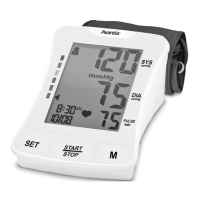
Identifies the physical components of the Avantia BPM-80 blood pressure monitor and their functions.
Step-by-step guide on how to install and replace the AA batteries in the monitor.
Guides users on configuring memory zones, date, time, and measurement units before first use.
Instructions on how to properly insert the air plug and wrap the arm cuff around the upper arm.
Details how to press the START/STOP button to begin the blood pressure measurement process.
Explains the symbol for an irregular heartbeat and when to consult a physician.
Describes the indicator that classifies readings based on international guidelines.
Provides steps to access and scroll through previously stored blood pressure readings in memory.
Explains the procedure to delete all stored blood pressure readings from the monitor's memory.
Details how to display the average blood pressure reading from the last three tests.
Provides instructions on cleaning the BP monitor unit and cuff, and general care practices.
The Avantia BPM-80 is an arm-type fully automatic blood pressure monitor designed for non-invasive measurement and monitoring of arterial blood pressure in adults. It provides accurate readings equivalent to those obtained by a trained observer using the cuff and stethoscope auscultation method. The device is intended for self-monitoring and should not be used for self-diagnosis or to alter prescribed medical treatment without consulting a physician.
The Avantia BPM-80 measures both systolic and diastolic blood pressure, as well as pulse rate. It features an oscillometric measurement method. The monitor is equipped with an irregular heartbeat detection function, which displays a heart symbol if an irregular heartbeat is detected at least twice during a measurement. An irregular heartbeat is defined as one that is 25% slower or faster than the average detected during measurement. If this symbol frequently appears, it is recommended to consult a physician. The device also includes a blood pressure classification indicator, based on international guidelines, which helps users understand their readings in relation to established risk categories (Severe hypertension, Moderate hypertension, Mild hypertension, High-normal, Normal, Optimal).
The monitor has a memory function that can store up to 120 readings in two separate user zones, each with a date and time stamp. This allows for tracking blood pressure trends over time. It also calculates the average of the last three test results, providing a quick overview of recent measurements.
To begin using the monitor, four AA alkaline batteries must be installed, or an optional DC6.0 V, 1000mA AC adapter can be used (not included). Before taking measurements, it is crucial to set the date, time, and unit of measurement (European or U.S. time display) to ensure accurate time stamps for stored readings. This is done by pressing the "SET" button while the unit is off to enter system settings, then using the "M" button to adjust values and "SET" to confirm. Users can select one of two memory zones, each capable of storing 60 readings, by pressing the "M" button and confirming with "SET".
For measurement, the arm cuff is wrapped around the upper left arm, ensuring the tube is aligned towards the little finger. The cuff should be snug but not too tight, allowing about 1 inch (2-3 cm) between the cuff edge and the bend of the elbow. The user should sit comfortably with their arm resting on a flat surface, with the cuff at heart level. To start a measurement, press and hold the "START/STOP" button until a beep is heard. The LCD will light up, and a quick diagnosis will be performed. The cuff will initially inflate to 190 mmHg and then automatically adjust to one of four pressure levels based on the user's blood pressure. During inflation, a flashing heart symbol indicates heart beat detection. Once the measurement is complete, three short beeps will sound, and the systolic and diastolic blood pressure readings will be displayed and automatically stored in the selected memory zone.
For accurate readings, several tips are provided:
The monitor will automatically shut off after 3 minutes of inactivity. If the cuff pressure exceeds 37.24 kPa (280 mmHg), the unit will automatically deflate. If it does not deflate, the user should detach the cuff and press the START/STOP button.
To recall previous readings, with the power off, press and hold the "M" button to display the most recent reading. Subsequent presses of the "M" button will scroll through all stored readings in the currently selected memory zone. To view readings from other memory zones, the monitor must be turned off, and the desired zone selected before recalling. The monitor can also display the average of the last three tests by pressing the "M" button when the unit is off; the "AVG" symbol will appear along with the average results. To delete all records from memory, press and hold the "M" button when the unit is off to recall a reading, then press and hold the "SET" button for approximately 3 seconds. The monitor will beep, indicating successful deletion, and then transfer into testing mode. Deleted readings cannot be recovered.
The Avantia BPM-80 requires simple care to ensure its longevity and accuracy. The monitor should be stored in a dry place, away from direct sunlight. It is important to avoid contact with water; any moisture should be wiped away with a dry cloth. The unit should also be protected from intense shaking or collisions. Storing the unit in dusty environments or areas with unstable temperatures should be avoided. To clean the blood pressure unit, a damp cloth can be used. The cuff itself should not be submerged in water; instead, it should be wiped with a damp cloth for cleaning. The device also features low battery detection, indicated by a symbol on the display, prompting the user to replace the batteries when the display appears dim or does not light up.
 General
| Measurement Method | Oscillometric |
|---|---|
| Inflation | Automatic |
| Memory | 60 readings |
| Cuff Size | 22-32cm |
| Display | LCD |
| Accuracy (Pressure) | +/- 3 mmHg |
| Accuracy (Pulse) | +/- 5% |
| Power Source | Battery |
| Operating Humidity | 15-85% RH |

 To Next Page