1. Preparation before Set Up
2. Basic Operation & LED Indication
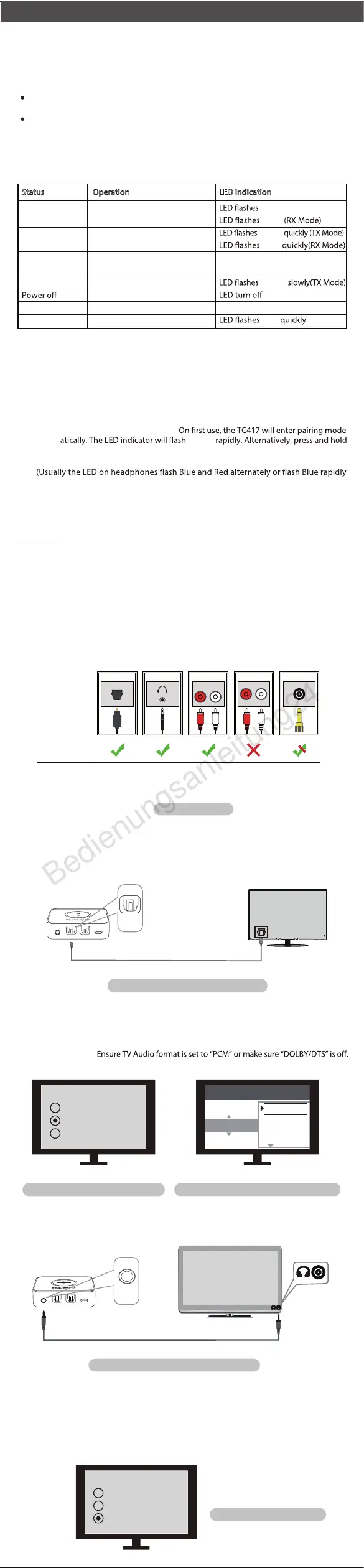
Please answer question prior to set up
Watch TV with your Bluetooth headphones/speaker but your TV does not have Bluetooth
–Use the TC417 as a Bluetooth Transmitter (TX) – refer to Point 3
Stream music from your cellphone/PC to non-Bluetooth speakers
– Use the TC417 as a Bluetooth Receiver (RX) – refer to Point 4
What would you like to do?
IMPORTANT:
3. Bluetooth Transmitter (TX Mode)
During the pairing process, keep the devices close to each other and wait.
Once connected, LED indicator stays SOLID .
NO need to re-pair the transmitter and headphones for each use. The transmitter will
ALWAYS auto reconnect to the last paired device within 5-10 seconds after powering
on both devices. Alternatively, restart both the transmitter and headphones and wait
5 -10 seconds for them to reconnect.
After connecting your optical cable you should be able to hear sound from your head-
phones; if not:
1) Ensure the AUX/SPDIF(Optical) switch on the TC417 is set to the “SPDIF” position.
2) Ensure your TV Speaker setting is set to “External Speaker”.
3)
After connecting your audio cable you should be able to hear sound from your head-
phones; if not:
1) Ensure the AUX/SPDIF (Optical) switch on the TC417 is set to the “AUX” position.
2) Ensure your TV speaker setting is set to “Headset”.
3) Plug wired ear buds into the headphone jack on TV; check if you can hear sound.
Please refer to your headphone’s user manual
when in pairing mode).
autom
the PAIR button for 2 seconds to enter pairing mode.
Slide TX/RX switch to “TX” position.
light.
Press and hold MFB button for 3 seconds until you see the
3.1 Pair and connect to Bluetooth headphone/receiver
3.2 Check your TV/Audio Source output options
3.3 Connect the TC417 to your TV/audio source
Reconnect
1) Turn on the TC417:
2) Set the TC417 to TX mode:
3) Enter the TC417 into PAIRING MODE:
4) Enter headphones into PAIRING MODE:
5) Connecting:
3.3.1 Optical audio out
3.3.2 AUX 3.5mm audio out
- 1 -
Power on
Pairing
Connected
Reconnection
Volume up/down
Low battery
Press and hold MFB for 3 seconds
After power on, press and hold
for 2 seconds
/
/
Press and hold MFB for 3 seconds
Tap +/-
/
Status
Operation
slowly(TX Mode)
LED turn SOLID (TX Mode)
LED turn SOLID (RX Mode)
/
GREEN
GREEN
GREEN
GREEN
GREEN
GREEN
GREEN
BLUE
BLUE
BLUE
LED indication
-
+
RED
IMPORTANT:
3.3.1 3.3.2 N/A 3.3.43.3.3
Optical
OUT
RCA jacks
labeled
"AUDIO OUT"
LR
AUX/3.5mm
Other RCA
jacks (usually
audio IN)
Please refer
to Point:
Natively
Supported?
Jack
Options
Fig 3-1 Output options
Big Phone
Jack
Fig 3-2 Set up TC417 using TV optical audio out
Optical audio cable
DC SV
AUX SPDIF IN
SPDIF IN
SPDIF OUT
-
+
DC SV
AUX
AUX
SPDIF IN SPDIF OUT
OPTICAL
Fig 3-3 Set TV speaker to “External Speaker” Fig 3-4 Set TV Audio Format to “PCM” (IMPORTANT)
Speakers
Internal speakers
External speakers
Headset
Settings
Audio Format
PCM
Dolby Digital
DTS
DTS Neo 2:5
Fig 3-5 Set up TC417 using TV AUX 3.5mm audio out
AUX/3.5 mm audio cable
Speakers
Internal speakers
External speakers
Headset
Fig 3-6 Set TV speaker to “Headset”
English


 To Next Page
 Loading...