
 Need help?
Do you have a question about the Avantree Roadtrip and is the answer not in the manual?
Step-by-step guide for initial Bluetooth pairing with a smartphone.
Instructions for pairing a second smartphone to the device.
How the speakerphone automatically or manually reconnects to paired phones.
Details on adjusting the FM transmitter frequency for audio streaming.
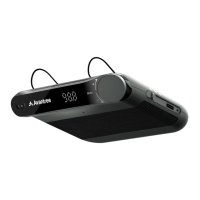
The Avantree Roadtrip is a wireless car speakerphone designed to enhance your in-car communication and audio experience. This device serves as a versatile solution for hands-free calling, music streaming, and even broadcasting audio through your car's stereo system via an FM transmitter. Its primary function is to provide a safe and convenient way to interact with your smartphone while driving, minimizing distractions and ensuring compliance with hands-free driving laws.
At its core, the Avantree Roadtrip acts as a Bluetooth speakerphone, allowing you to connect wirelessly to your smartphone for calls and audio playback. It features a built-in microphone and speaker, enabling clear two-way communication without needing to hold your phone. Beyond basic speakerphone capabilities, it integrates an FM transmitter, which is a key feature for those who wish to stream audio from their phone directly through their car's existing stereo system. This means you can listen to music, podcasts, or navigation prompts from your phone with improved sound quality through your car's speakers, simply by tuning your car radio to the same FM frequency as the Roadtrip.
The device supports multi-point connectivity, allowing it to connect to two smartphones simultaneously. This is particularly useful for individuals who carry both a personal and a work phone, or for couples sharing a vehicle, ensuring that calls from either device can be managed through the speakerphone.
The Avantree Roadtrip is designed for intuitive and user-friendly operation, with several features aimed at convenience and ease of use in a car environment.
Power Management: The device can be powered on or off using a simple slide switch. It also boasts an "Auto power on/off" function, which intelligently manages power based on your presence in the car. When enabled (by setting the switch to "ON" or "FM"), the speakerphone will automatically turn off approximately 10 minutes after your phone disconnects (indicating you've left the car) and automatically turn back on when you open your car door, ready to reconnect. This feature helps conserve battery life and ensures the device is ready when you need it without manual intervention. This auto power function can be disabled by sliding the switch to "OFF."
Pairing and Connectivity: Connecting the Roadtrip to your smartphone is a straightforward process. For the first-time connection, you slide the switch to "ON," and the device automatically enters pairing mode, indicated by alternating blue and red LED flashes. You then simply select "Avantree Roadtrip" from your phone's Bluetooth settings. For connecting a second smartphone, you put the speakerphone back into pairing mode, connect the second phone, and then reconnect the first phone by tapping "Avantree Roadtrip" on its Bluetooth menu. The speakerphone will provide voice prompts like "Pairing" and "Connected" to guide you through the process.
Call Control: Managing calls is effortless with dedicated controls. You can answer or end a call with a short press of the knob switch, reject an incoming call by holding the knob switch for 2 seconds, and redial the last number with a double press. A crucial safety feature is the microphone mute function, which can be toggled on or off during a call with a short press of the knob switch, indicated by a red LED.
Music Control: When streaming audio, the knob switch allows you to adjust the volume. For playing or pausing audio, a short press of the knob switch is used. Skipping to the next or previous track is achieved with a double or triple click of the knob switch, respectively. Note that when using the FM transmitter, volume control should be done via your car's radio, not the speakerphone.
FM Transmitter Functionality: To utilize the FM transmitter, you slide the switch to the "FM" position. The device's display will show the current FM frequency. You then tune your car radio to a vacant FM frequency (typically below 90.0MHz or above 107.0MHz, characterized by static or buzz) and rotate the Roadtrip's knob switch to match that frequency. The knob switch allows for fine-tuning in 0.1 MHz increments. For quicker adjustments, pressing and holding the knob switch will make the FM display flash, allowing you to change the frequency in 1 MHz increments. This feature transforms your car's stereo into an extension of your smartphone's audio system.
Voice Control: The Roadtrip supports voice control functions (like Siri or Google Assistant) on your connected phone. A short press of the knob switch can enable or disable this feature, allowing you to issue commands to your phone hands-free.
Installation: The device is designed to be easily clipped onto your car's sun visor, placing it in an optimal position for both microphone pickup and speaker projection, as well as for convenient access to its controls.
Maintaining the Avantree Roadtrip involves simple charging and occasional resetting to ensure optimal performance.
Charging: The speakerphone is equipped with a rechargeable battery. When the battery is low, you will hear a "Low battery" voice prompt, and the LED indicator will turn red. To charge the device, you connect it to a power source using the provided USB cable and car charger. A full charge typically takes between 1.5 to 2 hours. During charging, the LED will be steady red, and it will turn off once charging is complete.
Clear Pairing History/Factory Reset: If you encounter difficulties with pairing or wish to clear all previous pairing data, the device can be factory reset. This process involves putting the speakerphone into pairing mode (alternating blue and red LED flashes) and then double-pressing the knob switch. The LED will briefly flash pink, indicating that the reset is complete, and the device will return to pairing mode, ready for new connections. This feature is useful for troubleshooting connectivity issues or preparing the device for a new user.
The Avantree Roadtrip is a comprehensive solution for hands-free communication and audio streaming in your vehicle, combining ease of use with practical features for a safer and more enjoyable driving experience.
 General
| Bluetooth Version | 4.1 |
|---|---|
| Microphone | Built-in |
| Speaker Output | 3W |
| Charging Port | Micro USB |
| Operating Range | 33 feet (10 meters) |
| Compatibility | Bluetooth-enabled devices |
| Frequency Response | 20Hz - 20kHz |

 To Next Page
