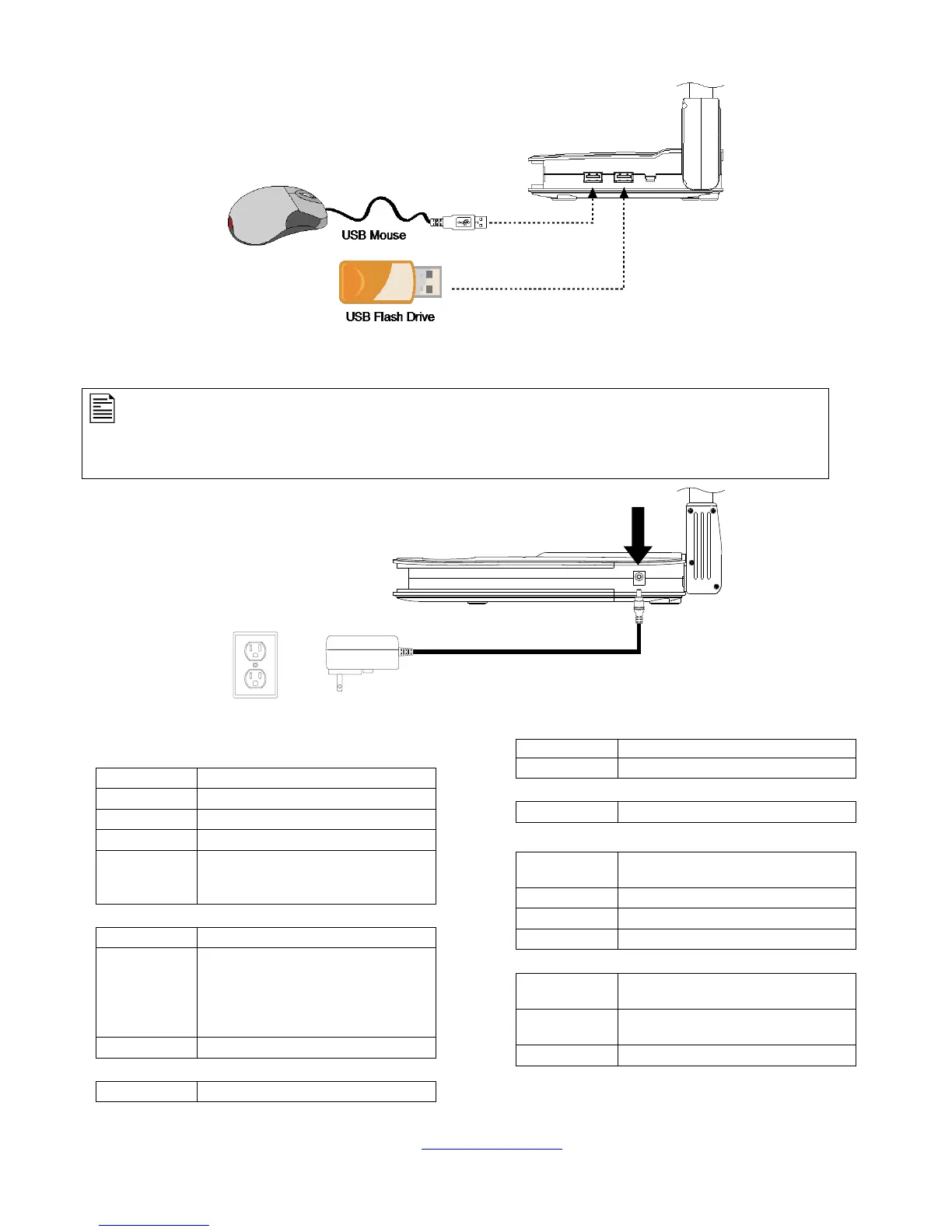
Connecting the External USB Device to AVerVision U50
Connecting a Power Adapter (Optional)
Connect a power adapter to a standard 100V~240V AC power outlet.
The power from the computer USB is sufficient enough to power AVerVision U50. However, if your laptop or desktop
USB port does not supply as much power as the USB specification says it should, then you may encounter problems
and need an external power supply.
The symptoms of insufficient power are typically the U50 randomly appearing and disappearing from Device Manager,
and accompanying beeps. If a power supply is required, the specification for the power adapter is 5Vdc, 3A.
General Specification
Image
2592x1944, 1920x1200,
1920x1080, 1280x720,
1280x960, 1024x768
Large than A3 (483 x 362 mm -Max)
*at 4:3, shooting area were 483*362 mm
*at 16:9, shooting area were 483*272 mm
*at 1080P, shooting area were 360*203
mm
DC 5V (3A), 100-240V, 50-60Hz from host
equipment or adapter (optional)
3.4 Watts (LED on); 2.3 Watts (LED off)
Power and signal connectivity to host
equipment
390mm x 248mm x 447.5mm (+/-2mm
include rubber foot)
259mm x 163mm x 38.79mm (+/-2mm
include rubber foot)
For detailed warranty information, please visit our website http://www.averusa.com and select the country where the unit is purchased.


 To Previous Page
 Loading...