
 Need help?
Do you have a question about the Avermedia AS315 and is the answer not in the manual?
Checks if the USB Type-C port supports video output to the AS315.
Addresses iPad connection issues with non-Apple power adapters.
Explains how to mute the AS315 speaker using the device controls.
Guides audio output selection on iPad to AS315 instead of monitor.
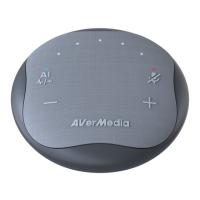
The AVerMedia Pocket Speakerphone Hub AS315 is a versatile device designed to enhance your workspace, whether at home, in a small huddle room, or on the go. It functions primarily as both a multi-port hub and a speakerphone, offering a compact and lightweight solution for modern work environments. The AS315 aims to streamline your setup by providing essential connectivity and audio capabilities in a single, portable unit, thereby empowering what AVerMedia refers to as the "anyplace workspace."
One of the core functions of the AS315 is its ability to act as a central hub for various devices. With a single cable connection, it allows users to plug in multiple peripherals, reducing cable clutter and promoting an organized workspace. This cable management feature is particularly beneficial for those who frequently move between different work locations or prefer a minimalist desk setup. The device's compact design ensures it takes up minimal space, making it easy to carry in a bag for business trips or daily commutes.
As a speakerphone, the AS315 integrates advanced audio technology to facilitate clear and uninterrupted communication during meetings, presentations, and training sessions. A key feature in this regard is its AI noise reduction capability. This intelligent technology is designed to accurately identify and suppress common background noises often encountered in office or home environments, such as keyboard typing sounds, coffee machine hums, and fan noise. By filtering out these distractions, the AS315 ensures that important conversations remain focused and intelligible, improving the overall quality of virtual interactions. Users can activate this AI noise reduction with a single click, providing an immediate solution to noisy surroundings.
The AS315 also offers convenient audio control features. It includes dedicated buttons for volume adjustment, allowing users to easily increase or decrease the sound output. A prominent microphone mute button provides quick control over your audio input, enabling you to mute or unmute your microphone with a simple touch. This push-to-talk/mute functionality is intuitive and helps maintain privacy or manage interruptions during calls. The device's omnidirectional microphone is designed to pick up sound from all directions, making it suitable for group calls where multiple participants are speaking from different positions around the speakerphone.
Beyond its primary functions, the AS315 is built with user comfort and health in mind. By providing a high-quality speakerphone experience, it helps users avoid the potential ear pain or hearing damage that can result from prolonged use of headphones or earbuds. This allows for more natural and comfortable communication, whether you're sitting at your desk or moving around your workspace during a group call. Its compatibility with a wide range of popular conferencing software, including Teams, Zoom, Google Meet, Cisco Webex, Skype, and FaceTime, ensures seamless integration into existing workflows and communication platforms.
For installation, the AS315 is designed for plug-and-play convenience, requiring no additional drivers. Users simply connect the device to their computer via the built-in USB Type-C cable. Once connected, the speakerphone automatically configures itself as the computer's default speaker and microphone, identified as "AVerMedia Speakerphone AS315." This automatic setup simplifies the process, allowing users to quickly start using the device without complex configurations. The AS315 can also function as a docking station, enabling connections to external monitors, keyboards, webcams, and other peripherals, further consolidating your workspace setup.
Maintenance of the AS315 is straightforward, primarily involving ensuring proper connections and understanding its indicator lights. The device features LED indicators that provide visual feedback on its status. For instance, flashing white lights indicate that the volume is starting up or processing, while solid white lights show the current volume level. A solid blue light on the AI indicator signifies that AI noise reduction is enabled, and a solid red light on the Mic. Mute indicator confirms that the microphone is muted. These visual cues help users quickly ascertain the device's operational status and make necessary adjustments.
Regarding audio output, particularly when connecting to an iPad with both a monitor and the AS315 having speakers, the device follows a specific logic. The iPad is designed to output sound to the audio device connected last. To ensure audio output from the AS315, users should connect the monitor to the AS315's HDMI port first, then connect the AS315's built-in USB Type-C cable to the iPad, and finally, if a power supply is needed, plug it into the AS315. This sequence ensures the AS315 is the last audio device connected, directing sound through its speakers.
While the AS315 does not have a dedicated "mute speaker" button, users can mute the speaker directly by continuously pressing the volume down button until all volume indicators turn off. Alternatively, the speaker volume can be muted through the computer's keyboard shortcuts or system audio settings. This flexibility ensures that users have multiple ways to manage audio output according to their preference and convenience.
For optimal video output through the AS315's HDMI port, it is crucial to ensure that the computer's USB Type-C port supports DisplayPort Alt Mode, Thunderbolt 3, or Thunderbolt 4 projection. Users can identify compatible ports by looking for a lightning bolt symbol (indicating Thunderbolt 3 or 4) or a D-shaped icon (indicating DP Alt Mode) next to the USB Type-C port. This ensures that video signals can be properly transmitted through the AS315 to an external monitor or TV.
When powering an iPad through the AS315, especially when using a non-Apple power adapter, users might experience occasional disconnections between the iPad and the AS315. To maintain a stable connection and avoid potential incompatibilities, AVerMedia recommends using genuine Apple USB power adapters. This advice highlights the importance of using compatible accessories to ensure reliable performance and connectivity.
In summary, the AVerMedia Pocket Speakerphone Hub AS315 is a thoughtfully designed device that combines the functionalities of a multi-port hub and an AI-powered speakerphone into a single, highly portable unit. It aims to simplify connectivity, enhance communication clarity through intelligent noise reduction, and promote a more organized and comfortable workspace. Its user-friendly installation, intuitive controls, and compatibility with major conferencing platforms make it a practical tool for anyone seeking to optimize their virtual communication and productivity in diverse work settings.
 General
| Model | AS315 |
|---|---|
| Category | Switch |
| Type | Unmanaged |
| Connectivity | Wired |
| Ports | 5 |

 To Next Page