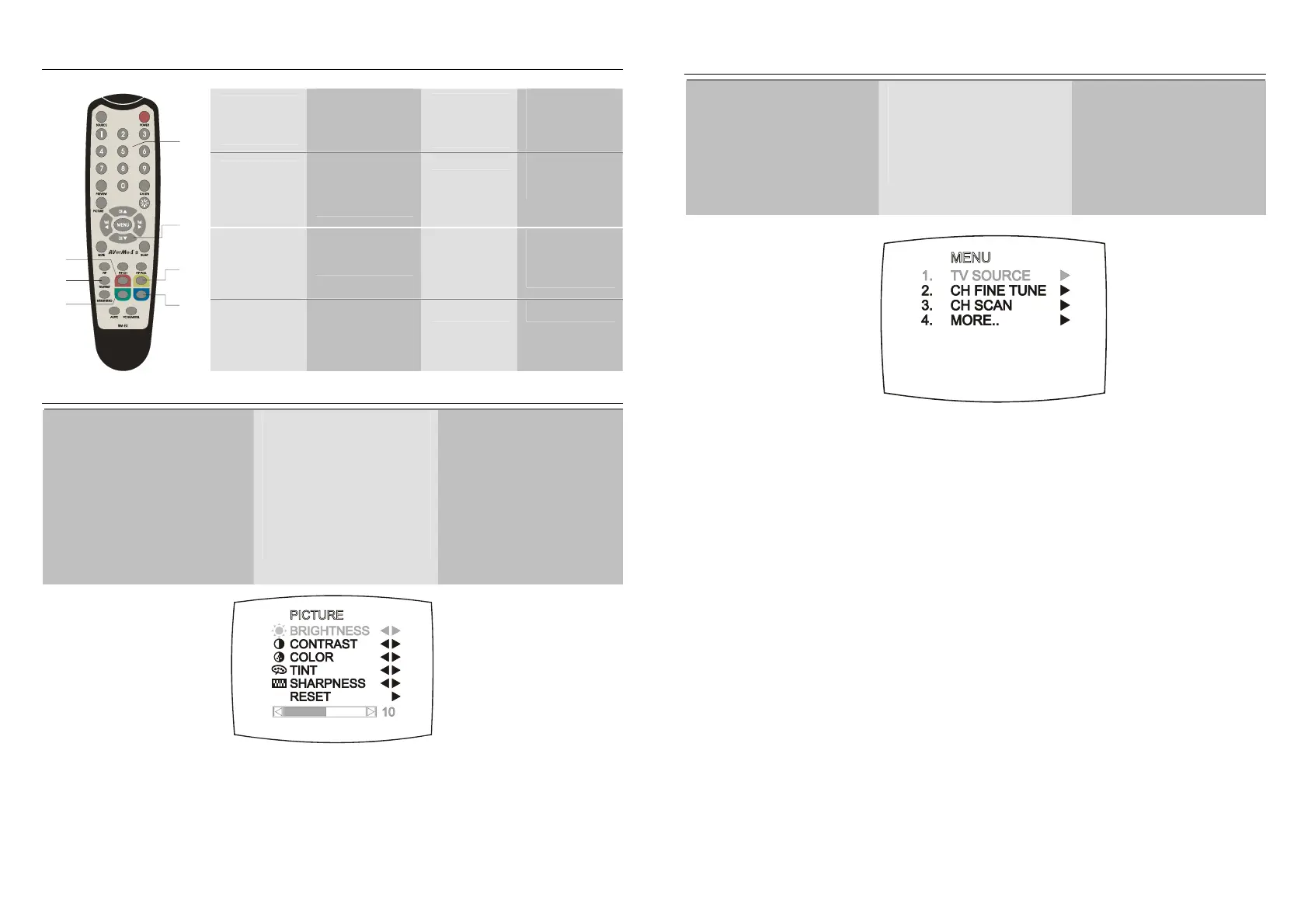
Teletext Control Buttons (Optional)/
本產品不支援這個功能
/
本产品不支持这个功能
The figure and descriptions in this section show how to use the teletext function using the remote control.
1
NUMBER
BUTTONS
To select a teletext
page
5
FASTEXT LINK /
VOL ◄
Jump to the teletext
page which the red
color corresponds
to.
2
CH▲/▼
Use the CH▲ and
CH▼ buttons to go
to the next upper or
lower teletext page.
6
TELETEXT
Press to view
teletext, and
disable teletext
3
FASTEXT LINK /
VOL►
Jump to the teletext
page which the green
color corresponds to.
7
FASTEXT LINK
Jump to the teletext
page which the
yellow color
corresponds to.
1
2
3
4
5
6
7
4
FASTEXT LINK
Jump to the teletext
page which the blue
color corresponds
to.
Customizing the Picture Setting/
自行調整影像設定
/
自行调整影像设定
If you want to adjust the picture
quality, press the PICTURE
button on the remote. Then, you
can use the CH▲ or CH▼
buttons to select the items in the
PICTURE menu; and the Vol◄ or
Vol ► buttons to make the
adjustment.
To restore the picture default
setting, select RESET and then
press Vol ►.
如果您想自行調整影像的畫
質,您可以在遙控器上按下
PICTURE 鍵,然後使用 CH▲
或 CH▼鍵選定想要調整的項
目,另外使用左或右鍵來調
整。若您想還原影像畫質的原
始出廠值,請選擇最下面的重
設即可(已掃描及記憶的頻道
不會消除)。
如果您想自行调整影像的画
质,您可以在遥控器上按下
PICTURE 键,然后使用 CH▲
或 CH▼键选定想要调整的项
目,另外使用左或右键来调
整。若您想还原影像画质的原
始出厂值,请选择最下面的重
设即可(已扫描及记忆的频道
不会消除)。
)
Calling Up a Menu Display /
開啟功能表選單
/
开启菜单
Press the MENU button on the
remote control to call up and exit
the main menu or submenu dis-
play. Then, you can use the CH▲
or CH▼ buttons to select the
items in the menu list; and the
Vol◄ or Vol► buttons to adjust or
to make a selection. The table on
the next page lists the different
functions you will find in the menu.
按下遙控器上的 MENU 鍵開啟
功能表選單,然後使用 CH S或
CH T鍵選定所欲設定的項目,
並且使用 Vol X或 Vol W 做調
整。下表所列的是功能表中各項
不同的功能及說明。
按下遥控器上的 MENU 键开启
菜单,然后使用 CHS 或 CHT
键选定所欲设定的项目,并且使
用 VolXor VolW 做调整。下表
所列的是菜单中各项不同的功能
及说明。
)
5











 To Next Page