you want to remove/add.
Use the CH▲ or CH▼ buttons to select ADD to include or
DEL to remove the channel number in the channel line up and
then press Vol►.
Note: To browse through channels while setting the USER CH
and CATV number, press the CH▲ or CH▼ buttons.
接著在「有線電視頻道」或「無線電視」選單
中,輸入您想要重置(至「使用者頻道」)、移
除或增加的頻道號碼。
然後,選擇「增加」來加入頻道;或者選擇「刪
除」來移除「使用者頻道」與「有線電視頻道」選
單中的頻道號碼。
注意:在設定「使用者頻道」、「有線電視頻道」
或「無線電視頻道」時,可按 CH S 鍵與 CH T
鍵瀏覽。
接着在「有线电视频道」或「无线电视」菜单
中,输入您想要重置(至「使用者频道」)、
移除或增加的频道号码。
然后,选择「增加」来加入频道;或者选择「删
除」来移除「使用者频道」与「有线电视频道」
菜单中的频道号码。
注意:在设定「使用者频道」、「有线电视频道」
或「无线电视频道」时,可按 CH S 键与 CH
T 键浏览。
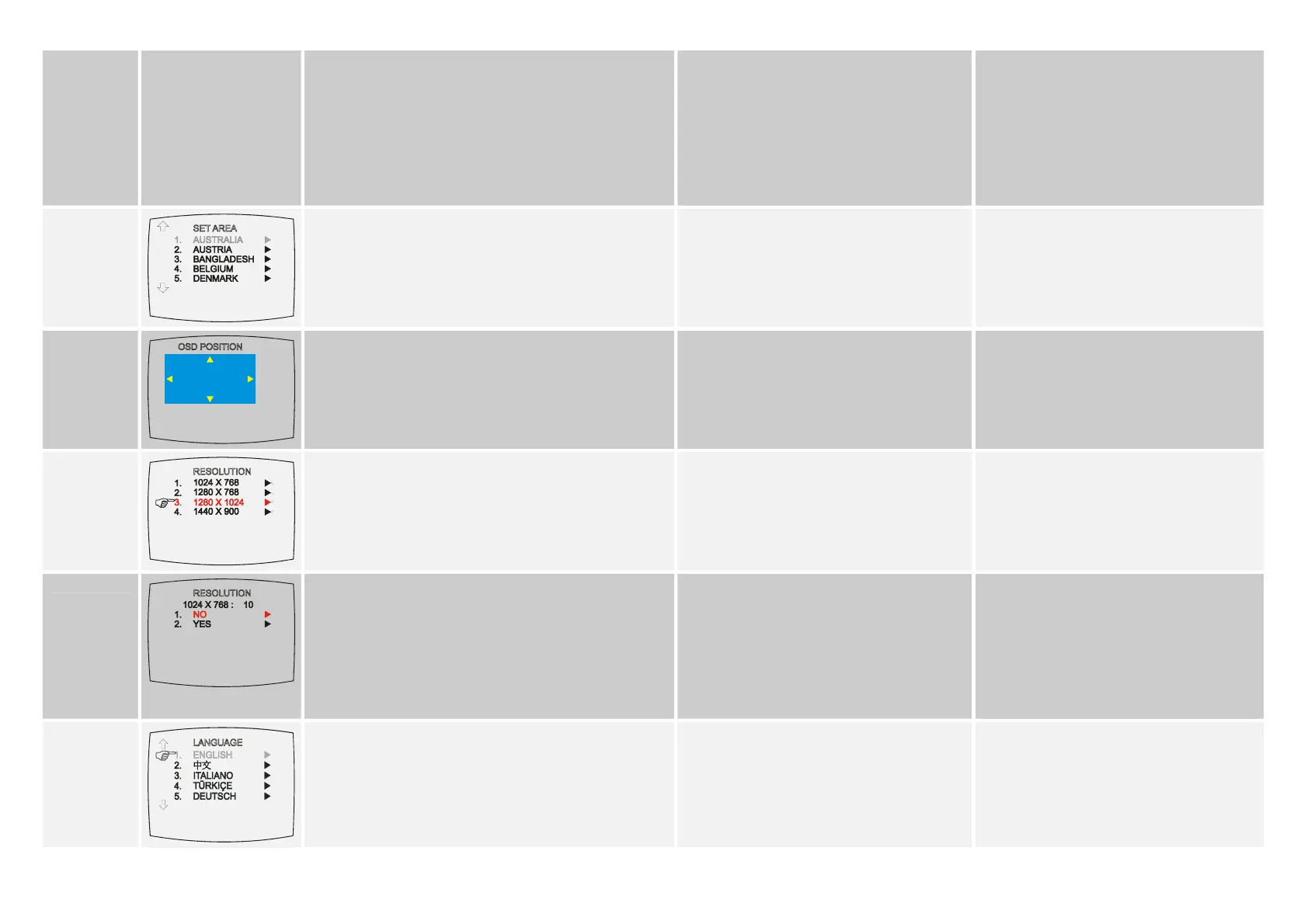
SET AREA
)
Press the MENU button, select MORE, select SET AREA in the
MORE, list items, use the CH▲ or CH▼ buttons to choose the
appropriate country signal, then press Vol► button to make the
selection.
If your country is not listed, choose another country with the
same TV system as yours.
圓剛 TVBox-銀色風暴於出廠時已設定為台灣區域
頻率。
如果您需要自行進入此模式,您可按下遙控器上的
MENU 鍵,在功能表單 區域設定中,選定您所在
的國家區域。
圆刚液晶电视器 800 于出厂时已设定为台湾区域
频率。
如果您需要自行进入此模式,您可按下遥控器上
的 MENU 键,在菜单单 区域设定中,选定您所
在的国家区域。
OSD POSITION
Use the CH▲, CH▼, Vol◄, and Vol► buttons to move the
frame where you want to set the position of the MENU, then
press MENU.
使用 CH S, CH T, Vol◄, 或 Vol X 鍵移動螢幕
顯示的位置,然後按遙控器上的 MENU 鍵固定後跳
出。
使用 CHS, CHT, Vol◄, 或 Vol X 键移动屏幕显
示的位置,然后按遥控器上的 MENU 键固定后跳
出。
RESOLUTION
Use the CH▲ or CH▼ buttons to choose from four display
resolution settings then press Vol►.
您可以依照需求選擇解析度設定值。
使用 CH S 或 CH T 鍵來選擇您想要的畫面解析
度,然後按下 Vol X 即可。
您可以依照需求选择分辨率设定值。
使用 CH S 或 CH T 键来选择您想要的画面分辨
率,然后按下 Vol X 即可。
)
Use the CH▲ or CH▼ buttons to select NO to restore the
original resolution setting or YES to accept the new resolution
setting then press Vol►.
If the monitor can not support the new setting, the original
setting will be automatically restored after 10 seconds or press
PC BGM/Res. button of the remote control to switch to
resolution setting of 1024x768.
可按 CH▲ 或 CH▼上下移動,按 Vol►來選擇
YES 或 NO。若選擇 NO,會跳回原來的解析度
設定,若選擇 YES,則可改成你所選擇的解析
度。
若螢幕無法支援你所選的解析度,導致畫面不清
楚或全黑時,請靜待 10 秒後,將會自動跳回原
來的解析度設定,或是可以按遙控器上的 PC
BGM/Res.鍵快速切換至 1024x768 的解析度。
可按 CH▲ 或 CH▼上下移动,按 Vol►来选择
YES 或 NO。若选择 NO,会跳回原来的分辨率
设定,若选择 YES,则可改成你所选择的分辨
率。
若您的显示输出设备不支持您所选的分辨率,导
致整个画面不清楚或者是黑屏时,静候 10 秒钟
后将会自动还原到初始设定的分辨率,或者您可
以按遥控器上的 PC BGM/Res 键快速切换至
1024*768 的解析度
LANGUAGE
Use the CH▲ or CH▼ buttons to select from different
languages then press Vol►.
用 CH▲鍵 或 CH▼鍵切換英文或繁體中文模式,然
後按下 Vol►鍵選擇該語言。
用 CH▲ 键 或 CH▼键切换英文或繁体中文模式,
然后按下 Vol►键选择该语言。
6











 To Next Page