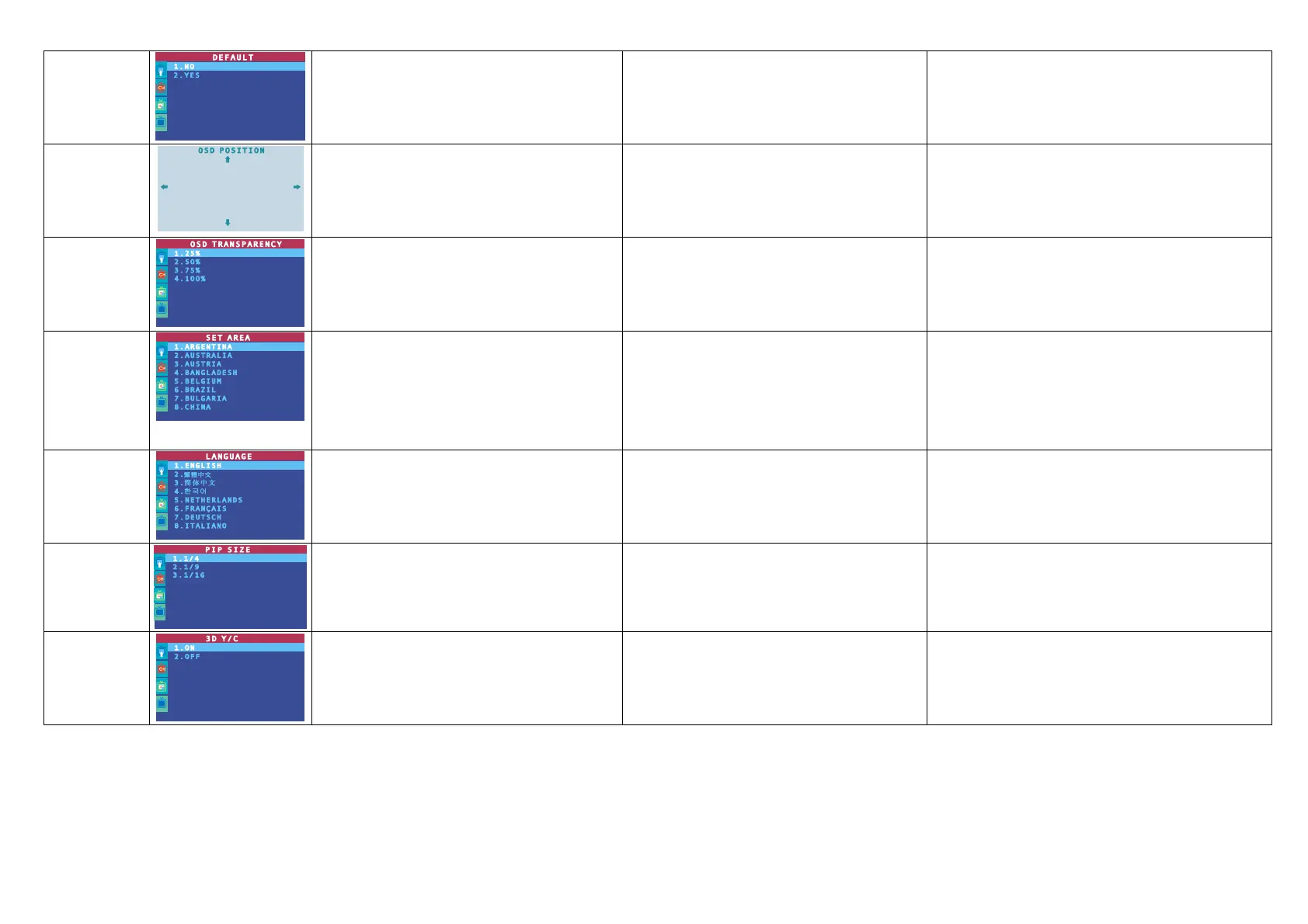
DEFAULT
Use the CH▲ or CH▼ buttons to select YES to
clear all the preset channels and to restore the
original factory default picture setting or NO to
exit. Then press Vol►/OK.
CH S CH T
Vol►/OK
使用 CH S 或 CH T 键来选择时,可以清除所有已经
扫描及记忆的频道,并且会回到出厂的默认值。若选择
否 键 则所有设定不变然后按下 Vol►/OK 键即可。
OSD POSITION
Use the CH▲, CH▼, Vol◄, and Vol► buttons
to move the frame where you want to set the
position of the MENU, then press MENU.
CH▲, CH▼, Vol◄, Vol►
MENU
使用 CH▲, CH▼, Vol◄, 或 Vol►键移动屏幕显示的
位置,然后按遥控器上的 MENU 键固定后跳出。
OSD
TRANSPARENC
Y
Use the CH▲ or CH▼ buttons to choose from
OSD transparency settings then press
Vol►/OK
CH▲ CH▼
Vol►/OK
使用 CH▲或 CH▼键来选择想要的菜单透明度,然后
按下 Vol►/OK 键即可。
SET AREA
Press the MENU button, select MORE, select
SET AREA in the MORE, list items, use the
CH▲ or CH▼ buttons to choose the appropriate
country signal, then press Vol►/OK button to
make the selection.
If your country is not listed, choose another
country with the same TV system as yours.
MENU
圆刚电视盒于出厂时已设定为台湾区域频率。
如果您需要自行进入此模式,您可按下遥控器上的
MENU 键,在菜单 区域设定中,选定您所在的国家区
域。
LANGUAGE
Use the CH▲ or CH▼ buttons to select from
different languages then press Vol►/OK.
CH S CH T
, Vol X/OK
用 CH S 键 或 CH T 键切换英文或繁体中文模式,然
后按下 Vol X 键选择该语言。
PIP SIZE
Use the CH▲ or CH▼ buttons to select from
different PIP size then press Vol►/OK.
(*for AVerTV DVI Box9 only)
CH S CH T PIP
Vol X/OK (*
DVI Box9 )
CH S CH T 的 PIP 窗口
Vol X/OK (* DVI Box9-3D
Y/C 与圆刚 DVI Box9 )
3D Y/C
Use the CH▲ or CH▼ buttons to select ON to
enable 3D Y/C function and or select OFF to
disable the 3D Y/C function. Then press Vol►.
(*For AVerTV DVI Box9 only and this function
will not work in Hong Kong and Mainland China)
CH S CH T ON 3D
Y/C OFF 3D Y/C
Vol X
(*
)
CH S CH T ON 3D Y/C
OFF 3D Y/C Vol X/OK
* DVI Box9-3D Y/C 但
6











 To Next Page