Main Menu On Screen Display Usage
使用说明
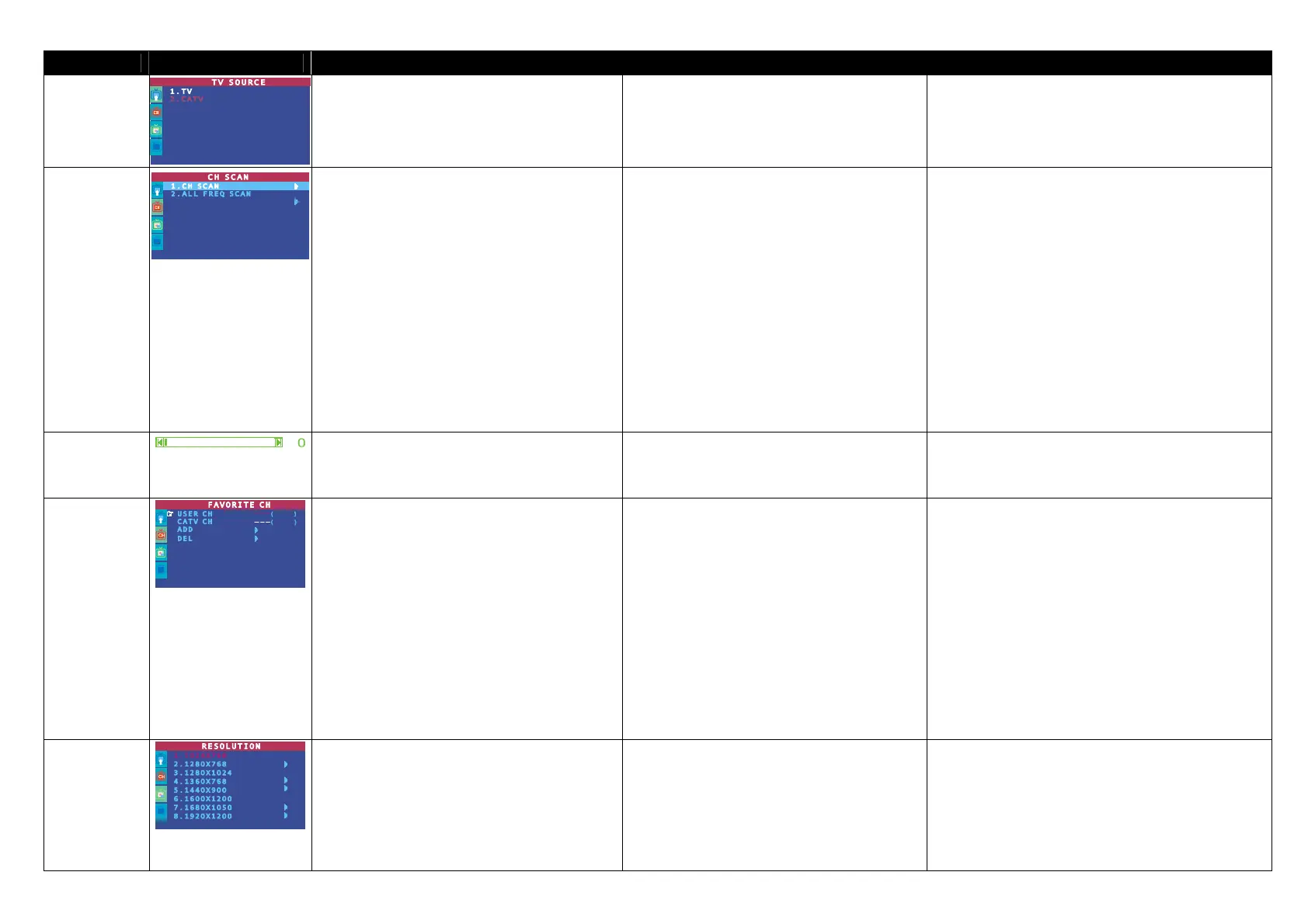
TV SOURCE
Use the CH▲ or CH▼ buttons to select between
antenna TV or cable TV source, then press
Vol►/OK button to make the selection.
CH S CH T
Vol XOK
使用 CH S、 CH T 键在无线或有线电视频道间切换,
然后按 Vol X(切换) 键来做选择。
Use CH▲ or CH▼ buttons to select between CH
SCAN or All FREQ SCAN. Press Vol►/OK
button to make the selection. If you want to
interrupt or cancel the scanning process, press
any button, but this will only memorize the
scanned channel.
These two types of channel-preset functions
enable you to memorize all active channels in
your area.
Use the CH SCAN function first. If there are
channels missing after you perform CH SCAN,
use ALL FREQ SCAN function and repeat the
searching process.
NOTE: ALL FREQ SCAN is a very time
consuming process. If the default frequency table
already includes all active TV channels in your
area, then avoid using the ALL FREQ SCAN.
(
)
:
使用『频道扫描』功能,它会按照内定的频率表(按照您
国家当地的电视频率)自动搜寻并记忆所有有效的电视频
道。扫描中途欲停止,请按遥控器上的任意键,不过只能
记忆已扫完的频道。
建议您先使用『频道扫描』。当您做完频道扫描之后,如
果仍有些频道遗漏,您可以使用『全频率扫描』来重新再
扫一次。
注意 : 『全频率扫描』是非常耗时的。如果您已用『频
道扫描』扫完所有可看的频道,建议尽量避免使用『全
频率扫描』。
CH FINE TUNE
If the TV reception is not clear, choose CH FINE
TUNE then press Vol◄ and Vol► buttons until
the TV picture becomes clear.
Vol X Vol W
当电视收讯不清时,请选择菜单中的 频道微调 , 然后
按遥控器上的 Vol X 或 Vol W 键调整,直到画面清楚
为止。
FAVORITE CH
33
33
This function enables you to add, remove,
reprogram or reassign the TV channels with
channel numbers that are easier to remember.
In the selected USER CH, enter the new channel
number you want to assign or the channel
number you want to remove/add to the channel
line up. Then, in the CATV CH or TV CH, enter
the channel number you want to remap or the
channel number you want to remove/add.
Use the CH▲ or CH▼ buttons to select ADD to
include or DEL to remove the channel number in
the channel line up and then press Vol►.
Note: To browse through channels while setting
the User CH and CATV number, press the CH▲
or CH▼ buttons.
CH S CH
T
通过喜爱频道的设定,圆刚液晶精灵-电视王 II 能使您轻易地
增加或移除您所喜爱的电视频道,也可以将这些您喜爱的频道
重新编号,赋予更容易记忆的编号。
在「喜爱的频道」中,输入您想指定、移除或增加的频
道号码至「使用者频道」的频道号码中。
接着在「有线电视频道」或「无线电视」菜单中,输入
您想要重置(至「使用者频道」)、移除或增加的频道
号码。
然后,选择「增加」来加入频道;或者选择「删除」来移除
「使用者频道」与「有线电视频道」菜单中的频道号码。
注意:在设定「使用者频道」、「有线电视频道」或「无
线电视频道」时,可按 CH S 键与 CH T 键浏览。
RESOLUTION
Use the CH▲ or CH▼ buttons to choose from
display resolution settings then press Vol►/OK.
Under wide screen (16:9/16:10) mode, you can
choose to view in 4:3 or PANORAMA mode.
Press Vol► to enter the sub menu.
(*Only AVerTV DVI Box9 supports 4:3 and
PANORAMA mode.)
CH▲ CH▼
Vol►/OK
(16:9/16:10)
4:3 PANORAMA Vol►
(* DVI Box9-3D Y/C DVI Box9
4:3 PANORAMA .)
您可以按照需求选择分辨率设定值。
使用 CH▲或 CH▼键来选择您想要的画面分辨率,然后
按下 Vol►即可。
在宽屏幕模式下(16:9/16:10)您还可以进一步选择 4:3
或是 PANORAMA 模式。按下 Vol►
*只有圆刚 DVI Box9-3D Y/C 与圆刚 DVI Box9 支持
4:3 和 PANORAMA 模式


 To Next Page
 Loading...