EasyManua.ls Logo

AVGO NOXQI - User Manual

Default Icon
12 pages
Print Icon
To Next Page IconTo Next Page
Loading...
USER MANUAL
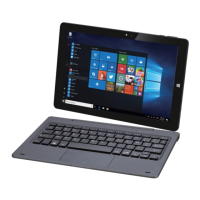
10.1" 2-in-1 Laptop/Tablet with Detachable Keyboard
Please read this manual carefully before using.
and keep it for future reference.
MODEL NO.: NOQB5, NOXQI
picture for reference only.
Question and Answer IconNeed help?

Do you have a question about the AVGO NOXQI and is the answer not in the manual?

Summary

Features

Unit at a Glance

Safety Information

Charging the Battery

Turning the Tablet On or Off

To turn on your tablet

Instructions for powering on the tablet, including login process.

To turn off the screen

How to turn off the display to save battery power or set auto-off.

To turn off the tablet

Steps to properly shut down the tablet device.

Built-in Applications

Touch-Screen Navigation

Swipe right

Swiping from the right edge to reveal menus and settings.

Swipe left

Swiping from the left edge to view application thumbnails.

Swipe down

Swiping from the top to close applications or access docks.

Connecting Your Tablet to a Wi-Fi Network

Troubleshooting

Specifications

AVGO NOXQI Specifications

General IconGeneral
BrandAVGO
ModelNOXQI
CategoryKeyboard
LanguageEnglish

Related product manuals