12
EN
D - CONFIGURATION
720P WIFI IP CAMERA
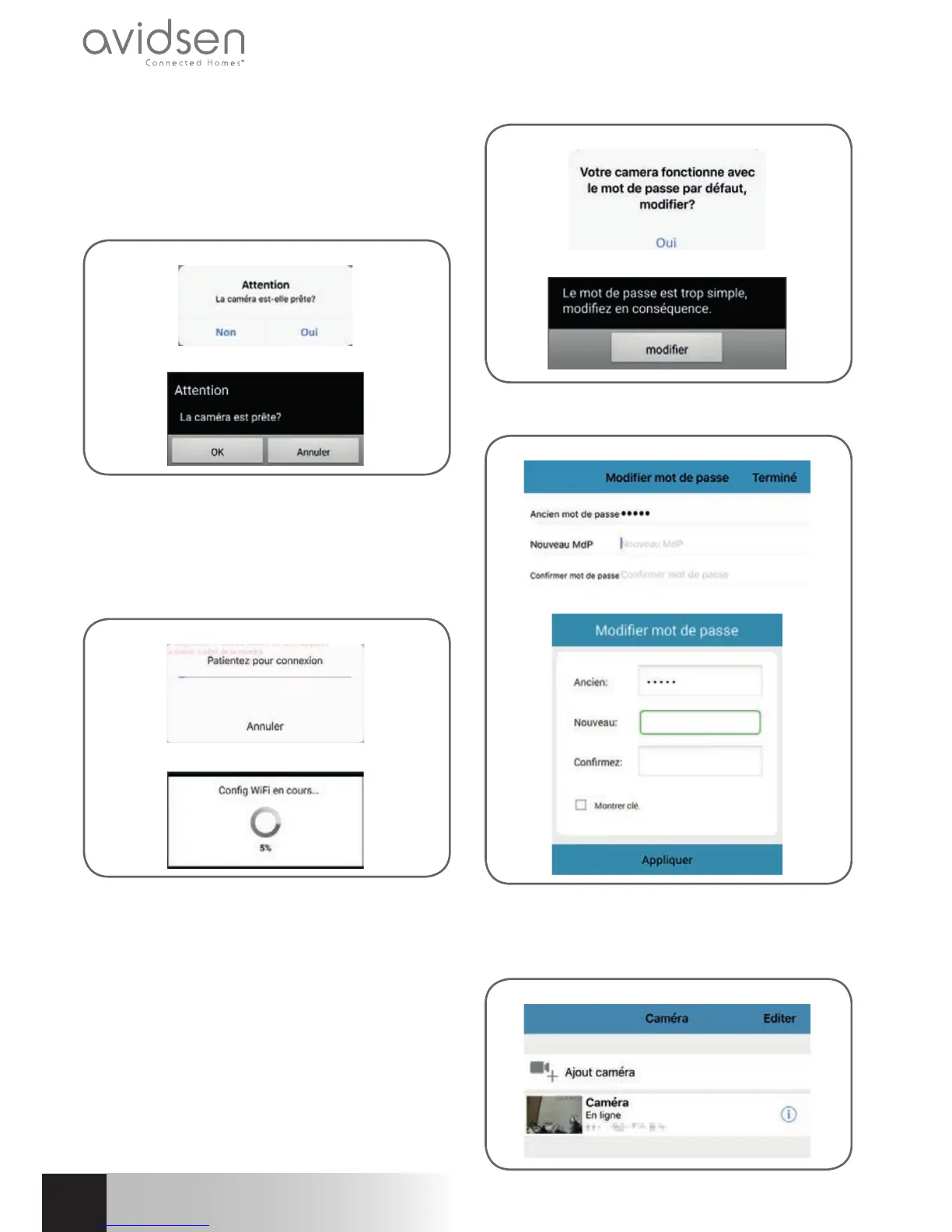
After entering the password for the WiFi network
that the camera should be using, click on
"Appliquer" (Apply): your tablet or smartphone will
ask if the camera is accessible and if it is ready to
be confi gured
iOS
Android
If your camera is nearby and not confi gured, click
on "Oui" (Yes) or "OK" to begin confi guration using
the app.
Note: the camera will take 30 seconds to load up
after being switched on.
iOS
Android
Once the WiFi connection information has been sent
to the camera by the app, the camera will connect
to the network using WiFi.
Your smartphone or tablet will ask you to change
the password:
iOS
Android
Click on "Oui" (Yes) or "Modifi er" (Change) and
enter a new password
iOS
Android
Finally, click on "Terminé" (Done) on the upper right-
hand side of the screen or on "Appliquer" (Apply)
to add the camera to the list of cameras recognized
by the app.
iOS



 To Next Page