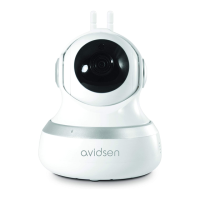
The Avidsen HomeCam WR360 is a motorized IP WiFi camera designed for home surveillance, offering a range of features for monitoring and security.
Function Description
The HomeCam WR360 allows users to monitor their home remotely, view live video, and record events. It features motion detection with alerts, enabling the camera to send push notifications to a smartphone when movement is detected. The camera can record video without a micro SD card (to the cloud, if a subscription is active) or with a micro SD card (up to 128GB). It supports both local storage and cloud storage options. The camera can be integrated with smart home ecosystems like Google Assistant and Amazon Alexa, allowing for voice control and the creation of automated scenarios. Users can define specific actions to be triggered based on events, such as motion detection, or schedule actions based on time. The camera offers two-way audio communication, allowing users to speak and listen through the device. It also features night vision for monitoring in low-light conditions.
Important Technical Specifications
- Resolution: 2 Megapixels (2M Pixels)
- Power Supply: 12V/1A
- Video Playback: Real-time
- Communication Protocol: 2.4GHz WiFi 4
- Encryption: WPA-PSK/WPA2
- Angles of Rotation: Vertical 60°, Horizontal 180°
- Audio: Two-way
- Night Vision: Yes, 25m range
- Sensor and Lens: 1/4" CMOS
- Shutter Speed and Compression: 1/25 – 1/100,000 per second - H264
- Storage: Yes, on SD card (128GB max, not included)
- Average Power Consumption: 10.8W Max DC 12V, 1A
- Operating Temperature: -20°C to +55°C
- Dimensions and Weight: 73mm x 72.5mm x 187mm – 315g
- Connectivity: Compatible with 2.4 GHz WiFi networks (WPA/WPA2 encryption). Not compatible with 5 GHz WiFi or WEP encryption.
Usage Features
The HomeCam WR360 is managed through the Avidsen Home mobile application, available on Google Play and the App Store.
- Installation: The camera can be easily installed by connecting it to an electrical outlet and pairing it with the Avidsen Home app. The app guides users through the process of creating an account, installing the micro SD card (if desired), and connecting the camera.
- Account Creation: Users can create an account using an email address or phone number, followed by a verification process.
- Camera Pairing: The camera can be paired via a QR code displayed on the smartphone screen, which the camera scans, or through an alternative method involving manual WiFi network selection.
- Basic Settings: The app allows users to configure various settings, including device name, device settings, activate/deactivate sound, image quality adjustment, full screen view, take a photo, activate/deactivate oral communication, activate/deactivate video recording, and access the photo album.
- Motion Detection: Users can enable and configure motion detection alerts, adjusting sensitivity and setting activation time ranges.
- Recordings: The camera supports continuous recording and event-triggered recording (motion or sound detected). Recordings can be stored on a micro SD card or in the cloud (subscription may be required). Users can format the SD card through the app.
- Smart Home Integration: The camera can be linked with Google Assistant and Amazon Alexa. This enables voice commands to control the camera and integrate it into broader smart home scenarios.
- Scenario and Automation: The Avidsen Home app allows users to create custom scenarios and automations. These can be simple, like turning on a light when motion is detected, or more complex, involving multiple devices and conditions (e.g., temperature, humidity, time of day, wind speed). Users can define actions to be executed based on specific conditions, such as motion detection, or schedule actions at particular times.
- Privacy Mode: The camera offers a privacy mode to switch off the image and sound when monitoring is not necessary.
- Access Management: Users can manage access to camera settings and motion detection settings.
Maintenance Features
- Cleaning: Always unplug the product from the mains before carrying out any maintenance. Never use abrasive or corrosive substances to clean the products. Use a soft, slightly damp cloth. Never use an aerosol to spray the product as this may damage the internal workings.
- Lens Filter: The camera's lens filter may be vulnerable to scratching and dirt. Avoid exposing the lens to direct sunlight or any reflected light source.
- Recycling: The product should not be disposed of as household waste. It contains hazardous substances and should be returned to a local distributor or recycling collection service.
- Troubleshooting: The manual provides a comprehensive FAQ section to address common issues such as inability to install the app, app freezing, configuration problems, poor image quality, and pairing issues. Solutions include checking device compatibility, updating software, verifying network configuration, and resetting the camera.
- Warranty: The product is guaranteed for parts and labor for 2 years from the date of purchase. Proof of purchase must be retained for the duration of the warranty period. The warranty does not cover damage caused by negligence, knocks or accidents. The parts of this product must not be opened or repaired by any persons not employed by Avidsen. Avidsen undertakes to keep a stock of spare parts for this product throughout the contractual warranty period.
- Support: Avidsen provides customer service for technical support and RMA requests.

 Need help?
 General

 To Next Page