14
EN
d - CONFiGurATiON
720P WIFI IP CAMERA
2
Password: The password used to log in
to sender-address@gmail.com, in our
example
3
Advancedsettings
4
Send to: Enter the email address here
that will receive the alerts. In our example:
addressee@gmail.com
5
SMTPserver:varieswiththeemailprovider
of the address sending the alert. In our
example,usingGmail,smtp.gmail.com
6
Serverport:dependsontheemailproviderof
theaddresssendingthealert.Iourexample
usingGmail,587
7
Encryption type: security when logging in,
associated with the email provider. In our
exampleusinggmail, STARTTLS
8
Subject:subjectoftheemailalert
9
Message:bodyoftheemail
10
Test: allows you to simulate an alert, send
anemailandtocheckthat your camera is
correctlycongured.
11
Save/Apply:tosavetheconguration
Note:itdoesnotmatterwhotheemailprovider
oftherecipientis,asitistheemailproviderofthe
senderthatdictateswhatneedstobeentered.
However,youmustensurethatthealertsarenot
treatedasspambytherecipient'sinbox.
Warning: someemailproviderswillnotaccept
the camera sending notications without
authorisation from you. Refer to your mailbox
safetysettingsformoredetails.
Information:Ourtechnicalsupport will notbe
abletohelpyouwiththesesettingsifyoucontact
them,asitdependssolelyonyourmailbox.For
more information, please contact your email
accountprovider.
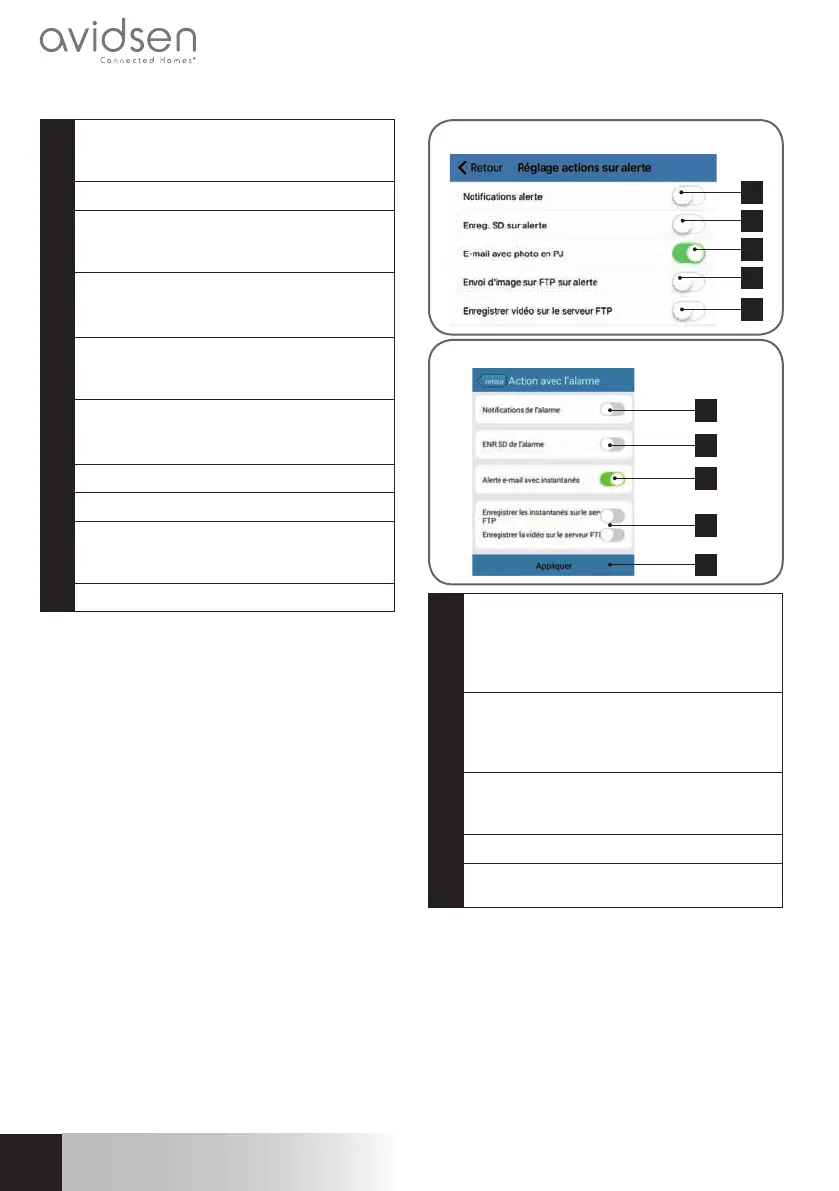
When you have nished conguring your
camera,itwillbeabletosendemails.Youmust
now tell it when to send them, in the "Action
avec alarme"(Actionwithalarm)or "Réglage
actions sur alerte"(Actiononalarmsettings)in
thecamerasettings:
1
2
3
4
5
iOS
1
2
3
4
5
Android
1
App notication in the event of an alert: all
devicesonwhichthecamerawasaddedto
the Aviwatch app will be notied if there is
movement(theappmustberunningin the
backgroundonthetabletorsmartphone)
2
SavingtoSD:ifamicroSDcardwasinserted
into the camera, any alert triggers a video,
whichissavedtothecard.Thevideocanbe
viewedremotely(seebelow)
3
Emailwith attachedphoto:ifemailwasset
up(seethepreviousparagraph),anemailwill
besentwhenmovementisdetected
4
FTPoptions,notdiscussedhere
5
Click on "Appliquer" (Apply) to save your
settings,or"Retour"(Return)oniOS.
Once this conguration has nished, simply
activatemovementdetectioninthe "Réglages
alertes(SetAlerts)"menu:


 To Next Page
 Loading...





