13
ENEN
d - CONFiGurATiON
720P WIFI IP VCAMERA
6
Videoqualitysettingsandnumberofframes
persecond.
Warning: if you set the video quality too
highwithrespecttothequalityoftheinternet
connectionofyourcameraandsmartphone
ortablet,youmayexperiencechoppyvideo
orlossofconnection.
Two streams can be adjusted: they
correspond to the maximum resolution
= "résolution Max", and low resolution =
"résolutionfaible",whichyoucanselectfrom
thelivevideodisplay.
Warning:insomecases,achangeincamera
resolutionwillonlyhappenwhentheappis
restarted. Exit and re-launch the Aviwatch
appifthereisaproblem.
7
Congurethecamera'scurrentWiFisettings
8
IfamicroSDcardhasbeeninsertedintothe
camera,youcan reformatit anddisplayits
totalandfreememory
9
Setting the date and time stamps on the
camera'svideo
10
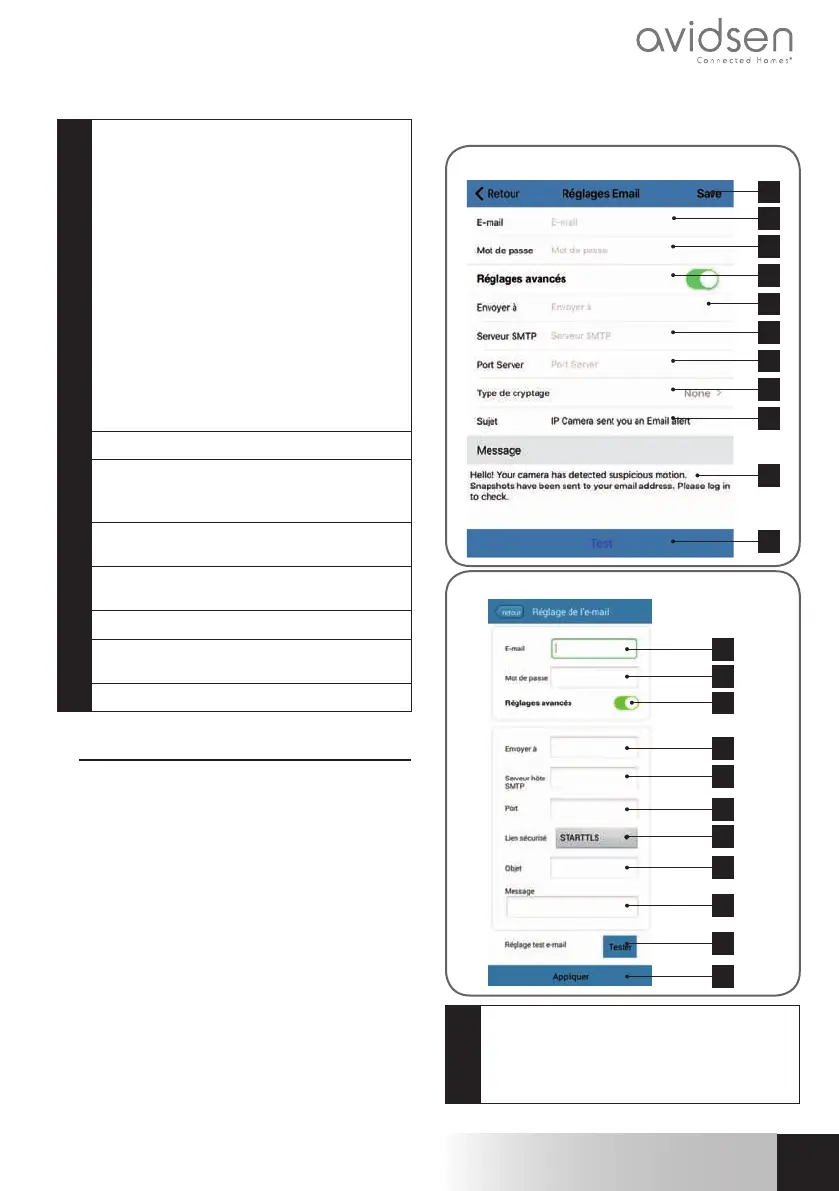
Settingsforsendingemailsintheeventofan
alert(seetheexamplebelow)
11
SettingsforsavingtoanFTPserver
12
Restarting the camera remotely/Update/
Reset
13
Cameranetworkinformation
2.2-Example:programminganemailalertto
besentwhenmovementisdetected
Toprogramanalerttobesentwhenmovement
is detected, you need 2 email addresses: the
address of the sender which will be used by
thecamera,andtheaddresswhichwillreceive
thealerts.Thecamerausestheusernameand
passwordofthesenderaddresstoconnectand
send the email. Conguration depends on the
chosenemailprovider'ssettings.
Note:the2 email addressescan be thesame
(youwillsimplybesendinganemailtoyourself).
Inourexample,weuse
www.gmail.com:
sender-address@gmail.comsendsthealerts,
recipient@gmail.com receives the alerts.
Both addresses need to have been created
beforehand.
First,goto“Réglages Email”(Emailsettings):
1
11
2
3
4
5
6
7
8
9
10
iOS
1
2
3
4
5
6
7
8
9
10
11
Android
1
Email:Namethatyoushouldentertologin
totheemailboxwhichwillsendthealerts.In
ourexampleusingGmail,thisisthesender
address:
sender-address@gmail.com



 To Next Page
 Loading...




