
 Need help?
Do you have a question about the Avigilon NVR4-HDDS-PACK-32TB and is the answer not in the manual?
This document is an installation guide for the Avigilon NVR Standard Storage Expansion Pack, designed to guide Avigilon NVR customers through adding storage to their NVR system by setting up a second Avigilon Control Center (ACC) storage volume. The expansion packs are compatible with specific NVR models, including NVR5-STD, NVR4X-STD, and NVR4-STD.
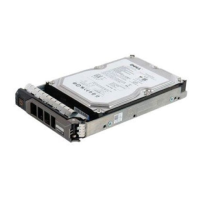
The Avigilon NVR Standard Storage Expansion Pack provides additional storage capacity for Avigilon Network Video Recorders (NVRs). This expansion is crucial for surveillance systems that require extended video retention periods or higher resolution recordings, which demand significant storage. By adding a second storage volume, users can scale their surveillance infrastructure to meet growing data storage needs without replacing the entire NVR system. The process involves physical installation of hard drives, configuring the extended storage within the NVR's system, and then integrating this new storage into the Avigilon Control Center (ACC) system for active use. This modular approach allows for flexible and cost-effective upgrades to existing Avigilon NVR deployments.
The NVR Standard Storage Expansion Pack is available in two main capacities:
These expansion packs are compatible with a range of Avigilon NVR models, ensuring broad applicability. The compatible NVR models include:
The installation process involves physical drive replacement or addition, followed by software configuration. The system requires a Windows-based operating system for configuration, utilizing tools like Disk Manager and the Server Administrator portal. The storage configuration involves setting up a second ACC™ Storage Volume, which implies that the NVRs are designed to manage multiple storage arrays or volumes for redundancy and capacity. The use of RAID initialization is mentioned, indicating that the system supports RAID configurations for data protection and performance, although specific RAID levels are not detailed in this document. The initialization process for the second storage volume involves selecting the GPT partition style, which is suitable for large disk capacities (over 2TB).
The primary usage feature of this expansion pack is to extend the recording capacity of Avigilon NVRs. This allows users to store more video footage, which is critical for compliance, forensic analysis, and long-term surveillance needs. The integration with Avigilon Control Center (ACC) ensures that the added storage is seamlessly incorporated into the existing surveillance management system. Once configured, the ACC system will automatically utilize the new storage volume for recording, without requiring manual intervention from the user for day-to-day operations. The process of adding extended storage to the ACC system involves:
This streamlined integration ensures that the expanded storage is immediately available for use by the ACC system, enhancing its overall recording capabilities. The system's ability to manage multiple storage volumes allows for flexible allocation of storage resources, potentially enabling different retention policies for various cameras or event types.
The document highlights several aspects related to the maintenance and integrity of the expanded storage:
In summary, the Avigilon NVR Standard Storage Expansion Pack is a vital component for extending the storage capabilities of Avigilon NVRs, designed for seamless integration with the ACC system. It offers flexible capacity options, robust data protection through RAID (implied), and clear guidance for installation and verification, supported by comprehensive technical resources.

 To Next Page
 General