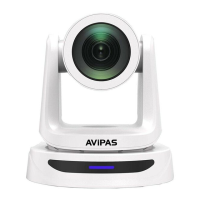
Need help?
Do you have a question about the Avipas AV-1080 and is the answer not in the manual?
Important safety and usage guidelines to prevent damage and ensure proper operation of the camera.
Information regarding the product's classification as Class A production and its potential electromagnetic radiation effects.
Guidelines for safe installation and operation, adhering to electric safety standards.
Advice on handling the product during transport, storage, and installation to avoid damage.
Details on the product's power supply voltage and current, including polarity indication.
Specific instructions and warnings to follow before and during camera installation.
Warning against unauthorized modification or dismantling of the camera.
List of included accessories such as camera, power adapter, cables, remote control, and user manual.
Visual guide and labels for the interface ports on the SDI (AV-1080) and HDMI (AV-1081) camera models.
Step-by-step instructions and illustrations for mounting the camera on a wall using the provided bracket.
Step-by-step instructions and illustrations for mounting the camera on a ceiling using the provided bracket.
Details on CMOS sensor, resolution, frame rate, 10x optical zoom, and wide field of view.
Description of fast auto-focus and quiet, smooth PTZ operation.
Supported video outputs, compression standards, audio interface, and network protocols.
Low-power sleep, communication protocols, RS-232 cascade, and preset positions.
Lists various applications like tele-education, webcasting, and videoconferencing.
Detailed specifications including sensor, lens, zoom, illumination, focus, aperture, shutter, white balance, and noise reduction.
Settings for image adjustments and camera's view angles.
Specifications for camera's rotation ranges and movement speeds.
Details on preset accuracy and IP camera specific features like video coding.
Specifications for frame rates, audio standards, and sampling rates.
Lists supported network protocols and input/output interfaces.
Covers input voltage, current, temperature, power consumption, size, and weight.
Illustrates and labels the external connection ports for SDI models.
Illustrates and labels the external connection ports for HDMI models.
Provides detailed measurements and diagrams of the camera's physical size and mounting points.
Functions of Standby, Camera Address, Number Keys, and Focus/Zoom controls.
How to set/clear presets and use Pan-Tilt directional buttons.
Using key combinations with F1-F4 for camera addresses.
Instructions for enabling or disabling the Backlight Compensation feature.
Guide to navigating the main menu using the MENU and arrow buttons.
Details on configuring system settings like protocol, address, and baud rate.
Lists various functions accessible via specific key combinations.
Explains the RS-232 interface, pin definitions, and computer connection diagram.
Detailed definition of each pin on the RS-232 Mini-DIN 8-pin connector.
Detailed definition of each pin on the RS232 DB9 connector.
Describes how to set up VISCA networking and camera cascade connections.
Explains controlling the camera via RS232 interface and its serial parameters.
Guide to navigating the main menu using the MENU and arrow buttons.
Details on configuring system settings like protocol, address, and baud rate.
Instructions for accessing and adjusting camera-specific settings via the menu.
Details on adjusting exposure mode, EV, BLC, flicker, gain limit, and DRC.
Instructions for configuring color settings like WB Mode, RG/BG Tuning, Saturation, Hue, and AWB Sensitivity.
Settings for brightness, contrast, sharpness, gamma, DCI, B&W mode, flip, and digital zoom.
Details on focus mode, AF-zone, and AF-sensitivity settings.
Settings for pan/tilt/zoom speed, image freezing, and acceleration curve.
Configuration options for 2D, 3D noise reduction, and dynamic hot pixel correction.
Options for selecting the video output format and resolution.
Lists available video output formats and resolutions.
Displays firmware versions for MCU, Camera, AF, and Lens.
Instructions on how to restore the camera to its original factory settings.
Explains direct connection via Ethernet and IP connection via router/switch.
Detailed steps for configuring computer's TCP/IP settings to match the camera's network segment.
Steps to verify network connectivity using the 'ping' command in the DOS prompt.
Instructions for logging into the camera's web interface as administrator or normal user.
Guide for downloading and installing the necessary browser plug-in for web access.
Overview of the video preview interface and available controls after logging in.
How to play back recorded video files and snapshot picture files.
Overview of the configuration options available in the web interface.
Settings related to video preview mode, recording time, and storage routes.
Settings for audio encoding, sample rate, sample bits, bit rate, channel, and volume.
Settings for video encoding, compressed format, image size, rate control, and image quality.
Details on bit rate, frame rate, I frame interval, stream names, stream publish (RTMP), and RTP multicast.
Configuration of Focus, Exposure, and Color parameters.
Settings for brightness, contrast, sharpness, gamma, DCI, B&W mode, flip, and digital zoom.
Settings for 2D noise reduction, 3D noise reduction, and image style.
Configuration for displaying date, time, and title overlays on the video stream.
Settings for adjusting the font size of OSD elements based on resolution.
Settings for video output format and resolution.
Configuration for network ports and Ethernet settings (DHCP, IP, Subnet Mask, Gateway).
Settings for preferred and alternate DNS servers.
Configuration for GB28181 protocol, including enable, clock sync, and registration details.
Settings for device name, ID, language, and system time configuration.
Settings for managing user authority, names, passwords, and permissions.
Information on updating firmware versions for MCU, Camera, and AF.
Steps for upgrading firmware via the web interface or recovery menu.
Instructions for restoring the device to its original factory settings.
How to restart the camera to apply settings or troubleshoot issues.
Instructions for logging out of the web interface and returning to the login screen.
Guidelines for routine cleaning and care of the camera, including lens cleaning recommendations.
Warnings about environmental conditions and usage that may affect camera performance.
Solutions for common image-related issues like 'No image' or 'Abnormal display'.
Steps to resolve issues with viewing video in Internet Explorer, including plug-in installation.
Troubleshooting steps for connectivity problems with the web browser interface.
Steps to diagnose and resolve issues related to audio playback.
Troubleshooting for IR remote control and serial communication issues.
Lists camera return commands, acknowledgment/completion messages, and error messages.
Table detailing commands for AddressSet, IF Clear, Power, Zoom, and Focus control.
Commands for White Balance (WB), Gain, Exposure (AE), Shutter, and Iris control.
Commands for Gain Limit, Brightness, Exposure Compensation, Backlight, WDR, Noise Reduction, Flicker, and Aperture control.
Commands for Memory, IR, Flip, Color Saturation, ID Write, System Menu, IR Receive, Brightness, Contrast, Flip, and Video System.
Commands for Pan-tilt drive, Pan-tilt limit set, and inquiry commands for Power, Zoom, and Focus.
Inquiry commands for Focus Position, WB Mode, Gain, AE Mode, Shutter, Iris, Gain Limit, Brightness, Exposure Comp, Backlight, WDR, NR, Flicker, Aperture, Picture Effect, Memory, Menu, IR Reverse, Picture Flip, Color Saturation, ID, and IR Receive.
Inquiry commands for Brightness, Contrast, Flip, Gamma, Version, Video System, Pan-tilt Max Speed, and Pan-tilt Position.
Command list for Pelco-D protocol, detailing functions, bytes, and parameters for PTZ control and queries.
Continuation of Pelco-D commands for PTZ control, presets, and position queries.
Command list for Pelco-P protocol, detailing functions, bytes, and parameters for PTZ control and queries.
Information about the limited warranty coverage, duration, and what is excluded.
Statement regarding the copyright of the manual and restrictions on copying or translation.
Contact information for AVIPAS Inc., including address, phone, fax, email, and website.
Company details for the manufacturer, AVIPAS Inc.
Information about the distributor, SWIT Electronics USA, LLC.
 General
| Sensor Type | CMOS |
|---|---|
| Optical Zoom | No |
| Video Compression | H.264 |
| Power Supply | DC 12V |
| Motion Detection | Yes |
| Weather Resistance | IP66 |
| Resolution | 1920x1080 |
| Sensor Size | 1/2.7 inch |
| Lens | 3.6 mm |
| Field of View/Viewing Angle | 90 degrees |
| Pan Angle | 355 degrees |
| Tilt Angle | 90 degrees |
| Communication | IP |
| Protocols | HTTP, TCP/IP |
| Operating Temperature | -10°C to 50°C |
| Night Vision | IR LEDs |
| Connectivity | RJ45 |
| Storage | MicroSD card (up to 128GB) |

 To Next Page