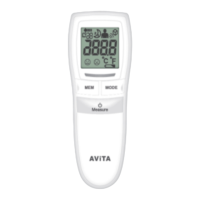
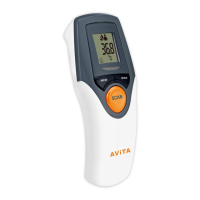
This document describes the Infrared Ear/Forehead Thermometer, Model TS42.
Function Description
The TS42 is an infrared thermometer intended for home use to measure human body temperature in people of all ages. It takes temperatures in seconds by measuring the heat generated by the ear canal or on the forehead. It can also measure object/liquid temperature. The device is designed for multiple patient, multiple use. The patient is the intended operator, though handicapped persons and children may require assistance.
Important Technical Specifications
- Range of Measurement:
- Human Body: 34°C – 43°C (93.2°F – 109.4°F)
- Measuring Accuracy:
- Human Body: 34°C – 43°C (93.2°F – 109.4°F) ±0.2°C (0.4°F)
- Out of range: ±0.3°C (0.5°F)
- Operating Environment:
- Temperature: 15°C ~ 40°C (59°F ~ 104°F)
- Relative Humidity: up to 95% (non-condensing)
- Atmospheric Pressure: 700~1060 hPa
- Storage/Transportation Environment:
- Temperature: -25°C ~ 55°C (-13°F ~ +131°F)
- Relative Humidity: up to 95% (non-condensing)
- Atmospheric Pressure: 700~1060 hPa
- Display Resolution: 0.1°C
- Power Supply: 2 x 1.5V LR03(AAA) alkaline batteries
- Auto Switch-off: In 60 seconds without operation
- Memory: 30 sets of measurements
- Weight: Approx. 65g (without batteries)
- Dimensions: Approx. 134.3 x 42.4 x 47.6 mm (L×W×H)
- Typical Service Life: 3 years
- Battery Shelf Life: 5 years
- Battery Operation Time: About 90 minutes (depends on battery brand)
- Device Classification: Type BF
- IP Rating: IP22 (protection against solid foreign objects of 12.5mm Ø and greater and against vertically falling water drops when enclosure tiled up to 15°)
- Compliance: CE marked (2797), Medical Device Directive 93/42/EEC, RoHS Directive 2011/65/EU, REACH Directive EC 1907/2006.
Usage Features
The thermometer features an LCD display showing date, forehead scan mode, ear scan mode, object mode, memory symbol and sets of records, low battery indicator, degree of measurement (°C or °F), measurement in progress indicator, and time.
Measuring Body Temperature in the Ear:
- Remove the front cover.
- Press the Power/Measure button for 1 second to switch on.
- Ensure the measurement mode flashes on screen. If it shows forehead mode, press Power/Measure again to switch to ear mode.
- Wait for 2 beep sounds, indicating readiness, followed by the last temperature reading.
- Ensure the sensor tip and ear canal are clean. Pull the ear slightly up and backwards before inserting the sensor tip to point directly at the eardrum.
- Insert the sensor tip carefully and press the Power button for 1 second.
- A beep sound signals the end of measurement, and the value appears on the display.
Measuring Body Temperature on the Forehead:
- Ensure the cap is in position on the probe nozzle.
- Press the Power/Measure button.
- Ensure the measurement mode flashes on screen. If it shows ear mode, press Power/Measure again to switch to forehead mode.
- Wait for 2 beep sounds, indicating readiness, followed by the last temperature reading.
- When ready, press and hold the Power/Measure button.
- Place the probe on your temple, slide it across your forehead to the other temple, then release the button to stop. A beep will sound, and the temperature will appear.
- Note: Forehead temperature may be affected by external climatic conditions. Ear temperature is recommended if in doubt.
Measuring Object/Liquid Temperature:
- Press the "Forehead Measure" or "Power/Ear Measure" button for 1 second to switch on. Two short beeps follow a successful self-test.
- Press the "Memory" and "SET" buttons simultaneously for 3 seconds to switch to "Object Scan Mode". The object mode symbol appears.
- Point the sensor tip towards the object or liquid (maintaining a distance of 3 cm). Press "Forehead Measure" or "Power/Ear Measure" to take a measurement (do not immerse in liquids).
- A short beep and the measured value appear on the display.
- Note: The displayed temperature is the measured surface temperature, not the adapted temperature.
- To switch back to thermometer mode, press "Memory" and "SET" buttons simultaneously for 3 seconds until the object mode symbol disappears and a short beep sounds.
Setting °C/°F and Date/Time:
Upon first use or battery change, the device performs a self-test, displays all elements for approx. 1 second, and emits two short beeps. In Standby mode, date and time are shown, and "--" is displayed.
- Changing from Fahrenheit to Celsius:
- Press the "SET" button for 3 seconds.
- Press the "Memory" button to confirm.
- Date/Time Function:
- Press the "SET" button to change.
- Press the "Memory" button to confirm.
- The blinking Date, Year, Hour, and Minute will display. Repeat steps 1 and 2 to adjust.
- The unit is then ready, or press "Memory" to turn it off.
- After this, the thermometer shows "OFF" and switches off automatically.
Memory Function:
The device stores up to 30 measurements.
- Press the "Memory" button. The latest measurement is displayed first.
- Continue pressing "Memory" to view previously stored measurements.
Battery Installation:
When batteries are weak, the battery warning symbol appears. If the symbol flashes and "Lo" appears, batteries must be replaced. If too flat, the thermometer switches off automatically.
- Slide off the battery cover on the back.
- Remove used batteries.
- Replace with 2 x 1.5V LR03(AAA) alkaline batteries, ensuring the "+" sign faces up.
- Slide the cover back on. The unit is ready.
- Note: Remove batteries if not used for an extended period. Dispose of batteries properly according to local regulations, away from children and heat. Do not use rechargeable batteries.
Error Codes:
- "Hi" (Higher than 43°C / 109.4°F): Temperature measured is too high. Operate within specified ranges.
- "Lo" (Lower than 34°C / 93.2°F): Temperature measured is too low. Operate within specified ranges. If repeated, clean sensor tip and contact retailer/Customer Services.
- "Err" (Operating temperature out of range 15°C~40°C / 59°F~104°F): Operate the thermometer only within the specified temperature ranges.
Maintenance Features
Cleaning and Disinfecting:
For home use, 75% Ethanol Isopropyl alcohol (available in pharmacies) can be used.
- Probe and Tip: Clean with 75% Ethanol or Isopropyl alcohol before and after each measurement.
- Thermometer Body: Use a soft, dry cloth. Never use abrasive cleaning agents, thinners, or benzene. Do not scratch the probe lens or display. Do not expose to extreme temperatures, humidity, direct sunlight, or shock.
Calibration:
It is recommended to calibrate the device every 1 year.
General Safety:
- Do not disassemble, repair, or remodel the thermometer.
- Avoid direct finger contact with the lens.
- No modification of this equipment is allowed.
- Take 3 temperatures and use the highest reading if they differ.
- Avoid extreme shock or dropping.
- Patients and thermometer should stay in steady state room conditions for at least 30 minutes before measurement.
- Avoid measuring temperature within 30 minutes after exercise, bathing, or returning from outdoors.
- The temperature result is ONLY for reference; consult a physician before medical action.
- Avoid potential allergic reactions; do not let the front of the scanner directly contact a patient's wound.
- Keep the device away from pets, pests, and children. Small parts may be inhaled or swallowed.
- Report any serious incidents to the manufacturer and competent authority.
- Contact the manufacturer for assistance with setup, use, or maintenance.
- Avoid using near an operating cell phone or microwave oven.

 Need help?
 General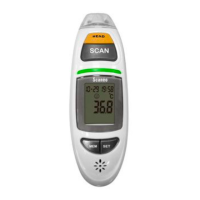

 To Next Page