Product Introduction
Product Introduction
4
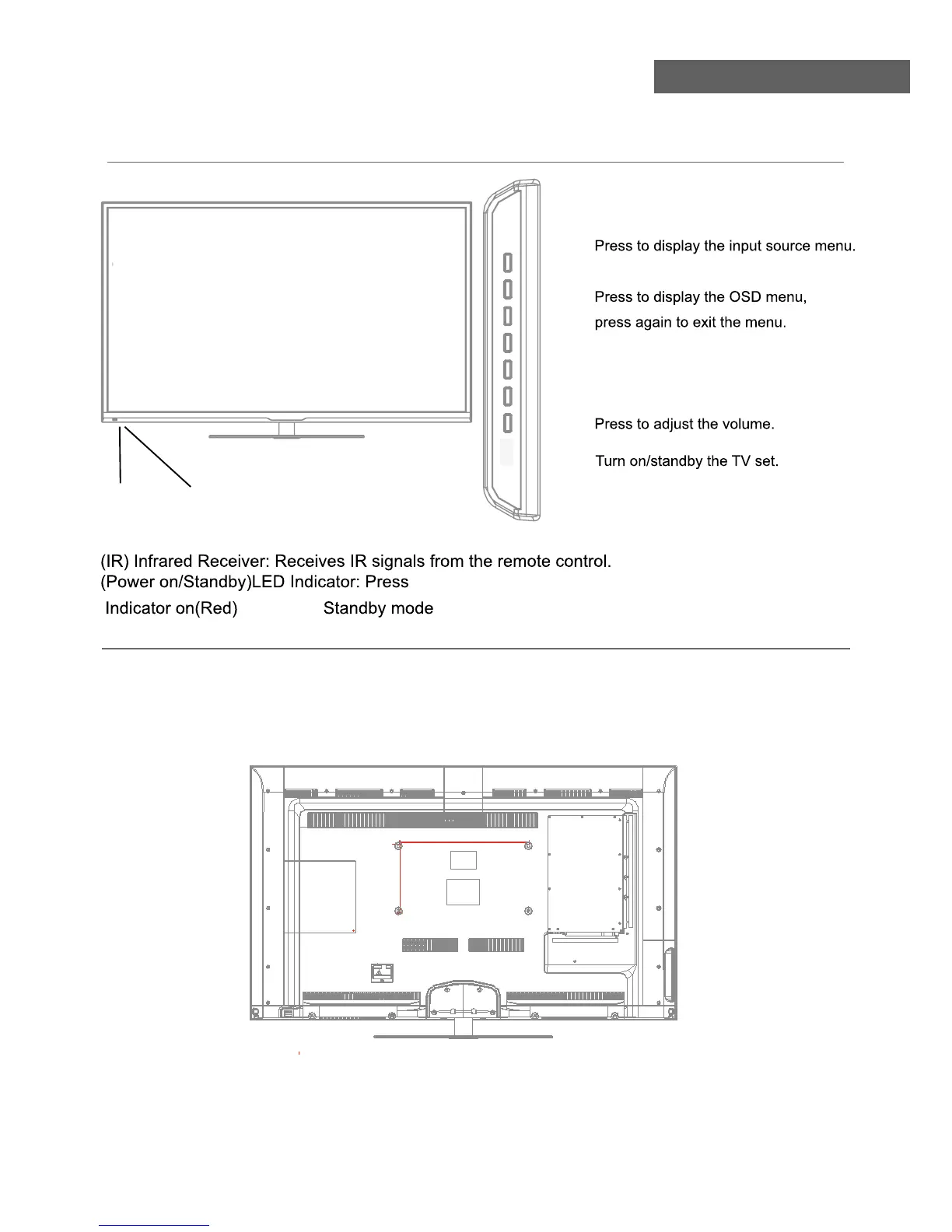
Front View
POWER to turn on and off.
Indicator on(Green) Power on mode
Led Indicator
Remote Control window
(Keep clear)
The TV is provided with mounting holes 400x200mm for a VESA approved wallmounting bracket (NOT
SUPPLIED). Remove the Posi screws holding the base to the base bracket and lift the base away (do not
remove the basemounting bracket).Mount the VESA bracket using 4xM5x12mm ISO metric threaded screws
(not supplied). Do not use screws longer than 12mm, it will occur damage to the internal parts. Fit the wall
- Do not fasten the screws too tight for this may damage the TV or cause the TV to fall, resulting in personal
injury.
- Do not mount your TV at more than a 15 degree tilt.
- Always use two people to mount the TV to a wall.
- Do not install your Wall Mount Kit while your TV is turned on. It may result in personal injury due to electric
shock.
Wall Mounting
INPUT:
MENU:
CH+/-:
Press to scan through channels.
VOL+/-:
POWER:
400mm
200mm
INPUT MENU CH+ CH- VOL+ VOL- POWER


 To Next Page