6.6 Browsing picture files
6.6.1 Select Pictures icon in main menu which will appear after BD player read out disk
or/and USB device . Press ENTER key while Pictures icon is highlighted, system
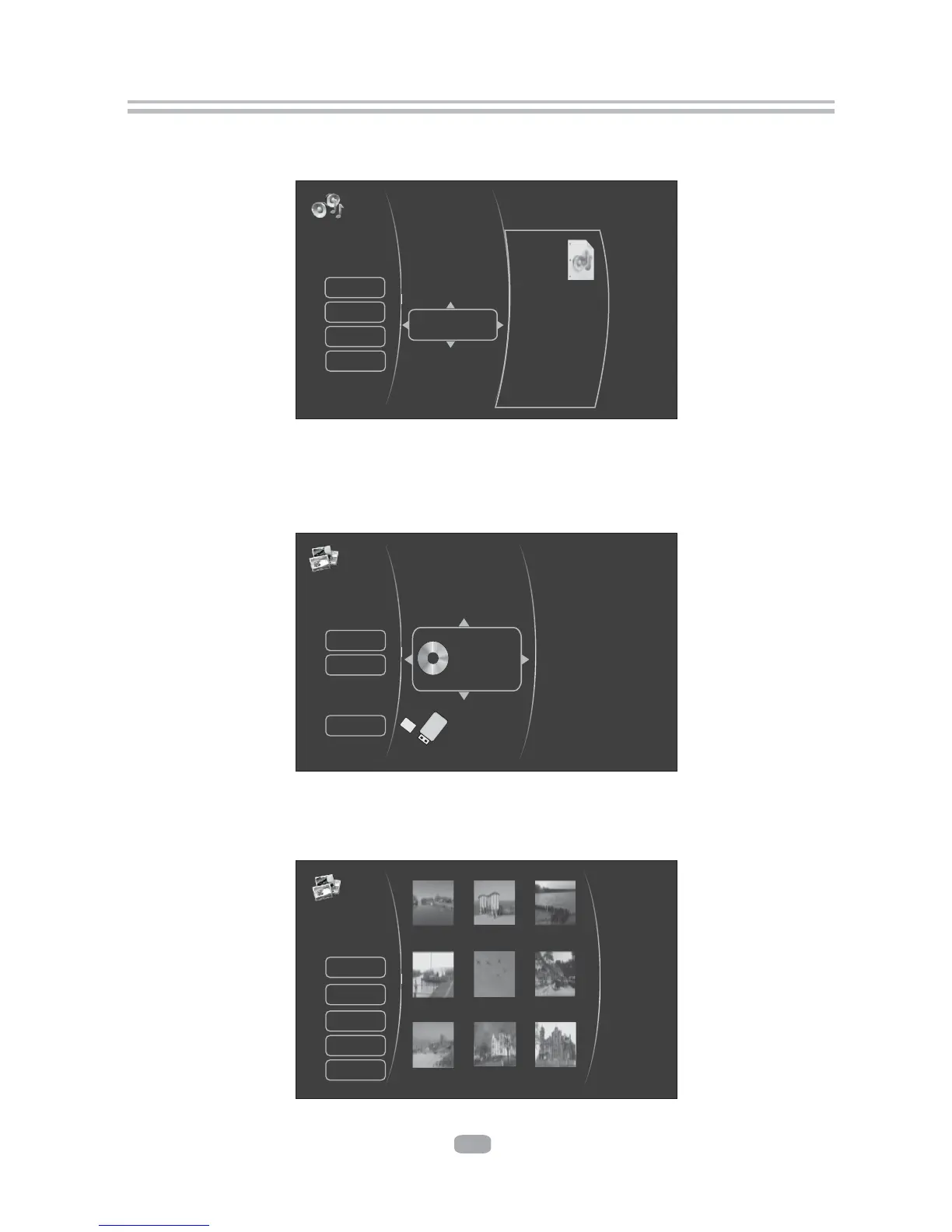
will bring out a sub menu for file source selection.( Figure 5-5)
Figure 5-5 Picture Media Selector
6.6.2 Select disk or USB to open a browser which files on current
disk/USB device, so you can choose any files you want to play.(
allows you to view
Figure 5-6 )
Figure 5-6 Picture Browser Screen
18
Figure 5-4 Audio Browser Screen
6.5.2 Select disk or USB to open a browser which allow files on current disk /
USB device, so you can choose any files you want to play .(
you to view
Figure 5-4 )
Pictures
2 Item(s)
Settings
Pictures
Main Menu
Browse Music
Optical Disc
USB 1
Music
3 Item(s)
mp3
Browse Pictures
Main Menu
Previous folder
Play Files
TrackNo03.mp3
TrackNo01.mp3
TrackNo02.mp3
Title
Artist
Album
19 Item(s)
HD
Browse Music
Main Menu
Previous folder
Start Silde Show
Pictures
Settings
PICT1556.JPG PICT1557.JPG PICT1557.JPG
PICT1509.JPG PICT1619.JPG PICT1764.JPG
PICT1765.JPG PICT1771.JPG PICT1005.JPG


 To Next Page