KP-6840 Reader Installation Sheet Version 2.1 / Doc# 041508 Page 1 of 2
Installation Sheet (Wiegand Interface)
KP-6840 LF Card & PIN Reader
These instructions are for AWID’s Model KP-6840 reader, using compatible proximity credentials from AWID.
Parts List (b) 1 Model KP-6840 Reader/Keypad
(a) 1 Installation Sheet for KP-6840 (c) 2 #6-32 × 1” machine screw (for single-gang utility box)
Preparation
Reader Location: Select the reader’s mounting location. The KP-6840 Reader may be screwed to a single-gang
utility box like a cover plate, or to a wall or other surface. On a metal surface, read range is reduced about 20%.
The KP-6840 Reader may be installed indoors or outdoors, but needs protection from direct rain or snow.
DC Power Supply: DC power for this reader is usually supplied from the +DC and Ground terminals of the
Wiegand reader port on the system’s panel. If this is not possible, use an independent power supply. Power may
be shared with other readers if the supply has sufficient current capacity. The power supply should be close to
+12 volts DC (as low as +5 volts is OK); 1 ampere capacity; linear-rated; regulated DC output.
Cable to Controller and Power Supply: 4 to 7 conductors from reader to the system (2 wires for DC power,
2 wires for Wiegand data, and 1 to 3 wires for external LED, Beeper/Alarm, and Hold control, if used ).
22 gauge stranded wires. Overall 100% shield for both power and data. 500 feet maximum length.
If the DC power supply is separated from the panel’s reader port, the reader’s black wire must be
connected to both the DC power supply’s Negative terminal and the panel reader port’s Ground terminal.
If the separate DC power supply is close to the reader, run two 22-gauge cables – 2 wires for DC power,
and 3 to 6 wires for Wiegand data (including Ground) and for the external control lines, if used.
Both cables must be overall-shielded and earth-grounded (at the end far from the reader).
Conduit: If cables are pulled through metal conduit, the conduit should be earth-grounded (like the cables).
Keypad Settings
The KP-6840 reader is shipped with the keypad’s output programmed for buffered 26-bit output, and its facility
code (or site code) set at 000. These two settings can be changed at your shop before you go to the installation site.
Just connect DC power from a bench supply or from a 9 volt or 12 volt battery to the red and black wires.
Start either programming routine with DC removed from the KP-6840 unit. Keep the KP-6840 fully assembled.
Good keypad technique: Press key in straight for about ½ second. Separate the keystrokes -- one key at a time.
Keypad’s Output Format
1. While the DC power is disconnected -- Press and hold the 4 key to change the format to 4-bit data burst;
or hold the 8 key to change the format to 8-bit data burst; or hold the 2 key to restore 26-bit buffered data.
2. With the 4 or 8 or 2 key still pressed in, connect the DC power. Within 3 seconds there is a beep
sequence, and the LED changes to standby-red.
3. Now release the pressed key. The change in keypad output format has been saved.
Facility Code in Keypad’s 26-bit Buffered Output
1. Connect the DC power. Watch the unit’s LED. While it is amber, slowly enter the 10-digit password
9 1 4 3 6 9 8 8 0 0; end with the # key. Press each key solidly. There is a short beep during each keystroke.
2. Within 3 seconds, start entering the facility code’s 3 digits (between 001 and 255); end with the # key.
3. There is a long beep and the LED color changes to standby-red. The facility code has been saved.
KP-6840 Reader Installation Sheet Version 2.1 / Doc# 041508 Page 1 of 2
Installation Sheet (Wiegand Interface)
KP-6840 LF Card & PIN Reader
These instructions are for AWID’s Model KP-6840 reader, using compatible proximity credentials from AWID.
Parts List (b) 1 Model KP-6840 Reader/Keypad
(a) 1 Installation Sheet for KP-6840 (c) 2 #6-32 × 1” machine screw (for single-gang utility box)
Preparation
Reader Location: Select the reader’s mounting location. The KP-6840 Reader may be screwed to a single-gang
utility box like a cover plate, or to a wall or other surface. On a metal surface, read range is reduced about 20%.
The KP-6840 Reader may be installed indoors or outdoors, but needs protection from direct rain or snow.
DC Power Supply: DC power for this reader is usually supplied from the +DC and Ground terminals of the
Wiegand reader port on the system’s panel. If this is not possible, use an independent power supply. Power may
be shared with other readers if the supply has sufficient current capacity. The power supply should be close to
+12 volts DC (as low as +5 volts is OK); 1 ampere capacity; linear-rated; regulated DC output.
Cable to Controller and Power Supply: 4 to 7 conductors from reader to the system (2 wires for DC power,
2 wires for Wiegand data, and 1 to 3 wires for external LED, Beeper/Alarm, and Hold control, if used ).
22 gauge stranded wires. Overall 100% shield for both power and data. 500 feet maximum length.
If the DC power supply is separated from the panel’s reader port, the reader’s black wire must be
connected to both the DC power supply’s Negative terminal and the panel reader port’s Ground terminal.
If the separate DC power supply is close to the reader, run two 22-gauge cables – 2 wires for DC power,
and 3 to 6 wires for Wiegand data (including Ground) and for the external control lines, if used.
Both cables must be overall-shielded and earth-grounded (at the end far from the reader).
Conduit: If cables are pulled through metal conduit, the conduit should be earth-grounded (like the cables).
Keypad Settings
The KP-6840 reader is shipped with the keypad’s output programmed for buffered 26-bit output, and its facility
code (or site code) set at 000. These two settings can be changed at your shop before you go to the installation site.
Just connect DC power from a bench supply or from a 9 volt or 12 volt battery to the red and black wires.
Start either programming routine with DC removed from the KP-6840 unit. Keep the KP-6840 fully assembled.
Good keypad technique: Press key in straight for about ½ second. Separate the keystrokes -- one key at a time.
Keypad’s Output Format
1. While the DC power is disconnected -- Press and hold the 4 key to change the format to 4-bit data burst;
or hold the 8 key to change the format to 8-bit data burst; or hold the 2 key to restore 26-bit buffered data.
2. With the 4 or 8 or 2 key still pressed in, connect the DC power. Within 3 seconds there is a beep
sequence, and the LED changes to standby-red.
3. Now release the pressed key. The change in keypad output format has been saved.
Facility Code in Keypad’s 26-bit Buffered Output
1. Connect the DC power. Watch the unit’s LED. While it is amber, slowly enter the 10-digit password
9 1 4 3 6 9 8 8 0 0; end with the # key. Press each key solidly. There is a short beep during each keystroke.
2. Within 3 seconds, start entering the facility code’s 3 digits (between 001 and 255); end with the # key.
3. There is a long beep and the LED color changes to standby-red. The facility code has been saved.
KP-6840 Reader Installation Sheet Version 2.1 / Doc# 041508 Page 1 of 2
Installation Sheet (Wiegand Interface)
KP-6840 LF Card & PIN Reader
These instructions are for AWID’s Model KP-6840 reader, using compatible proximity credentials from AWID.
Parts List (b) 1 Model KP-6840 Reader/Keypad
(a) 1 Installation Sheet for KP-6840 (c) 2 #6-32 × 1” machine screw (for single-gang utility box)
Preparation
Reader Location: Select the reader’s mounting location. The KP-6840 Reader may be screwed to a single-gang
utility box like a cover plate, or to a wall or other surface. On a metal surface, read range is reduced about 20%.
The KP-6840 Reader may be installed indoors or outdoors, but needs protection from direct rain or snow.
DC Power Supply: DC power for this reader is usually supplied from the +DC and Ground terminals of the
Wiegand reader port on the system’s panel. If this is not possible, use an independent power supply. Power may
be shared with other readers if the supply has sufficient current capacity. The power supply should be close to
+12 volts DC (as low as +5 volts is OK); 1 ampere capacity; linear-rated; regulated DC output.
Cable to Controller and Power Supply: 4 to 7 conductors from reader to the system (2 wires for DC power,
2 wires for Wiegand data, and 1 to 3 wires for external LED, Beeper/Alarm, and Hold control, if used ).
22 gauge stranded wires. Overall 100% shield for both power and data. 500 feet maximum length.
If the DC power supply is separated from the panel’s reader port, the reader’s black wire must be
connected to both the DC power supply’s Negative terminal and the panel reader port’s Ground terminal.
If the separate DC power supply is close to the reader, run two 22-gauge cables – 2 wires for DC power,
and 3 to 6 wires for Wiegand data (including Ground) and for the external control lines, if used.
Both cables must be overall-shielded and earth-grounded (at the end far from the reader).
Conduit: If cables are pulled through metal conduit, the conduit should be earth-grounded (like the cables).
Keypad Settings
The KP-6840 reader is shipped with the keypad’s output programmed for buffered 26-bit output, and its facility
code (or site code) set at 000. These two settings can be changed at your shop before you go to the installation site.
Just connect DC power from a bench supply or from a 9 volt or 12 volt battery to the red and black wires.
Start either programming routine with DC removed from the KP-6840 unit. Keep the KP-6840 fully assembled.
Good keypad technique: Press key in straight for about ½ second. Separate the keystrokes -- one key at a time.
Keypad’s Output Format
1. While the DC power is disconnected -- Press and hold the 4 key to change the format to 4-bit data burst;
or hold the 8 key to change the format to 8-bit data burst; or hold the 2 key to restore 26-bit buffered data.
2. With the 4 or 8 or 2 key still pressed in, connect the DC power. Within 3 seconds there is a beep
sequence, and the LED changes to standby-red.
3. Now release the pressed key. The change in keypad output format has been saved.
Facility Code in Keypad’s 26-bit Buffered Output
1. Connect the DC power. Watch the unit’s LED. While it is amber, slowly enter the 10-digit password
9 1 4 3 6 9 8 8 0 0; end with the # key. Press each key solidly. There is a short beep during each keystroke.
2. Within 3 seconds, start entering the facility code’s 3 digits (between 001 and 255); end with the # key.
3. There is a long beep and the LED color changes to standby-red. The facility code has been saved.

 Need help?
 General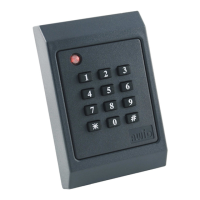

 To Next Page