Need help?
Do you have a question about the AWS AT Series and is the answer not in the manual?
Lists all components included with the scale.
Details the function of each button and the display elements.
Instructions for inserting and replacing the scale's batteries.
Step-by-step guide on how to turn on and use the scale.
How to switch between different units of weight measurement.
Explains the process of using the tare function for net weight.
Guidance on checking, calibrating, and adjusting the scale for accuracy.
Common issues, solutions, and explanations of scale error messages.
Technical data, capacity, and readability details for AT-100 and AT-500.
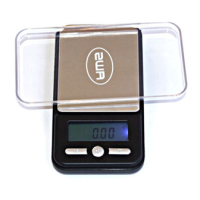
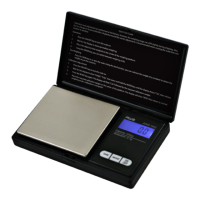
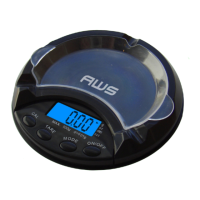
The AT-Series digital pocket scale is a precision measuring device designed for accurate weighing in various units. It is available in two models: the AT-100, with a capacity of 100g and a readability of 0.01g, and the AT-500, with a capacity of 500g and a readability of 0.1g. Both models are compact and portable, making them suitable for a wide range of applications where precise weight measurement is required.
The primary function of the AT-Series scale is to measure the weight of items with high accuracy. Users can easily switch between different units of measure, depending on their specific needs. The AT-100 model supports grams (g), ounces (oz), carats (ct), and grains (gn), while the AT-500 model supports grams (g), ounces (oz), troy ounces (ozt), and pennyweights (dwt). This versatility makes the scale suitable for weighing a variety of small items, from jewelry and precious metals to powders and ingredients.
The scale operates with a simple interface, featuring an ON/OFF key for power control, a MODE key for unit selection, a TARE key for subtracting container weights, and a CAL key for calibration. The digital display provides clear weight readings, and a weight indicator helps users monitor the stability of the measurement.
To begin using the scale, place it on a flat, level surface and press the ON/OFF key. The scale will perform a brief start-up process and then display zero, indicating it is ready for weighing. For accurate readings, it is crucial to wait a few seconds for the display to stabilize after placing an item on the weighing platform.
Changing the unit of measure is straightforward: simply press the MODE key to cycle through the available units. The scale is designed to remember the last unit used, so when it is turned off and back on, it will default to that unit, saving time for frequent users.
A key feature of the AT-Series scale is its tare function. This allows users to subtract the weight of an empty container or vessel, enabling them to measure only the net weight of the contents. To use this feature, place the empty container on the weighing platform and press the TARE key. The display will reset to zero. You can then add the items to be weighed into the container, and the display will show only the weight of the items. If the container is removed after taring, its weight will be displayed as a negative number. To return to normal weight display (gross weight), remove all items from the platform and press the TARE key again to re-zero the scale.
The scale is powered by two AAA alkaline batteries, ensuring portability and ease of use without the need for an external power source. Before initial use, it is important to check the battery compartment for any plastic insulation strips that might prevent battery drainage during shipping and storage, and remove them if present. When replacing batteries, ensure the positive and negative contacts are correctly aligned to ensure proper function.
Proper care and maintenance are essential to ensure the longevity and accuracy of your AT-Series digital pocket scale. Here are some key maintenance tips:
The manual provides guidance for common issues:
The scale also displays specific error codes to help diagnose problems:
By following these guidelines, users can ensure reliable and accurate performance from their AT-Series digital pocket scale for many years.
 General
| Interface | RS-232 |
|---|---|
| Units | lb, kg |
| Power | AC adapter |
| Display | LCD |
| Material | Stainless steel |

 To Next Page