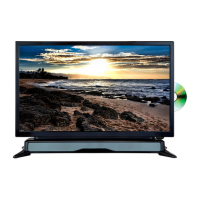
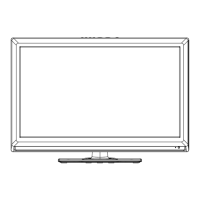
This document describes the AXESS 22" WIDE SCREEN HD LED TV WITH DVD PLAYER, model TV1805-22. It serves as an instruction manual, emphasizing safety information and detailed operational procedures.
Function Description
The AXESS TV1805-22 is a versatile 22-inch wide-screen HD LED TV that integrates a DVD player. It is designed to function as both a television and a monitor, offering a range of connectivity options for various external devices. The TV supports multiple TV standards and input sources, making it suitable for diverse entertainment and computing needs.
Important Technical Specifications
- Display Screen Type: Color active matrix LED display
- Model: TVD1805-22
- Maximum Resolution: 1920 x 1080
- Image Control: Fine digital control
- Power Supply: DC 12V; AC 100-240V~50/60Hz
- TV Receive System: NTSC System, ATSC System
- Frequency Range: Antenna: 2~69; Cable: 2~125
- Antenna Input Impedance: 75Ω (Unbalance)
- Sound Output: 2 x 3W
- Power Supply for Remote Controller: DC 3V (Two AAA size batteries)
- Power Consumption: 36 W
- Dimensions (LxWxH): 20.0 x 6.9 x 13.4 inch
- Weight (Net weight): 2.8 kg
- Operation Environment Temperature: 0℃-40℃
- HDTV Compatibility: 480i, 480p, 576i, 576p, 720p, 1080i, 1080p
- Input/Output Ports:
- One computer VGA/PC input
- One PC Audio input
- One AV input
- One HDMI input
- One EARPHONE output
- One USB input
- One ANTENNA input
- One Coaxial output
- One YPbPr input
- USB Support: USB 2.0 slot for multimedia files playback (Music MP3, Photo JPG).
- Card Reader Support: SD/MMC/MS cards.
- DVD Player: Integrated, supports various disc types.
- Environmental Compliance: Zero X radiation, ENERGY STAR® qualified.
Usage Features
The TV1805-22 offers a user-friendly experience with a comprehensive remote control and on-screen display (OSD) menu operations.
General Operation:
- Power On/Off: The TV can be turned on/off via the remote control or the power button on the unit. It enters standby mode after 10 minutes of no signal input in TV mode.
- Input Source Selection: Users can easily switch between various input sources (TV, AV, YPbPr, HDMI, VGA, USB, DVD) using the SOURCE button on the remote.
- Volume Control: VOLUME +/- buttons adjust the sound level.
- Channel Control: CHANNEL +/- buttons change channels.
- Menu Navigation: A MENU button provides access to the OSD, allowing navigation through Picture, Audio, Time, Setup, Lock, and Channel settings using directional buttons.
- Remote Control Functions: The remote includes dedicated buttons for MUTE, EPG (Electronic Program Guide), INFO (current program information), FREEZE (hold picture), ASPECT (display mode), SLEEP (sleep timer), and direct number input for channels.
Picture Settings:
- Picture Mode: Options include User, Standard, Dynamic, and Mild.
- Adjustments: Contrast, Brightness, Color, Tint (for certain TV systems), and Sharpness can be adjusted from 0-100.
- Color Temperature: Normal, Warm, and Cool options are available.
Audio Settings:
- Sound Mode: User, Music, Movie, and Standard modes.
- Adjustments: Bass and Treble can be adjusted from 0-100. Balance can be adjusted from -50 to 50.
- Surround Sound: On/Off option.
- AVC (Auto Volume Control): On/Off option.
- SPDIF Type: Options include Off, RAW, and PCM for digital audio output.
- Audio Language: Selection for preferred audio language (for digital programs).
- Accessibility: Features like Voice Guide (On/Off, Volume, Speed, Pitch) and Video Description (On/Off) for visually impaired users.
Time Settings:
- Sleep Timer: Configurable from Off to 240 minutes.
- Time Zone: Options for various regions (Eastern, Central, Mountain, Pacific, Alaska, Hawaii, Atlantic).
- Daylight Saving Time: On/Off (for digital programs).
- Clock: Automatically set by digital programs, not user adjustable.
Setup Settings:
- Menu Language: Select preferred OSD menu language.
- Transparency: On/Off for OSD menu.
- Zoom Mode: Normal, Wide, Zoom, Cinema (may vary by input source).
- Noise Reduction: Off, Weak, Middle, Strong.
- Advanced: Adjustable for PC/VGA input signals.
- Closed Caption (CC): CC on Mute, Off, On, with basic selections (CC1-CC4, Text1-Text4).
- DLC (Dynamic Luminance Control): On/Off.
- OverScan (HDMI mode only): On/Off to adjust image display.
- Restore Default: Reset to factory settings.
Lock Settings:
- Change Password: Set a new password (default is 0000).
- System Lock: On/Off.
- US TV Ratings (MPAA): N/A, G, PG, PG-13, R, NC-17, X.
- Canada TV Ratings: English (E, C, C8+, G, PG, 14+, 18+), French (E, G, 8 ans+, 13 ans+, 16 ans+, 18 ans+).
- RRT Rating: For programs with advanced rating information.
- Reset RRT: Reset RRT Rating.
Channel Settings:
- Air/Cable: Select preferred signal receiving type.
- Auto Scan: Automatically search and store available channels.
- Cable System: AUTO, STD, IRC, HRC (adjustable only when signal type is Cable).
- Favorite Channels: Label selected channels as favorites.
- Show/Hide Channels: Show or hide selected channels.
- Channel No./Label: Adjust channel number and label.
PC Settings (VGA Mode):
- Adjustments: H-POS (Horizontal Position), V-POS (Vertical Position), Clock, Phase (all 0-100).
- Auto: Automatically adjusts the PC screen.
USB Operation:
- Photo Playback: View JPG images, navigate previous/next, rotate photos.
- Music Playback: Play MP3 music, view track information, navigate previous/next, fast backward/forward, stop, pause, repeat.
- Media Support List: Video (MPEG1, MPEG2), Audio (WMA, MP3), Photo (JPEG).
DVD Setup Menu:
- General Setup: TV Display mode (NORMAL/PS, NORMAL/LB, WIDE), Angle Mark (On/Off), OSD Language, Captions (On/Off), Screen Saver (On/Off), Default settings.
- Audio Setup: Speaker Setup (LT/RT-Left/Right mix mode, STEREO).
External Connections:
- VCR: Connects via RF, Video, and Audio cables.
- DVD Player/Set-Top Box: Connects via Component Video (Y, Pb, Pr) and Audio cables. HDMI connection is also supported for digital audio/video.
- Digital Audio System: Connects via COAXIAL cable for 5.1 CH audio.
- USB: Plug in USB 2.0 memory devices.
- Headphone: Connects to the headphone jack, muting TV speakers.
Maintenance Features
- Cleaning: Unplug the TV before cleaning. Use a wet cotton cloth or soft cloth with non-corrosive cleaners. Avoid acetone, toluene, alcohol, or hard objects. Do not wipe the panel repeatedly or scrape/tap it.
- Power Cord: Unplug during thunderstorms or when not in use for a long time.
- Battery Replacement: Replace AAA batteries in the remote control when exhausted. Remove batteries if not using the remote for an extended period to prevent leakage.
- Troubleshooting Guide: The manual provides a list of common symptoms (e.g., no power, no picture, no sound, abnormal color, no remote control, screen flickering, horizontal stripes, colored dots) and their possible solutions, such as checking connections, adjusting settings, or replacing batteries.
- Professional Service: For persistent issues or internal adjustments, the manual advises contacting qualified professionals or after-sales support. Users are warned not to disassemble the back cover due to high voltage.
- Environmental Care: Dispose of used batteries in recycling bins.
The manual also highlights safety warnings, including precautions against electric shock, fire hazards, and proper placement of the TV to ensure ventilation and prevent damage from moisture or heat sources. It emphasizes that the main plug acts as a disconnect device and should remain readily operable.

 Need help?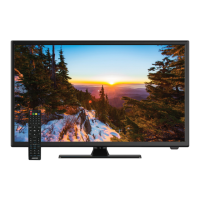

 To Next Page
 General