8.2. Output Current Setting
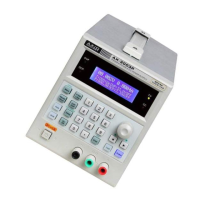
Press key [V-Set/I-Set] until “Current” is shown on the LCD.
Setting method 1: Press [Number key (current value)] [En-
ter] to set output current.
Setting method 2: Press [Number knob (current value)] to
change the output current setting immediately. When use
this method with the output ON, the output current will be
changed following the input value by rotating the knob.
For example: Set output current to 3.200A.
Press [I-Set] [3] [.] [2] [0] [0] [Enter].
8.3. Over Voltage Protection Setting
Press key [OVP], to set the maximum output voltage. If the
adjusted value or actual output value is more than the max-
imum value, the output voltage will automatically stop, the
OVP indicator turns on, and warning signal by the beeper
will be heard.
Press key [OVP/OCP] until “OVP Set” is shown on the LCD.
Setting method 1: Press [Number key (voltage value)] [En-
ter] to complete OVP setting.
Setting method 2: Press [Number knob (voltage value)] to
change OVP setting immediately.
For example: Set over voltage protection value to 33.0V.
Press [OVP] [3] [3] [.] [0] [Enter].
8.4. Over Voltage Protection Status Setting
Press key [Menu] until “OVP Status” is shown on the LCD,
to proceed over voltage protection status setting, then press
[On/Off] to turn on or off the OVP function.
8.5. Over Current Protection Setting
Press key [OCP], to set the maximum output current. If the
adjusted value or actual output value is more than the max-
imum value, the output current will automatically stop, the
OCP indicator turns on, and warning signal by the beeper
will be heard.
Press key [OVP/OCP] until “OCP Set” is shown on the LCD.
Setting method 1: Press [Number key (current value)] [En-
ter] to complete OCP setting.
Setting method 2: Press [Number knob (current value)] to
change OCP setting immediately.
For example: Set over current protection value to 3.30A.
Press [OCP] [3] [.] [3] [0] [Enter].
8.6. Over Current Protection Status Setting
Press key [Menu] until “OCP Status” is shown on the LCD,
to proceed over current protection status setting, then press
[On/Off] to turn on or off the OCP function.
8.7. Voltage/Current Delay Time Setting
Press key [Delay], “Delay” is shown on the LCD.
Setting method 1: Press [Number key (delay time)] [Enter]
to complete voltage and current delay time setting.
Setting method 2: Press [Number knob (delay time)] to
change voltage and current delay time setting immediately.
For example: Set the delay time to 99999s.
Press [Delay] [9] [9] [9] [9] [9] [Enter].
Note: The Delay setting is effective only under the Auto
running operation, therefore, during the storage proceed-
ing, the Delay setting will be saved to the memory address
simultaneously.
8.8. Function Setup
Press [Shift] [Menu], proceed to the function setting, then
press [Menu] to select the options under the current function.
8.9. Voltage Step Setting
Set the maximum value of Step to be the rating value of the
setting range.
Press key [Menu] until “Utility V Step” is shown on the
LCD.
Setting method 1: Press [Number key (voltage value)] [En-
ter] to set step voltage.
Setting method 2: Press [Number knob (voltage value)] to
change step voltage immediately.


 To Next Page
 Loading...