EasyManua.ls Logo

Axis Car Audio AX1500BT - User Manual

Axis Car Audio AX1500BT
12 pages
Print Icon
To Next Page IconTo Next Page
Loading...
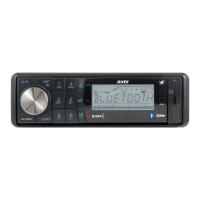
AX1500BT
DESIGNED FOR AUSTRALASIAN CONDITIONS
BLUETOOTH 12/24V MECHLESS
AM/FM MULTIMEDIA PLAYER
USB / SD-MMC INPUT - FRONT PANEL AUX-IN
FSTN Display for Wide Angle Views/Compact Chassis
SPECIFICATIONS:
GENERAL:
- Detachable Face Panel
- Mechless (without CD Deck)
- “Ultra Memory” Power Circuit to retain
settings when power is disconnected
- Illuminated Controls (Blue)
- FSTN Display for Wide Angle Viewing
- ISO DIN Mounting
- Mounting Depth 86mm
- Mini DIN Chassis: 178W x 50H x 86Dmm
- 12/24 Volt DC (10.8-32V) Negative Ground
- 2 Ch RCA Line Out - 5 Volt (Max)
- Speaker Impedance 4-8 Ohm
- Max Power 25 Watts x 4 Ch
MULTIMEDIA:
- USB Input: Front Panel
- SD / MMC Card Port: Front Panel
- AUX-IN: Front Panel (3.5mm)
- MP3 / WMA Player
- Intro / Repeat / Random Play / Pause
- Track Down / Up / Select (MP3/WMA Files)
TUNER:
- PLL Synthesized AM/FM Stereo
- Xtreme Long Range Tuner
- FM 87.5~108 MHz; AM 522~1710 KHz
- Interference Absorption Circuit
- 30 Station Presets - 18FM/12AM Memory
- Station Seek / Preset Scan / Auto Store
- Automatic or Manual Tuning
- Local / Distant Control
- Mono / Stereo
- Digital Clock
BLUETOOTH:
- Bluetooth in Phone Mode
- Call History
- Dial Pick-Up/Call Transfer
- A2DP Audio Streaming
AUDIO CONTROL:
- Rotary Encoder
- Electronic Volume / Balance / Bass / Treble
- Loud / Mute
- 4-Band DSP Settings
INCLUDED:
- Remote Control
- External Microphone
- ISO Wiring Harness
- Installation Hardware

Questions and Answers

Summary

SPECIFICATIONS

GENERAL SPECIFICATIONS

General physical and electrical characteristics of the car audio unit.

MULTIMEDIA FEATURES

Features related to media playback like USB, SD, AUX, MP3/WMA.

AUDIO CONTROL FEATURES

Controls for sound adjustments like volume, bass, treble, balance, DSP.

TUNER SPECIFICATIONS

FM/AM radio tuning capabilities, presets, and reception features.

BLUETOOTH FEATURES

Phone integration, call handling, and audio streaming capabilities.

INCLUDED ACCESSORIES

List of accessories provided with the unit.

INSTALLATION

INSTALLATION PRECAUTIONS

Important safety and environmental considerations before installing the unit.

MOUNTING ANGLE ADJUSTMENT

Guidance on setting the optimal tilt angle for the unit's display.

FRONT PANEL DETACHMENT

Instructions on how to remove and reattach the detachable front panel for security.

CONNECTOR CLEANING

Method for cleaning unit and panel connectors to ensure proper function.

TO SUPPORT THE UNIT

WIRE CONNECTION AND MAINTENANCE

FUSE REPLACEMENT

Instructions and warnings regarding the replacement of the unit's fuse.

CONTROL FUNCTIONS OVERVIEW

LOCATIONS OF PARTS

Identifies and explains the function of each button and port on the unit.

OPERATING INSTRUCTIONS

POWER ON;OFF AND MUTE

How to turn the unit on, off, and use the mute function.

VOLUME AND FUNCTION SELECTION

Controls for adjusting volume and selecting other sound functions via the knob.

EQ MODE SELECTION

How to select different equalizer presets (Flat, Pop, Rock, etc.).

STEREO;MONO SETTING

Adjusting reception between stereo and mono for FM broadcasts.

LOUDNESS FUNCTION

Activating the loudness feature to boost low frequencies at low volumes.

LOCAL;DISTANT RADIO SETTING

Setting radio tuning to 'Local' for strong signals or 'Distant' for weaker ones.

ADJUSTING THE CLOCK

Instructions for setting the unit's internal clock time.

PRESET STATIONS OPERATION

How to store and recall radio stations using preset buttons.

MP3;WMA CONTROL

PAUSE AND TRACK CONTROL

Functionality of pause, track skipping, and search buttons for media playback.

REPEAT AND INTRO MODES

Controls for repeating tracks/directories and previewing track beginnings.

RANDOM PLAYBACK MODE

Enabling random playback order for tracks.

SELECTING MP3;WMA FILES

Methods for searching and selecting MP3/WMA files by track, character, or folder.

CONNECTING EXTERNAL MEDIA

Steps for connecting and playing media from USB or SD cards.

BLUETOOTH OPERATION

BLUETOOTH DEVICE PAIRING

Steps to pair a mobile phone with the car audio system via Bluetooth.

CALL MANAGEMENT

How to answer, end, and reject incoming phone calls.

REDIAL FUNCTION

Procedures for redialing the last phone number.

AUDIO STREAMING (A2 DP)

Playing audio from a connected mobile phone through the car speakers.

CAUTION & MAINTENANCE GUIDELINES

TECHNICAL SPECIFICATIONS

MP3;WMA PLAYER SPECIFICATIONS

Technical performance details for MP3 and WMA file playback.

FM TUNER SPECIFICATIONS

Specific technical parameters for the FM radio tuner.

AM TUNER SPECIFICATIONS

Specific technical parameters for the AM radio tuner.

GENERAL TECHNICAL DATA

Overall technical specifications like power supply, impedance, and output power.

RCA OUTPUT SPECIFICATIONS

Technical specifications for the RCA audio output.

AUX INPUT SPECIFICATIONS

Technical specifications for the auxiliary audio input.

DIMENSIONS AND COMPATIBILITY

Physical dimensions of the unit and USB/SD card compatibility.

WARRANTY INFORMATION

CONSUMER WARRANTY DETAILS

Details of the warranty provided for typical consumer use.

30-DAY PURCHASE RETURN POLICY

Procedure for returns and replacements within the first 30 days.

POST-30 DAY WARRANTY SERVICE

Process for warranty repair and service after the initial 30-day period.

COMMERCIAL WARRANTY TERMS

Warranty terms applicable to products used in commercial applications.

Axis Car Audio AX1500BT Specifications

General IconGeneral
BrandAxis Car Audio
ModelAX1500BT
CategoryMedia Player
LanguageEnglish