EasyManua.ls Logo

Axis Car Audio AX1803BT - User Manual

Axis Car Audio AX1803BT
12 pages
Print Icon
To Next Page IconTo Next Page
Loading...
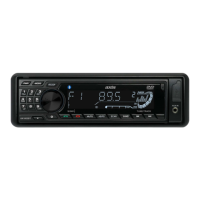
AX1803BT
BLUETOOTH 12/24V DVD/CD
MULTIMEDIA PLAYER
INSTRUCTION MANUAL
SPECIFICATIONS
GENERAL
- Flip Down Detachable Face Panel
- “Ultra Memory” To retain preset settings
after battery is disconnected
- LCD Display
- Illuminated Controls (White)
- Tele Mute
- Digital Clock
- Upgrade Firmware via USB
- ISO DIN Mounting
- ISO Wiring Harness
- Dimensions:
(Chassis) 178W x 50H x 158D mm
(Front Panel) 188W x 58H x 20D mm
- 2 Ch RCA Line Out
- 2 Ch RCA Input (Rear)
- Video Out
- Speaker Impedance 4-8 Ohm
- 12/24 Volt DC (10.8-32V) Negative Ground
- Fuse: 7.5A
- Max Power 40 Watts x 4 Ch
TUNER
- PLL Synthesized AM/FM Stereo
- Xtreme Long Range Tuner
- FM 87.5~108 MHz; AM 522~1710 KHz
- Interference Absorption Circuit
- 30 Station Presets - 18 FM/12 AM Memory
- Station Seek / Preset Scan / Auto Store
- Local / Distant Control
- Automatic or Manual Tuning
- Mono / Stereo
AUDIO CONTROL
- Rotary Encoder
- 4 Band DSP Settings
- Electronic Volume / Balance / Bass / Treble
- Loud / Mute
MULTIMEDIA
- USB Input: Front Panel
- AUX-IN: Front (3.5mm)
- AUX-IN: Rear (RCA)
INCLUDED
- External Microphone
- Remote
- ISO Wiring Harness
- Installation Hardware
BLUETOOTH
- Bluetooth in Phone Mode
- External Microphone
- Phone History
- Keypad in Face Panel
- Audio Streaming (A2DP)
- 10 Call History Memory
DVD PLAYER
- Supports DVD/CD/CD-R/RW/MP3/WMA
- Electronic Shock Protection
- Intro/Repeat/Random Play/Track Up-Down
- Select Folder/Track/File Search

Other manuals for Axis Car Audio AX1803BT

Questions and Answers

Summary

BEFORE YOU BEGIN

INSTALLATION

PRECAUTIONS

Important safety and installation guidelines to prevent damage or interference.

Detaching and Attaching the Front Panel

Instructions for removing and reattaching the detachable face panel for security.

Cleaning the Connector

Guide on cleaning the connector between the unit and front panel for proper function.

WIRE CONNECTION

Maintenance and Fuse Replacement

Procedures for fuse replacement and general maintenance of the wiring system.

Locations of Parts (Main unit)

REMOTE CONTROL OPERATIONS

Installation and Care

Install battery, handle with care, and follow important storage precautions.

Usage and Safety

Operate the remote effectively and adhere to safety cautions.

GENERAL OPERATIONS

Unit Control and Clock Settings

Manage unit power, sources, volume, mute, and set the clock time.

RADIO RECEPTION AND TUNING

Radio Operation and Presets

Tune radio bands, use auto seek, store presets, and manage local/distant modes.

MULTIMEDIA PLAYBACK OPERATIONS

Media Navigation and Playback

Navigate media files, control playback speed, stop/pause, and find specific tracks.

Advanced Playback Modes

Utilize playback features like Intro, Repeat, Random, and A-B Repeat for enhanced media experience.

External Input and Information

View media info via OSD, manage titles, and connect USB/AUX devices.

DVD;VIDEO CD;MP4 PLAYBACK

Disc Handling and Menu Navigation

Insert discs, navigate DVD/VCD menus, and control playback with PBC.

Playback Controls and Features

Manage playback speed, repeat options, track search, and audio/subtitle selection.

DVD Specific Functions

Access DVD title, root menu, and manage video settings for playback.

ADVANCED VIDEO PLAYBACK

Slow Motion, Frame-by-Frame, Zoom, TV Systems

Control playback speed, step through frames, zoom, and set TV system (PAL/NTSC).

BLUETOOTH OPERATION

Pairing, Streaming, and Call Management

Pair your mobile phone, stream audio, and manage calls for connected use.

TROUBLESHOOTING GUIDE

Common Issue Resolution

Resolve common audio and system issues using symptoms, causes, and solutions.

AUDIO AND DVD SETTINGS

Audio Customization and DVD Configuration

Adjust audio settings and configure DVD player preferences like TV system and language.

SYSTEM UTILITIES

Password, Reset, and Memory Backup

Manage system password, perform reset, and understand memory backup for settings.

WARRANTY INFORMATION

Warranty Coverage and Conditions

Details consumer and commercial warranty terms, exclusions, and duration.

Proof of Purchase Requirements

Specifies acceptable proof of purchase for warranty claims within 30 days and after.

Commercial Application Warranty

Outlines the limited six-month warranty for products used in commercial applications.

Axis Car Audio AX1803BT Specifications

General IconGeneral
Power Output4 x 50W
BluetoothYes
USB PortYes
AUX InputYes
EqualizerYes
SD Card ReaderYes
Remote ControlYes
Radio TunerFM