TROUBLE SHOOTING
GENERAL
Power Supply Requirements
Chassis Dimensions
Tone Controls
: DC 10-32 Volts, Negative
Ground : 178 (W) x 97 (D) x 50 (H)
: ±10 dB
- Bass (at 100 Hz)
- Treble (at 10 kHz)
Maximum Output Power @32V
Current Drain
: ±10 dB
: 4 x 45 watts
: 5 Ampere (max.)
RADIO
Frequency Coverage
IF
Sensitivity
FM
87.5 to 108 MHz
10.7 MHz
4dBμV(S/N=30dB)
AM
522 to 1620 kHz
450 KHz
36dBuV(S/N=20dB)
Stereo Separation >25dB /
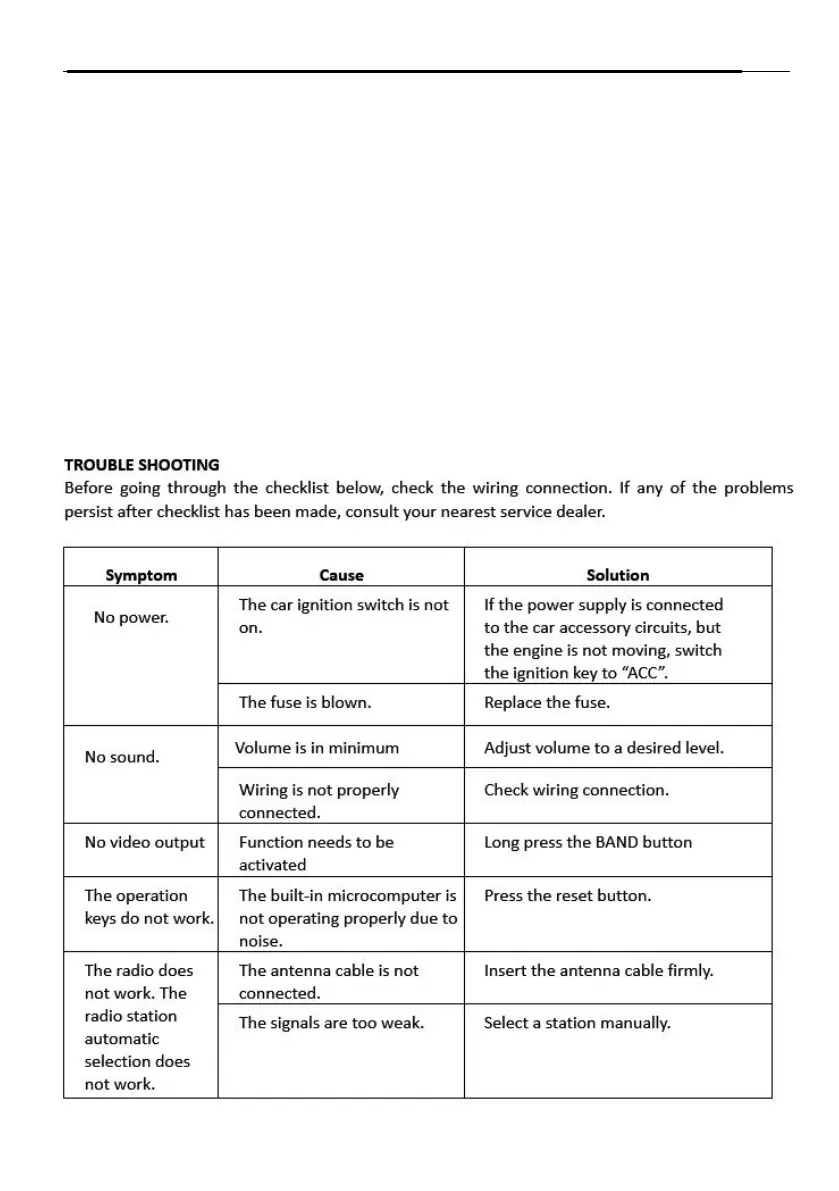
TROUBLE SHOOTING
Before going through the checklist below, check the wiring connection. If any of the problems
persist after checklist has been made, consult your nearest service dealer.
No power.
The car ignition switch is
not on.
If the power supply is connected
to the car accessory circuits, but
the engine is not moving, switch
the ignition key to “ACC”.
The fuse is blown. Replace the fuse.
Volume is minimum/mute. Adjust volume to a desired level.
Speaker or speaker wiring
are short circuited.
Remove short circuit.
The buttons do
not work.
Unit is frozen. Press the reset button.
The radio does
not work. The
radio station
automatic
scan does
not work.
The antenna cable is not
Insert the antenna cable firmly.
The signals are too weak. Select a station manually.
The antenna amplifier
has no power.
Connect to 12 volts.
9


 To Next Page